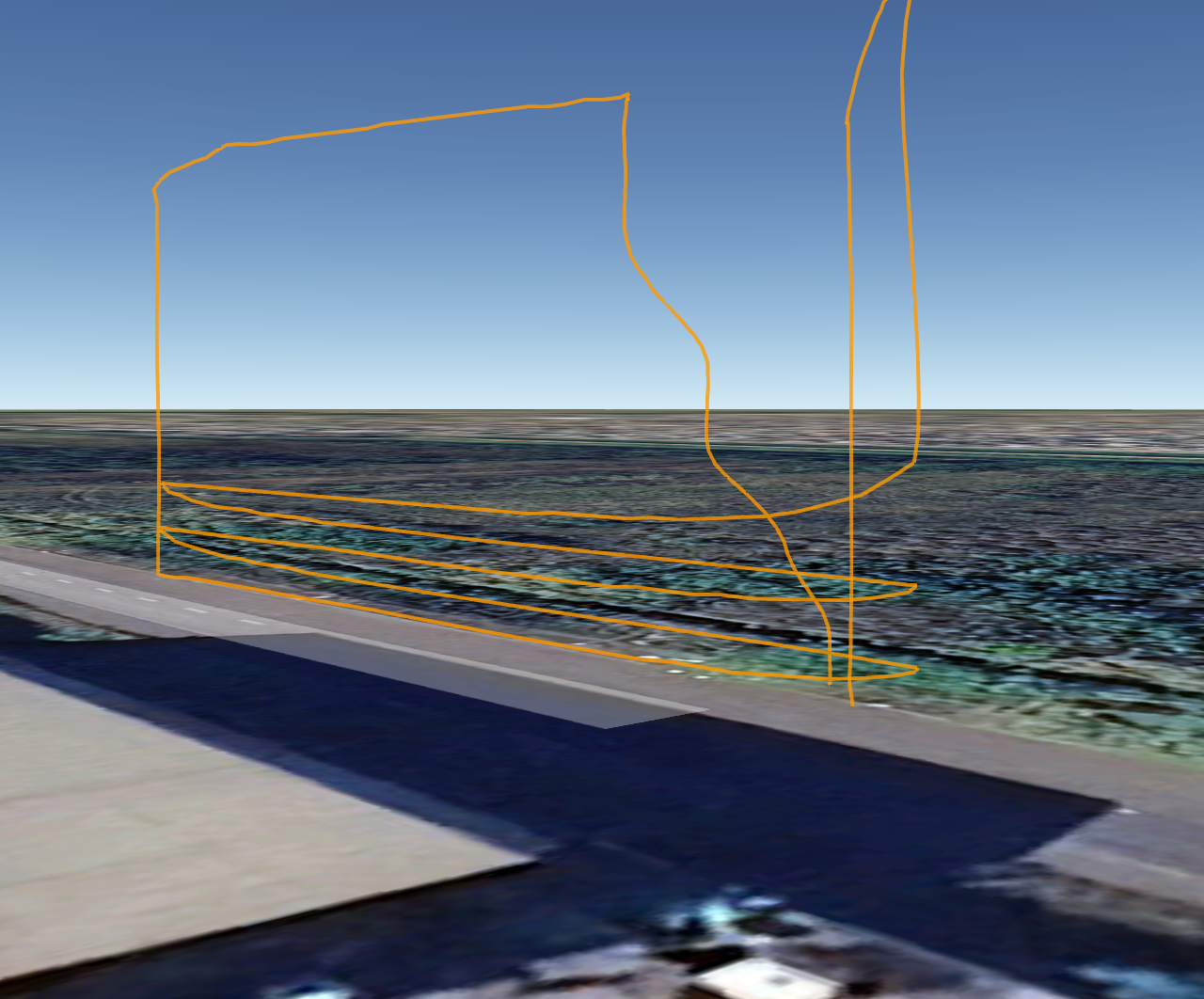
Boa tarde, Zane. Não consegui mais testar o aplicativo devido ao tempo chuvoso na minha cidade. Mas tenho uma dúvida. Vou começar a me aprofundar mais no mapeamento topográfico. Gostaria de saber como fazer o drone interromper uma missão para trocar a bateria e continuar de onde parou. Tentei fazer isso no mapeamento vertical, e a missão foi interrompida. Não consegui continuar de onde parou.
게시물
팔로우Mapeamento Vertical
Good morning.
In Map Pilot Pro, it is possible to perform mapping on the facade of a building, for example. In this case, vertically.
댓글을 남기려면 로그인하세요.
댓글 104개
It is much more straight forward in the regular mapping process. The aircraft comes back when the battery needs to be changed and it goes back to where it left off. We haven't handled the multi battery stuff as gracefully for vertical yet.
Obrigado, Zane, pelo feedback. Mas vou me concentrar no mapeamento horizontal na área de topografia por enquanto. Deixarei o mapeamento vertical para depois e esperarei o aplicativo funcionar melhor. Outra pergunta que gostaria de fazer é se posso criar uma missão pelo site ou apenas pelo aplicativo, e se também posso criar uma pelo Google Earth.
All mission planning is done in the app. You can define the area you want to cover on the website and sync that boundary to Map Pilot Pro but all final mission layout gets done in Map Pilot Pro.
You can read more about that here:
https://support.dronesmadeeasy.com/hc/en-us/articles/360029963631-How-to-create-Boundaries
Boa tarde, Zane.
Vi que há uma nova versão, 3.0.6b.
O que há de diferente? Outra coisa: é possível realizar uma inspeção de fachada, mas em vez de usar o drone para tirar fotos, apenas filmar com voo automatizado?
Changes can be seen here:
https://support.dronesmadeeasy.com/hc/en-us/articles/8581188807956-Update-History-Android
I am not sure what you mean with your other question.
Boa tarde, Zane.
Peço desculpas por insistir em apontar algumas falhas que encontro no aplicativo, mas acredito que seja para o benefício de todos. Testei a inspeção vertical esta tarde, mas gravei um vídeo em vez de tirar fotos. Preciso inspecionar um grupo de prédios dentro de um condomínio que estão a 5 metros de distância. Eu queria fazer essa inspeção automaticamente, mas estou muito inseguro sobre o processo vertical. Agora, como mencionei, fiz um teste de vídeo, e o drone filmou a primeira linha, e quando se moveu para a segunda, passou pela parede do prédio e não parou, continuando em linha reta. Executei a missão novamente, e ela funcionou. Minha preocupação é que em alguns lugares onde há obstáculos, eu não os veja e o drone caia. Isso ocorre porque meu drone DJI Air2s não tem sensores laterais. Eu seria capaz de verificar isso e continuar testando antes de realizar a tarefa em questão. Obrigado.
Good evening, Zane.
Regarding vertical mapping, I have a suggestion for improving the mission.
I saw a video from the DroneLink app; the app works much more stably. The drone ascends to the programmed height, flies to the location, descends, and starts horizontally taking photos, with the option to stop or not. When it reaches the end of the first level, it stops, ascends vertically in a straight line, and continues horizontally taking photos. Your app has a lot of glitches; the drone seems unstable; it even takes off taking photos from places other than the designated location. It's unclear exactly what it will do. I'll start using vertical mapping in 60 days. I don't want to switch apps, but if it's not reliable, I'll have to choose another. If you need more information, I'll let you know. I've done several tests.
The pattern you are describing is pretty much exactly what Map Pilot Pro is supposed to be doing.
You are experiencing some weirdness because you are using a Virtual Stick aircraft (not waypoint flight enabled) and are trying to do some really small passes. The small features in your flight plan would likely cause issues in other flight control softwares as well. Give them a try and let us know if it actually works out better or if it has the same issues.

We can see that the horizontal passes are not horizontal all the way across and that is something we will continue to work on with the Virtual Stick controls. The waypoint controlled flights don't do this.
Map Pilot Pro always takes an image when it takes off for use in elevation corrections.
From what I understand, the aircraft I'm using is a DJI Air2 S and it's not suitable? Or do I have some wrong configuration that I don't know how to adjust?
Good afternoon.
I ran a simulation in the same location where I'm training.
Since there's a possibility of turbulence if I keep the drone close to the building, as I was doing, between 5 and 7 meters away, I now flew at 13 meters and with a much larger overlap. What happened was that the drone took off, but it didn't get within 13 meters of the building. Instead, it moved about 30 meters away and wouldn't stop unless I stopped it manually.
I stopped the mission, deleted it from the app, reloaded it, and the drone did the same thing. However, I believe this isn't just because my drone has a virtual stick, so the system can only be used by more advanced drones
The Air 2S is suitable, it just isn't ideal.
Please make sure your flight logs are uploaded so we can see what is going on. The not getting within 13m and then going 30m away is certainly not right.
Estou sincronizando a missão aqui. Não sei se é isso que preciso. Mas não sei se ela será concluída porque precisei pausar duas vezes devido a este problema: o drone subiu, alinhou e começou a se mover para trás. Ele voou cerca de 30 metros e precisei pausar a missão nas duas vezes. Se você conseguir procurar, os arquivos são chamados de Canoas, teste 1331, e o outro eu fiz novamente para testar o rrrr. Acredito que os ajustes foram melhorando gradualmente, mas antes de colocar o equipamento em operação, preciso ter certeza de que ele funcionará corretamente antes que cause um acidente.
I can see that in the log files. Thanks. We will get this fixed.
Thanks for the feedback. I'll wait for a new update.
Good evening.
Has that fix I mentioned in the last message about the drone moving away from the obstacle on its own been fixed?
I want to do another test tomorrow.
An update to address that will not likely be available before the end of next week.
Entendi. Queria saber se dentro da plataforma consigo ver o caminho que o drone fez, semelhante aos que você me enviou nas últimas conversas, para que eu possa ver como a missão está funcionando.
Yes, you can see the flight logs in the missions section under the Map Pilot heading on the Maps Made Easy website. You can download the KML files there.
Bom dia, Zane.
Hoje tentei rodar uma simulação vertical novamente, mas fiz isso em campo aberto, como se houvesse um obstáculo ali. O que acontece é que o drone segue a linha horizontal, mas oscila para cima e para baixo no eixo transversal, como se estivesse sendo atingido por um vento de 20 km, mas não havia vento algum. Eu já tinha notado esse problema antes, mas pensei que pudesse ser devido à curta distância entre o drone e o prédio, ou algum tipo de turbulência. Mas não, o problema persistiu em campo aberto, e tive que pausar e retornar porque novamente não parou no limite de marcação. Acredito que esse problema não deva ser devido ao dispositivo de controle virtual.
Bom dia, Zane.
Em relação ao voo horizontal, o aplicativo está funcionando bem? O drone retorna automaticamente ao ponto de partida quando a bateria está quase acabando? Tenho a mesma dúvida sobre o plano de grade, pois está funcionando bem. Farei voos verticais manualmente porque é mais seguro do que usar o aplicativo. Se as coisas melhorarem no futuro, posso tentar usá-lo. Só preciso saber sobre voo horizontal e em grade.
There have been no updates since your last test. We hope to get something out this week. The aircraft will always use its own logic to return home when the battery is low. It will go up to the defined safe height and transit to the takeoff location before landing. The horizontal and grid flights are very mature and work well.
You can see the corners of the vertical flights are nice and sharp with waypoint flight. This was a Mavic 3 Enterprise.
Talvez eu não saiba como configurar o aplicativo. Porque lá vi que eles definiram a altura para (-)5 metros. Para mim, isso é negativo, e o drone afundaria no chão. Por isso perguntei se havia um tutorial para ensinar como programá-lo.
Outro problema é que o ponto nas fotos e a trajetória do drone não aparecem para mim como no vídeo. Então acho que é alguma configuração que estou fazendo errado.
Não sei se você consegue assistir a uma simulação que fiz usando apenas o controle, sem o drone voando. Observe que a trajetória não segue uma trajetória vertical, mas sim transversal ao descer de um nível para outro. E isso é no simulador, não no drone. A trajetória branca nem é visível. Se quiser, posso gravar um vídeo na tela do tablet e enviar por e-mail para que você entenda o que está acontecendo. Basta me enviar seu e-mail novamente.
The simulation actually runs on the aircraft and is pretty real for what would happen in the air.
There are multiple options for how the vertical area can be covered. The Orientation panel lets you pick which side of the defined line it will fly on and whether it traverses it horizontally or vertically. This is shown in the video link I posted this morning.
Então não sei o que está acontecendo.
Estou começando a achar que meu drone está com defeito. Mas ele é novo, não houve nenhum acidente nem nada.
Boa tarde Zane,
Vi que já existe uma atualização de software para a versão 3.0.7. Mas não sei se funciona para o meu modelo de drone ou se vale a pena atualizar, porque desisti de usá-lo para mapeamento vertical. Vou usá-lo manualmente por enquanto. Só queria verificar com você se, para mapeamento vertical, o drone rastreia a elevação conforme o terreno muda.
Boa tarde, Zane. Você viu a última mensagem que enviei? Poderia responder, por favor?