Posting

3 pengikut Ikuti
0
Avatar

Multibattery mission problems - 3

Today I went out again to try to end my 900 Ha forrest mission and had troubles again. High forrest, no line of sight, very hot and humid.

First mission with expected 2 batteries and Connectionless. First it was ok, but on the third line it stopped and did RTH. 
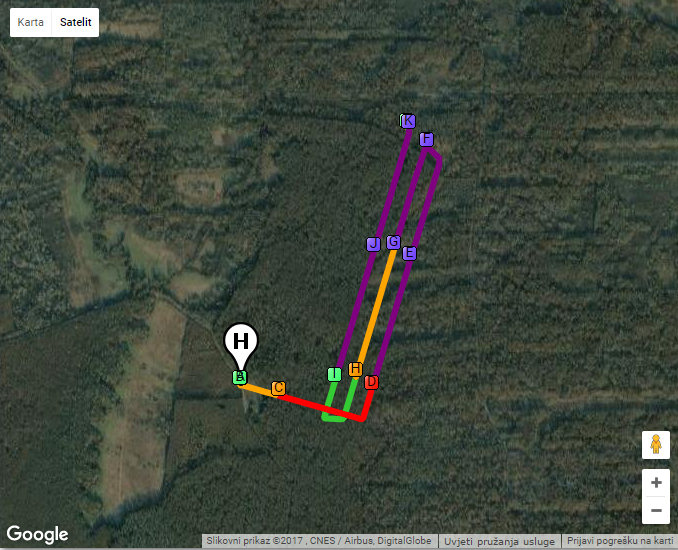
After changing battery and MicroSD (which I allways do) it resumed the mission, but lost signal immedeately, made a strange circel and resumed from the second line of the first battery.
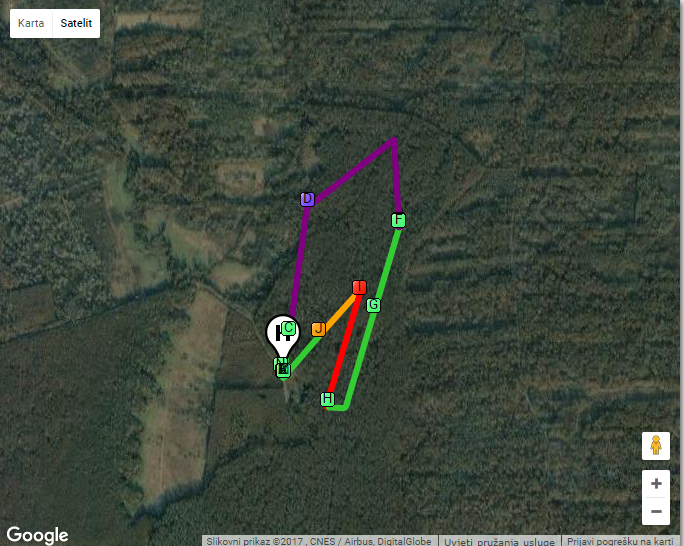
I stopped the mission, broke it in few single- battery missions and finished them.

Went to second mission with expected 3 batteries and Connectionless.

First battery went very well, but after changing batt and MicroSD, it reflew few lines and finished ok. But that costs battery and time.
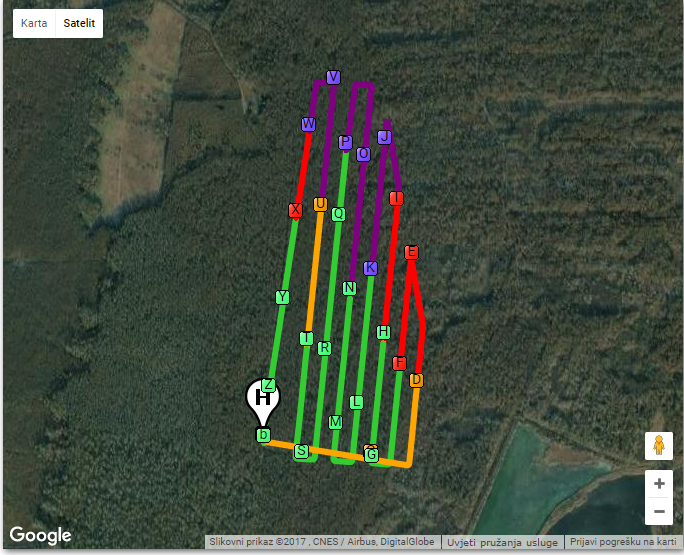
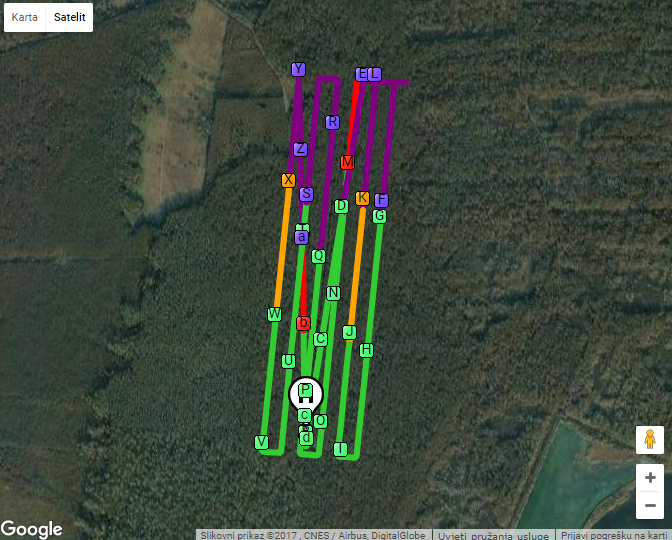
The app freezes a lot and crashed 2 times. No background apps and CPU on 50%, according to System status pro. And Notifications and locations turned off.

So, I think that Map Pilot is still the most versatile app, but it has serious problems.

Or it could be pilot error. If so, please help. 


Dario Finderle

Harap masuk untuk memberikan komentar.

12 komentar

0
Avatar

Thnx for your reply, but, as I stated in the post above, it was in Conectionless mode.

Dario Finderle 0 suara
Tindakan komentar Permalink
0
Avatar

If it was in connectionless mode the images should have been taken. The grey image dots only show up when there is an active connection back from the aircraft. They are there as a "nice to have" but if they aren't there that doesn't mean the images didn't get taken. 

Have you check your SD card?

Zane 0 suara
Tindakan komentar Permalink
0
Avatar

Yes, I use Pix4D discovery in place to check wether I have covered the whole area. So I don't have to go to that area again.

But, when you mentioned the SD card, I've just checked the cards I've been using at that place and found out that they are fake U3, with just 20Mb/s write speed!

I think that's the problem. 

Dario Finderle 0 suara
Tindakan komentar Permalink
0
Avatar

I am having the same issues. I am running large missions (3-5 double battery sets). I have begun to use connectionless setting on every mission because of forested environments and poor signal strength. We also upgraded to the iPad Mini 4. This I thought would have enough CPU power.

After the second and third battery changes, and even in connectionless mode, I had dropped images. On the fourth flight the drone acquired the first line then no pictures after. I thought because it was connectionless that the images would be on the SD Card. The SD card is the original that came with the X5 camera. Should we upgrade??

All of the apps on the iPad were shut down on the iPad. I restarted the iPad before I flew. Nothing has helped.

I fly large inventory missions on a monthly basis. This problem started occuring 3 updates back.

Are there going to be updates to address this problem?

Thanks,
J.

Jstewart 0 suara
Tindakan komentar Permalink
0
Avatar

Make sure you are using 2.5.3 which will clear out the image dots when the aircraft heads back to the home point for the next battery. Some mobile devices don't have the resources required to show hundreds or thousands of those dots. It basically maxes out the GPU. 

If you are doing large missions or lots of image dots are getting drawn before heading back to the home point you may have to manually clear the image dots. As soon as you start seeing any irregularity in the image spacing you can do a long press on the top half of the camera preview window. This will clear out all of the image dots except for the ones taken in the last 30 seconds. This also serves to free up system resources and keep things moving along smoothly. 

Zane 0 suara
Tindakan komentar Permalink
0
Avatar

Also, in Connectionless mode the images ARE being taken whether the image dots show up or not. That is why we offer it. The dots that are drawn in connectionless mode are more of "Hey Map Pilot! I took a picture" as opposed to the Active Connection mode's "I am Map Pilot and I am taking a picture now". 

Zane 0 suara
Tindakan komentar Permalink
0
Avatar

Yes I was seeing that the image dots were being removed when the mission paused to change batteries. In Connectionless mode however, images are being taken during corners and on the way back to HOME to change batteries.

I realize that you may not believe me, but even in Connectionless mode images were not being taken. I had a 15 minute gap in my images before randomly the drone started taking images again. I will email you the log files if it will help.

Thanks for your quick replys and helpful hints.

J.

Jstewart 0 suara
Tindakan komentar Permalink
0
Avatar

You just need to pay attention to the spacing. Once it gets wonky you will need to manually clear it. This affects all iOS devices with older processors. 

Did you actually verify that the images are not on the SD card? The connectionless trigger occurs within the aircraft and it would continue whether Map Pilot was there or not. So if there really was a 15 minute gap it may be a hardware issue despite the software troubles. 

The images in the corners is the tradeoff for Connectionless/Active.

I think if you can keep the dots issue cleared up you should be able to use Active Connect without issue. We do a bunch of our testing on a iPad Mini 2 to test the worst case. It starts getting weird images spacing around 300 images.


Zane 0 suara
Tindakan komentar Permalink
0
Avatar

OK. Thanks I will try what you have suggested. I have another mission of substantial size next week, so I will let you know how it goes.

Again thanks for your help. You have a great app!!!

Cheers,

J.

Jstewart 0 suara
Tindakan komentar Permalink