Publication

2 abonnés S’abonner
0
Avatar

Photos Taken With MapsMadeEasy Business Not Included In Upload

I attempted to attach photos taken with the $50 MapsMadeEasy for Business app. My project is 2 miles long. The project will not fully upload. The photos are in the project but the overlap areas are missing. This is a serious issue for me as I need to map this project every week. 

I need the points refunded and I need someone from support to contact me and work through this issue.

Josh Atwell

Commentaire officiel

Avatar

I have cancelled and refunded the most recent job you posted so you don't waste your points. 

If you believe you are having issues uploading all of the files please use the new DJI optimized workflow for uploading.

All of your overlap is marginal at best and more overlap should be used. Also, I highly recommend using Map Pilot's Linear Flight Planning for a job like this. 

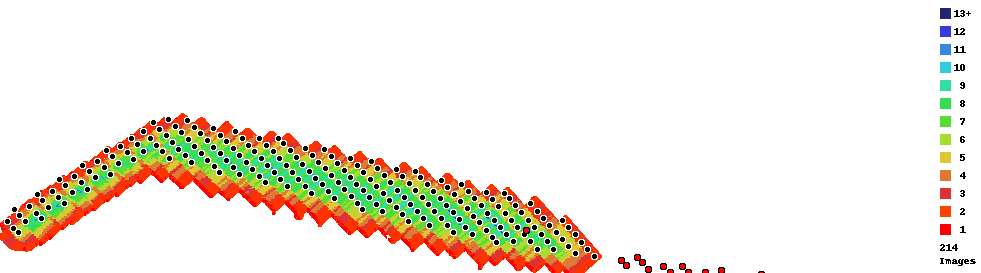
If you are concerned with the previous job you processed it has a gap in the images on the eastern side of the processed area. A missed pass combined with low overlap is going to make this happen. You can see the red dots off the right and how separated they are from the main body. Contiguous overlap is one of the requirements of the Data Collection guidelines that are agreed to at the time of upload. 
Zane
Actions pour les commentaires Permalien

Vous devez vous connecter pour laisser un commentaire.

5 commentaires

0
Avatar

The red dots to the right are not from a missed path. There are approximately 200 images that were uploaded from the eastern side of the project that apparently did not process. I am happy to provide the flight plan and files for your purview.


I am attempting to process the eastern side as a test.


The linear flight plan does not appear to allow me to arrange my passes so that the drone does not fly directly above the chemical processing tanks on the project. This is a condition of our operation on site.


I would love to  discuss this further. I will need a refund on the points used for this map so that I can fully process it as it has not processed all photos that were uploaded.

Josh Atwell 0 votes
Actions pour les commentaires Permalien
0
Avatar

I will need a map of this entire project every week for the next year.

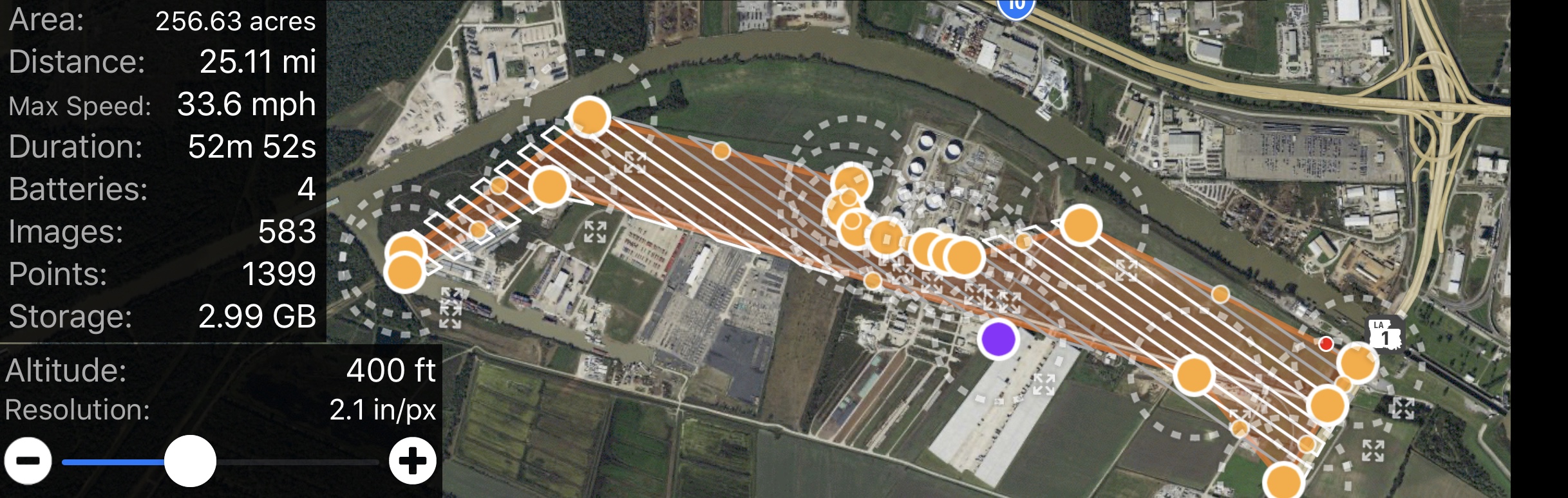
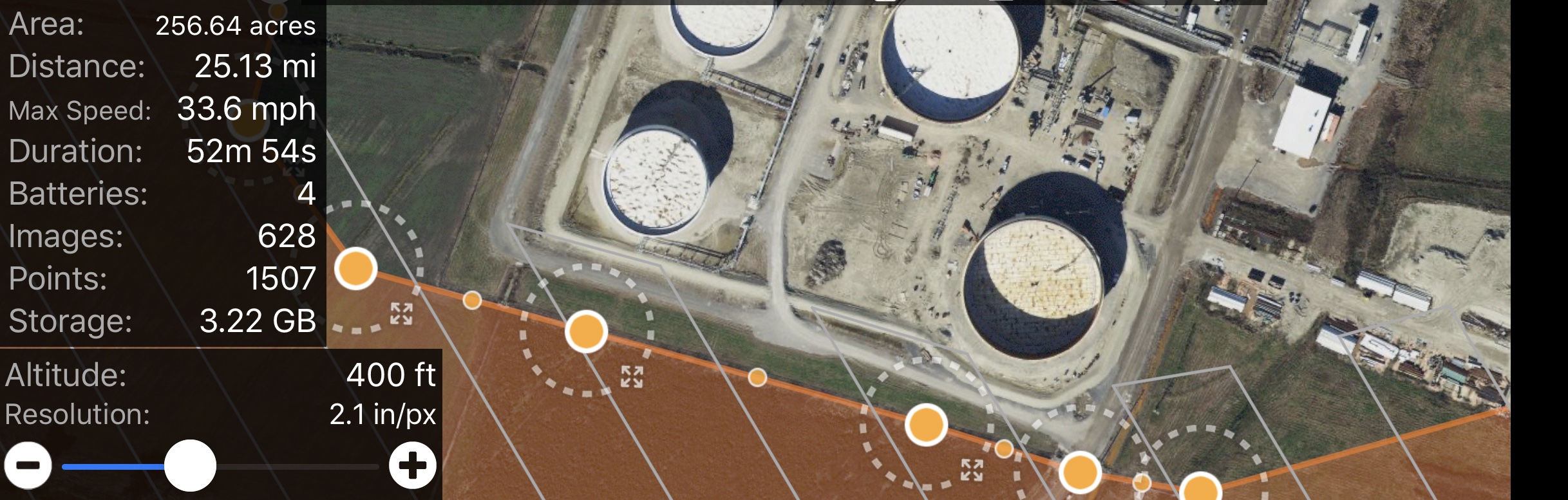
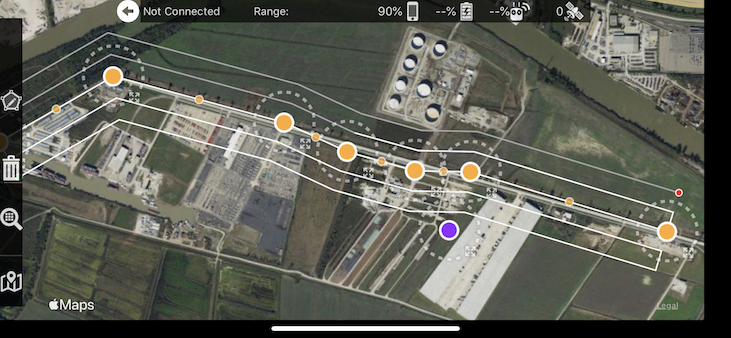
Here are screenshots of the flight plan.

Our company has a very large volume of projects and an entire division that conducts aerial photography and videography. If this method of using your mapping app for project progression tracking goes well, we could potentially invest a significant amount of resources into both your software and your drone packages. However, I need assistance with this one mapping project that was created exclusively using your software, as it will serve as our proof of concept for this method of project progression tracking.


As you can see we are able to keep the drone from flying over the tanks of the facility in the flight plan, which is a condition of our operation on this project.


Also, as you can see the same style flight path and overlap is used across the entire project.


I am attempting to process the below map which of only the east side to see if the data on that side was somehow corrupted by an error with your app.:

https://www.mapsmadeeasy.com/maps/detail/30d1533a207644fd81235466add34276/


Again, I will need all points used on this project refunded once this problem is diagnosed, so that I can get a full map of the entire project, even if I have to correct the settings in your drone control app and fly the project again. This should not be a problem for your company as we will continue to purchase points for the next year to map this same project every week. But we will absolutely not do so if you cannot work with us to diagnose this problem.

Josh Atwell 0 votes
Actions pour les commentaires Permalien
0
Avatar

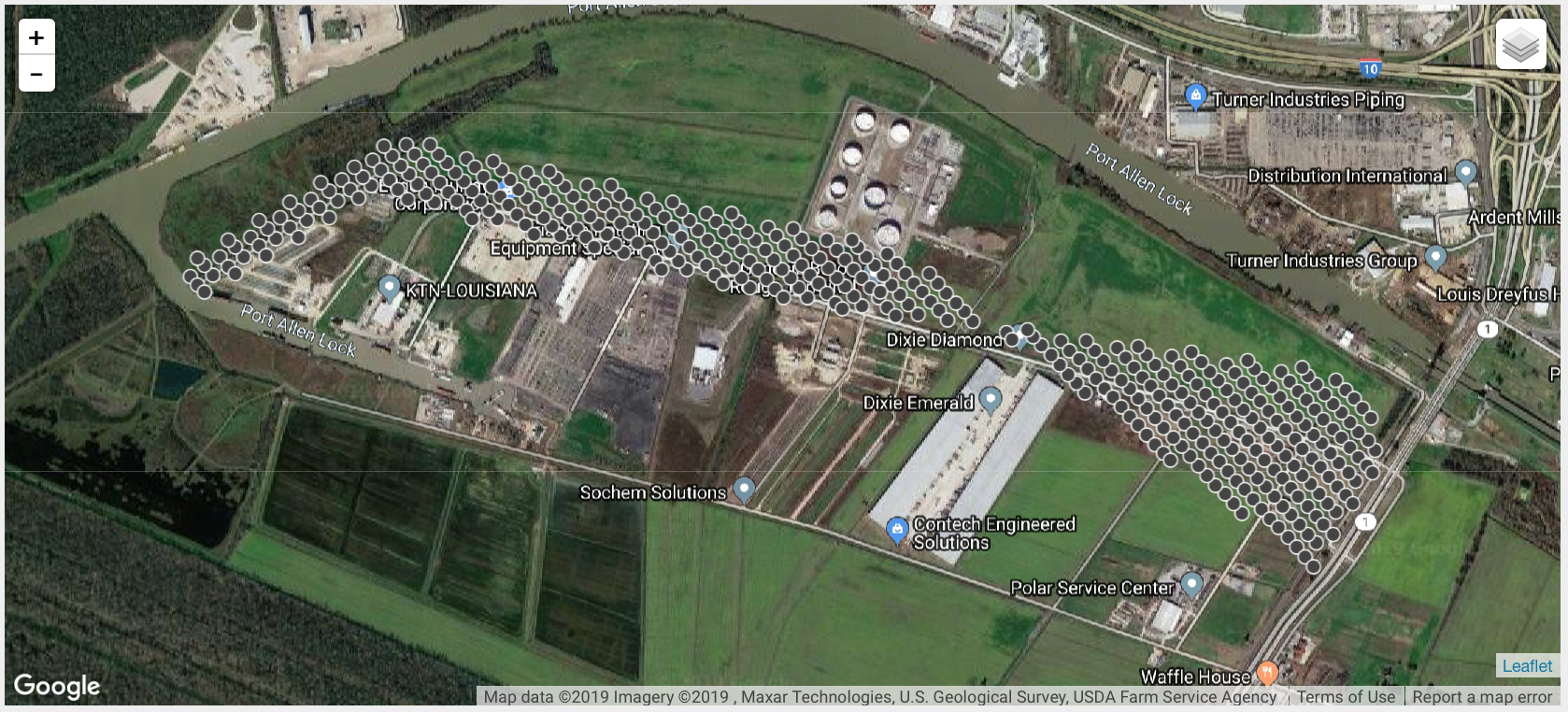
Here are the photo locations. Again, I will need a full refund for all maps on this account once this problem has been diagnosed.

If these images cannot be processed due to an error with your drone control application, I will fly the drone again and reapply the points to map this same area.

Josh Atwell 0 votes
Actions pour les commentaires Permalien
0
Avatar

Thank you for including these screenshots. It will help describe what is going on. The flight plan this shows is not exactly what was flown at the time of this image collection. 

See that gap right where the problem is? That is not contiguous with the other data. That is the problem here. This should have been processed in two separate jobs. The Data Collection guidelines that are agreed to at the time of upload state that all images must have contiguous overlap. "Don't upload non connecting sections or separate islands of coverage." We offer that view that shows where all the image locations are to help you see what you are uploading ahead of time and avoid this issue. 


As noted previously, your overlap is pretty low due to the skinny shape of the mission so you need to use more overlap for your Overlap Report to show all dark blues, not yellows and greens. Basically even at your missions widest, it is only getting 6 or 7 views on it. In that narrow spot by the plant it is dropping down to an unusable amount of views. Consider 6-7 views the dead minimum. You should be shooting for 13+. Thin areas of the flight plan require careful planning and may even take manual flight to fill it in if the linear planning tool isn't used. You can read more about Overlap Report interpretation here:
http://support.dronesmadeeasy.com/hc/en-us/articles/207148006-Overlap-Reports

The job was cancelled AND REFUNDED because it appeared that you were running the same files again. They are not going to turn out differently just by uploading it from another workflow. We did this to save you money. If we had let it run it would have turned out the same and it would not have been refunded. If you want us to run that dataset, we will, just let us know that is definitely what you want to do. 

The good news is that you are using our Business app which has the linear flight planning tool. This is how you should collect long thin missions like that. Use at least 3-4 passes and you will get even overlap along the whole path. I would recommend using 80% along track and 85% across track overlap with 4 passes for this job. You should easily be able to design a flight that does not violate your aircraft restrictions.
https://support.dronesmadeeasy.com/hc/en-us/articles/115000167986-Linear-Flight-Planning


Again, the partial output is not due to the app or our processing. The app collected what it was told to collect and the processing created the outputs it could based on the overlap it got to work with. Had there been more overlap in the data collection it would likely have turned out well. Sadly though there is nothing that can be done to save a data set that was not collected with appropriate overlap for this type of processing. 

If you feel that your flight met all of these criteria please turn on the flight sync feature so we can see the flights to diagnose things further. 

Zane 0 votes
Actions pour les commentaires Permalien