
It is funny you ask... Our next major release will have vertical mapping capabilities. Look for it by the end of June.
Acciones de comentarios

Good morning.
In Map Pilot Pro, it is possible to perform mapping on the facade of a building, for example. In this case, vertically.
Iniciar sesión para dejar un comentario.
It is funny you ask... Our next major release will have vertical mapping capabilities. Look for it by the end of June.
Sério? Ótimo. Eu nem vou procurar mais. Quero fazer todos os meus trabalhos na sua plataforma.
Abraço
Quando estiver liberado vai entrar automático no aplicativo?
Yes, the vertical mapping will be part of the regular app. Most of the new features will part of the Base subscription and up.
Não tem problema. Eu até prefiro se for pago. É que como estou iniciando mais nas áreas de inspeção de obras e fachadas, é melhor executar um voo automatizado, principalmente em edifícios altos. Vou aguardar
Olá, bom dia. O mapeamento vertical já está disponível no sistema?
It is coming soon in the next big release. Likely by the end of the month.
O aplicativo terá alguma mudança visual?
It has some new panels that help with the vertical layout but only when the vertical mission plan types are in use.
Bom dia
Alguma novidade sobre mapeamento vertical?
Obrigado.
Yes, the new version is available. Get the beta version of 3.0.1 here:
https://support.dronesmadeeasy.com/hc/en-us/articles/8160429529876-Installation
I installed the new version 3.0.1 but when I open it for a new mission it automatically closes the app
Try version 3.0.0.
I managed to install it. But I understood it would be available in the base plan.
It will be available in the Base plan if it is not now.

3.0.2 is now available with the vertical features available for Base tier and up.
Good morning. I need to subscribe to the basic plan, but I need to be sure if vertical mapping will be included in this plan. It's still included in the pro plan. The idea is to subscribe annually. But I need to be sure so I don't end up paying for the pro plan unnecessarily. Best regards.
Yes, the new features are available in the Base plan and up starting on version 3.0.2.
Could you send me the link for version 3.0.2?
because I'm trying to download it from the website but when I open the plan it crashes.
It is available here:
https://support.dronesmadeeasy.com/hc/en-us/articles/8160429529876-Installation
Delete any previous installations and then install it fresh.
O que está acontecendo é que fiz tudo conforme a configuração, mas quando abro o aplicativo para uma nova missão, ele fecha. Tentei em dois celulares diferentes e a mesma coisa acontece.
Sorry for the runaround... Version 3.0.3 has been released that has a fix for something that was only showing in the 'e' variant of the app so it got missed in yesterday's beta release.
Obrigado pelo feedback, Zane, e desculpe o incômodo. Mas onde posso encontrar a versão 3.0.3?
Ops. Acabei de ver. Obrigado.
Vou te incomodar um pouco mais. Consegui baixar e já paguei. Tem algum tutorial para me ajudar com isso?
We do not have any documentation or videos for these features yet. That will be coming in the next week or so.
The new mission types are found where the previous mission types were selected. For buildings you draw the face of what you want to cover. Then select the surface distance and overlap settings. It is all pretty similar to how things worked previously.
We highly recommend using the Simulator to see how things work or go into an open field so you can see how it works first before trying on an actual building.
Perfeito, Zane. Vou testar em campo aberto primeiro, mas não acho que seja difícil de operar. Obrigado. Vamos conversar.
Boa tarde, Zane. Fiz um teste hoje em dois voos diferentes, onde o drone tirou fotos de cima para baixo e outro na horizontal. No entanto, ele completou a rota inteira, decolou, pousou, mas não tirou as fotos como planejado. Passei para o processamento e não entendi o que estava acontecendo. Começou com o drone tirando fotos ainda no solo, depois com uma curva antes de iniciar a rota, depois algumas fotos e, em seguida, repetiu. Não sei se algum ajuste é necessário.

Na verdade, diferente do mapeamento tradicional, onde o drone para para tirar fotos e exibe pontos indicando a localização das fotos, este não me mostra nada.
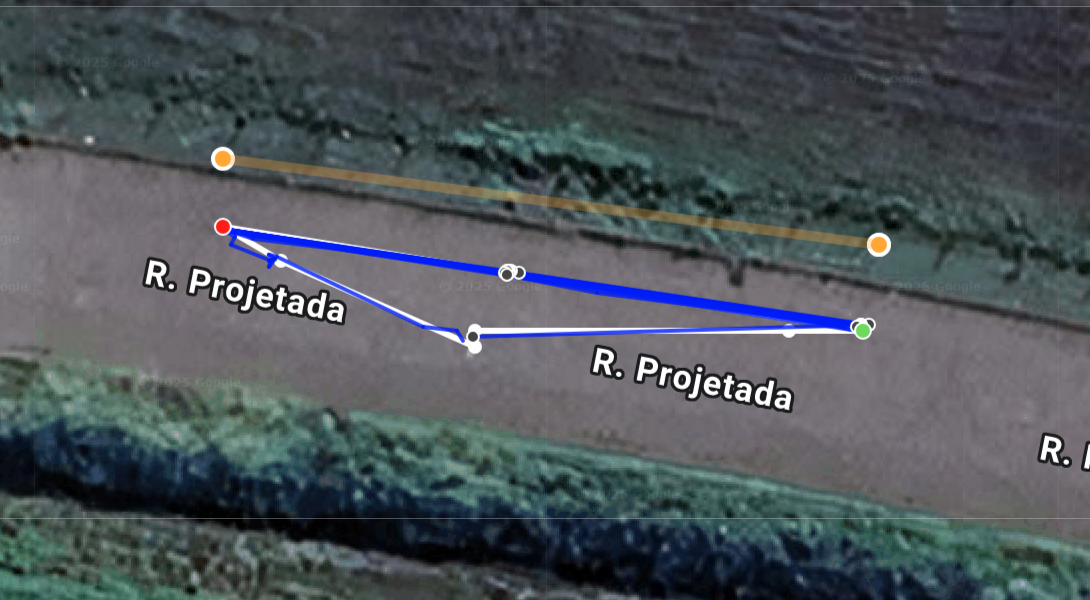
Thanks for giving it a look. One of your flights seems like it was weird but the second one worked well. This map had 63% overlap in both horizontal and vertical directions. Images were taken to get that image spacing on the face that you defined (shown by the orange line here). The image locations are shown by the grey dots in the flight log on the Maps Made Easy site as well as in the app as the images are taken. 17 images were collected.
You can review what is going to happen in the "Vertical View" panel which lets you scroll through the faces of the vertical mission to see what path is going to be taken.
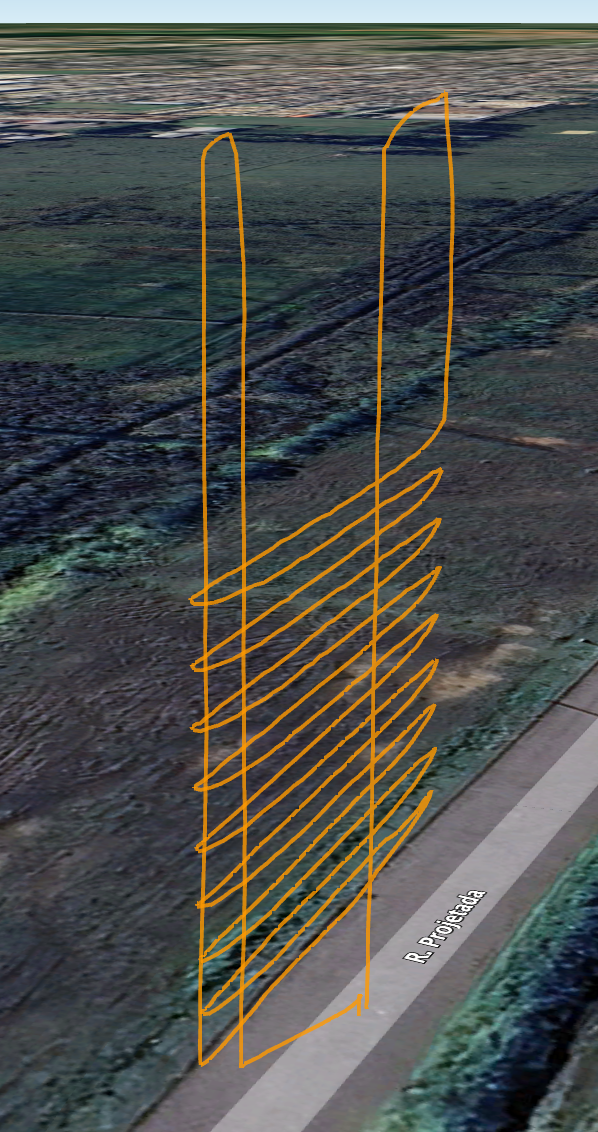
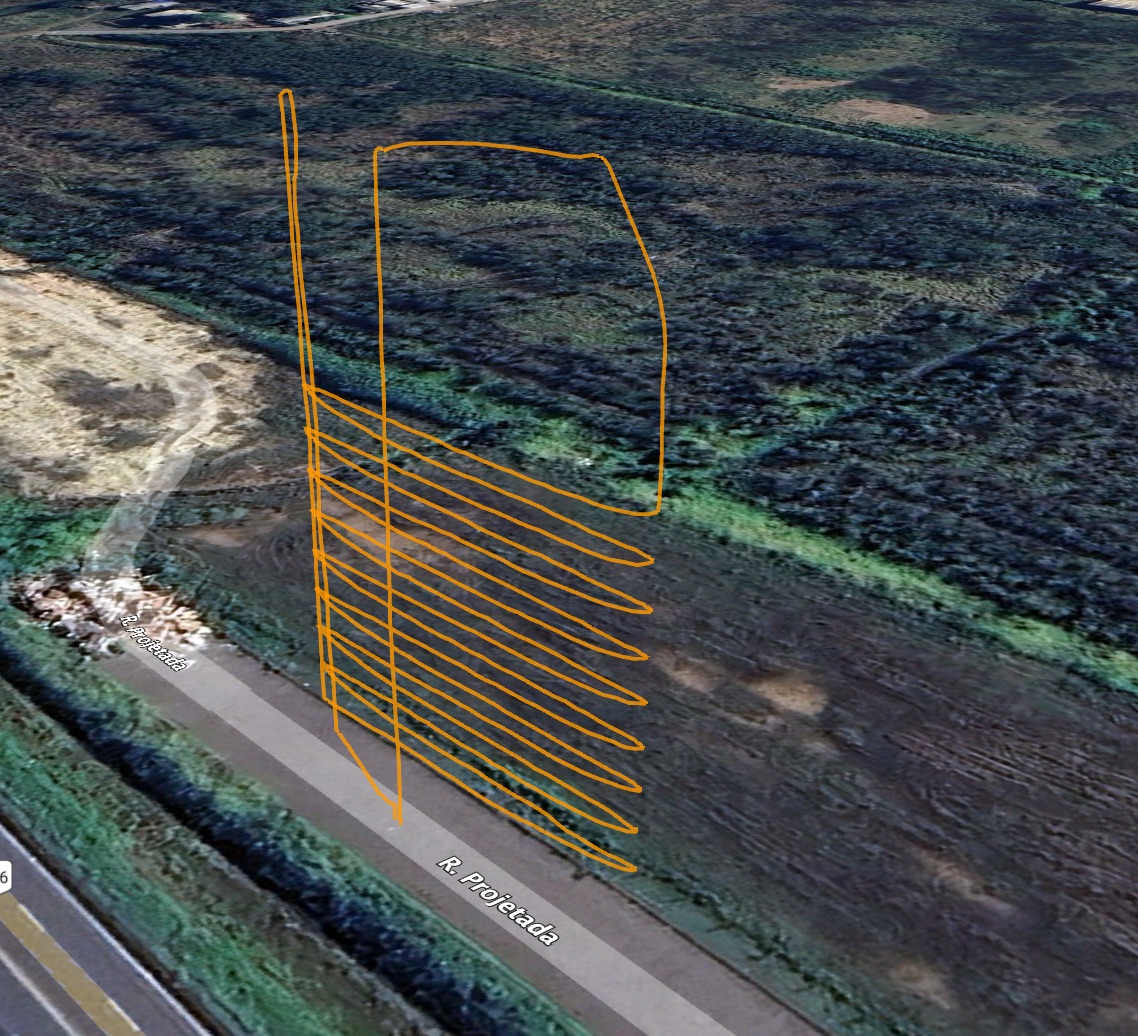
The aircraft will stop to take the images if the STI (Stop To Image) option is selected.


