Publicación

2 seguidores Seguir
0
Avatar

Help with Map Image

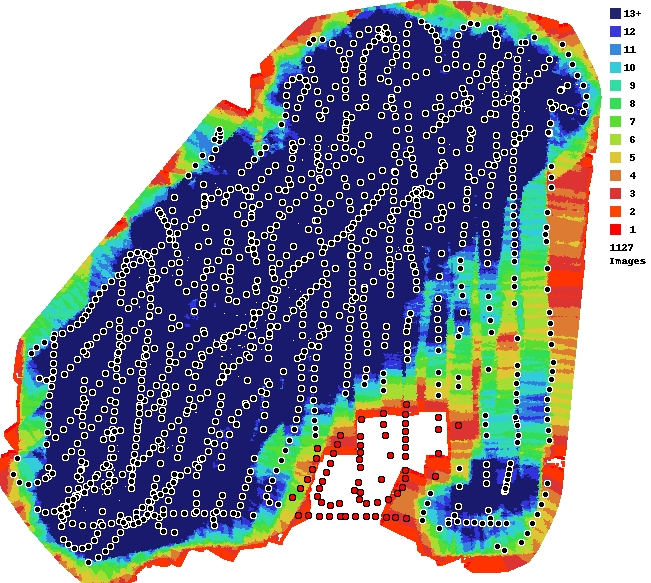
 I've processed a map/image and when the computer was done rendering it, it left a rather large hole in the bottom of the image.  Examining the overlap report, it appears that I did have images there, just not enough for overlap.

This image is more about the overall image than the photogrammetry.  Is there a way to force the machine to include those photos so I can fill out the gap?  Please?  

My success depends on being able to present a total overall image.

Can you help?  I am willing to pay points again to reprocess if that is necessary, I just need to include those photos to fill out the gap.

The file in reference is 1416 Aecon CYXH Rebab 3.

Thank you very much.

Ray Penner

Comentario oficial

Avatar

Sorry, but we cannot patch jobs after the fact.

If you don't need the 3D component of your maps and don't need them to be georeferenced very well you could probably just use photoshop or something to do the stitching. 

The only option for you is to collect better data and rerun it. Your data collection has some pretty serious issues with overlap.
 

Zane
Acciones de comentarios Permalink

Iniciar sesión para dejar un comentario.

4 comentarios

0
Avatar

Yeah, there is some serious issue with overlap.  However, did the computer program just omit those photos because they had no multiple matches?  If i submitted the whole set again, could that area be filled out on some override?

This data collection is sloppy and I'd get into my whole sob story... I was just hoping it would work and not delete all the photos because they don't match.

I understand there is only so much you can do.  

Ray Penner 0 votos
Acciones de comentarios Permalink
0
Avatar

The red dots indicate images that lacked sufficient detail to be matched or were substantially different. 

Rerunning the same data won't change anything. There are no settings that you can use to change that. 

We ALWAYS recommend the use of an app to automate the data collection. Our app follows our Data Collection guidelines as closely as is possible.

You also have a pretty strong travelling sunspot in your images since it must have been taken pretty close to solar noon. They make processing harder since features are changing between images and it makes the matching less accurate.

You can see an example of what that means here:

https://support.dronesmadeeasy.com/hc/en-us/community/posts/214857143-Flat-3D-model-

Zane 0 votos
Acciones de comentarios Permalink
0
Avatar

Well, my usual app would not work inside the airport boundary and this is likely due to software issues and that my DJI Go would not communicate with the Map Pilot.  I did look into the whole issue, but I did not have time to play with all the settings and wreck an RPAS system that typically works flawlessly 90% of the time.

Thank you for your analysis.  We did learn something here (sun spots) and the doing this work by hand is very difficult and almost impossible to repeat!

Anyone else reading this should know its not Map Pilot or the Maps Made Easy that caused this issue.  Its all in how you collect your data.  I was hoping I could "override" things, but Zane's explanation makes sense.  I would have submitted with more photos, but I fear the results would have been the same.

Cheers (and good flights!)

Ray Penner 0 votos
Acciones de comentarios Permalink