منشور

‏3 متابعين اتباع
0
Avatar

Moving home point not working

Hello,

I'm evaluating the pro licence. I'm coming from years of photogrammetry jobs using pix4d capture pro (now discontinued).

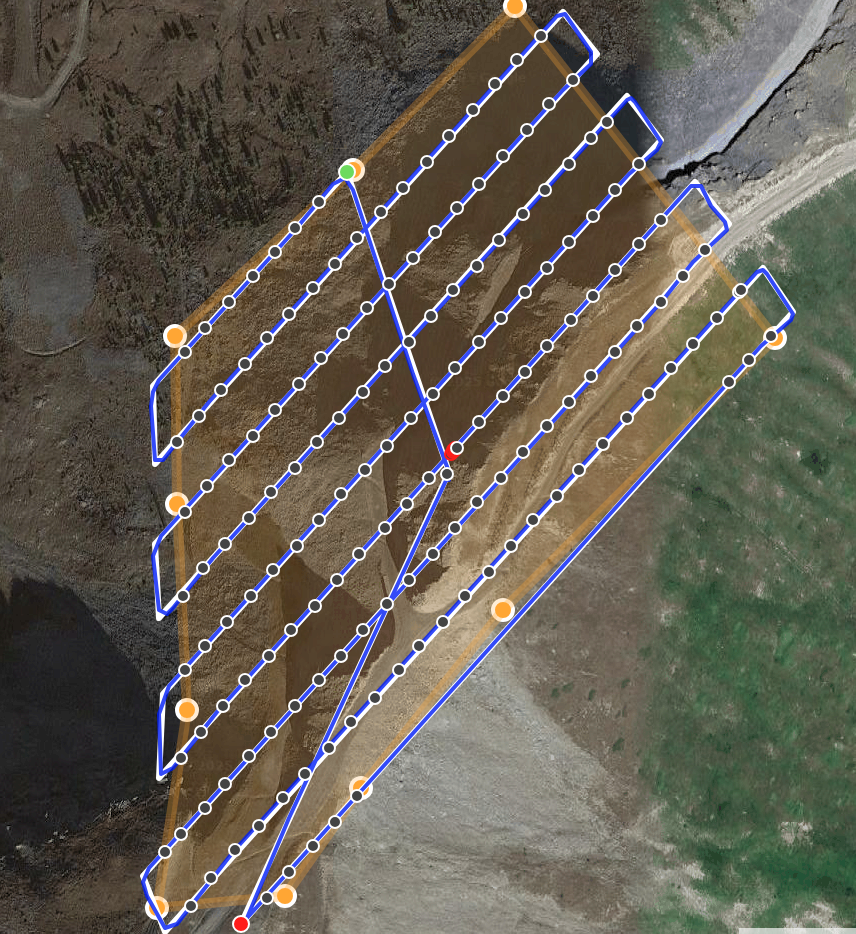
I have make several tests using a PH4PRO with an iOS tablet with GPS and cellular connection but there is no way to have the home point updated. This feature is very relevant because I work over mountains and using terrain following I can take off from the top and then follow by feet the drone while descending on a slope.

Last question: is it compliant with the new Iso 26 just released?

many thanks...

Marco

الرجاء تسجيل الدخول لترك تعليق.

9 تعليقات

0
Avatar

Yes, I have the pro evaluating license and the radiolink was very strong (test flight on a range of 200 meters). Ios is equipped with built-in GPS and the 4g connection is active. Anyway no way to have a moving homepoint....

Marco 0 أصوات
إجراءات التعليق ارتباط ثابت
0
Avatar

The takeoff location is defined as where the aircraft takes off. If mobile device has a GPS and you have the movable home point feature enabled it should update the home point with a yellow cross as shown in the article. 

Zane 0 أصوات
إجراءات التعليق ارتباط ثابت
0
Avatar

Yesterday I've made three big surveys over the alps and everything worked fined except the moving home point for PH4PRO. Are u sure that this feature can works also for the non V2 version?

Anyway my impression is that speed is a little bit fast. Can you confirm that the only option is the adjustable speed according to light? no way to set manually speed of drone?

Anyway I think I will buy the pro version; is the facade option contemplated for the future? many thanks again!

Marco 0 أصوات
إجراءات التعليق ارتباط ثابت
0
Avatar

We will give it a look but that feature is not dependent on the aircraft since the GPS signal for the pilot tracking comes from the mobile device in most cases. 

You don't want to get into setting the speed manually. The framing rate is super defined by the height the aircraft is flying, the overlap setting, the camera's sensor and lens parameters and the frame rate limit of the camera. As long as you aren't dropping any frames it is doing things correctly. Yours looks fine. 

If you want to disable to the automatic speed adjustment for some other reason you can do so using the setting shown here: https://support.dronesmadeeasy.com/hc/en-us/articles/209866886-Light-Based-Speed-Adjustment

This is really only if you want it to fly more slowly for some reason. Map Pilot Pro will attempt to not let you fly too fast for the data you are trying to collect. 

The facade mapping stuff is up and running and available for iOS in version 6.0.1. 

Zane 0 أصوات
إجراءات التعليق ارتباط ثابت
0
Avatar

many thanks for all your answers. And thank you for analyzing one of my flightplans.

I'll defenitively buy the pro version next week.

Cheers,

Marco.

Marco 0 أصوات
إجراءات التعليق ارتباط ثابت
0
Avatar

Thank you for bringing this issue to our attention. We have duplicated the problem and submitted a fixed 6.0.2 version. We hope it will be available by tomorrow. 

Tudor 0 أصوات
إجراءات التعليق ارتباط ثابت
0
Avatar

Hi Zane / Tudor,

I've just purchased the pro annual subscription. I've processed all datasets with no issues. Everything worked fine. Just some suggestions and little problem encountered: I work on high mountain environment where there's always gusts of wind. Probably the possibility to choose also a speed, based on the experience can be useful to avoid instability of my PH4PRO during the flight (best is no more than 4 - 4,5 m/s). In my opinion this is the best mapping drone ever made for portability, reliability and camera resolution (I have 3 PH4PRO for this job). 

Finally, during my test flight I always encountered messages coming from exlamation point icon: unknown_error_ dji and something regarding sensors AND takeoff error. Anyway no problem for takeoff, terrain following and landing. Good job!

Marco 0 أصوات
إجراءات التعليق ارتباط ثابت
0
Avatar

When you set the speed in the Options Menu it will act as a limiter to the speed. If the light based setting chooses a value or the camera parameters give you a certain value that is higher than what you have selected in the Options Menu it will honor that value as the max speed if it is lower than what the other settings have elected. 

I don't know what would be causing those issues either. That type of messages is something that comes straight from the aircraft and apparently it is unknown to DJI too. 

Take care of those P4Ps! I agree that they are the best. They have been the workhorse for a decade. 

Zane 0 أصوات
إجراءات التعليق ارتباط ثابت