Bài đăng

10 người theo dõi Theo dõi
0
Avatar

Text annotation??

Hi - Is it possible to add text to the map?  I know you have previously said something about ToolBox or something....but i have no idea of what that is or what that means.  I am not very tech savvy with GIS, but your program is great and my customers love it.  I'd just like to be able to add text on top of the map, somehow.


Any advice (in English, pls) is greatly appreciated.

Thx!

Mike

Mike Borkowski

Bình luận chính thức

Avatar

It is not currently possible to add text to the map annotations. This has been on our list of a while but being that we don't get all that many requests for it it tends not to be a priority.

We will give it another look to see if there is anything we can do to enable that capability quickly.

Jay
Thao tác bình luận Đường dẫn cố định

Vui lòng đăng nhập để lại bình luận.

11 bình luận

0
Avatar

I'd throw my request in for this too. I have clients who want me to be able to label things on the maps. Thanks!

Mick 0 bình chọn
Thao tác bình luận Đường dẫn cố định
0
Avatar

I'd also like to see some form of text annotation.  Being able to drop a marker is good, but not being able to communicate what that marker references diminishes the value of the marker to me.

Jimson Carr 0 bình chọn
Thao tác bình luận Đường dẫn cố định
0
Avatar

Even if as simple as being able to label the marker with an identifying number that could be referenced in a report.  Very important to me to be able to label points or items on the map itself.

Ken Larson 0 bình chọn
Thao tác bình luận Đường dẫn cố định
0
Avatar

Yes, a simple marker icon with the ability to add/edit a popover. This is actually very important and would make the workflow for the client much better and easier.

Shawn G. 0 bình chọn
Thao tác bình luận Đường dẫn cố định
0
Avatar

RE: c.2016 "This has been on our list of a while but being that we don't get all that many requests for it it tends not to be a priority. We will give it another look to see if there is anything we can do to enable that capability quickly."

I think adding a text label to a marker is a most important feature that needs to be added to the features.

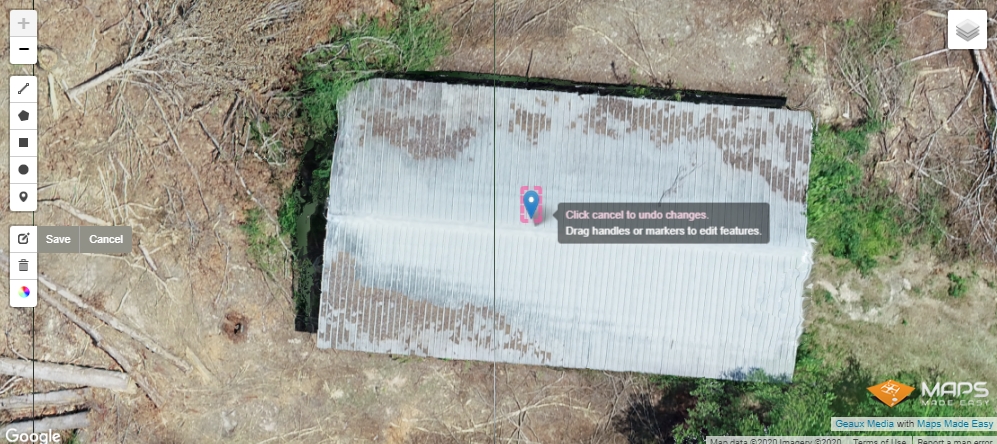
Currently, there seems to be no way to explain to the viewer why a marker is included other than the generic marker itself. See image below. If I place a marker on this shed, the viewer will be curious as to why I placed a marker there. All the viewer sees is a plain marker. It, therefore, requires me to further explain to the viewer what the marker represents. A simple text tag added to the marker would eliminate the need for further explanation and potential confusion. In this case, a simple text label of "Pump Shed" would be terrific.

And while you're in the process of adding this incredibly useful feature, please add the ability to optionally include a clickable link to the marker so that the viewer can click for more info.

I have every confidence that MME will see the wisdom and practicality of this invaluable feature and look forward to seeing it in the toolbox very soon. My guess is before the end of May 2020. Sweet!!

Old Scout 0 bình chọn
Thao tác bình luận Đường dẫn cố định
0
Avatar

Hello, I see this has been added to markers, but I don't see a clear way of adding text. When I add a marker, single/double-clicking does nothing, and right-clicking brings up lat/long.


Am I missing something here? Thanks!

Marc Sandlhauser 0 bình chọn
Thao tác bình luận Đường dẫn cố định
0
Avatar

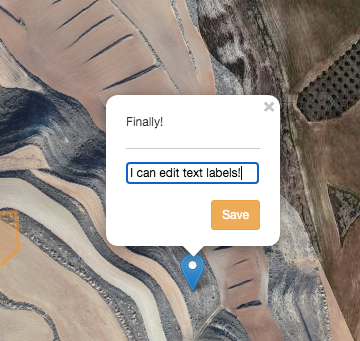
A single click on the blue marker that gets added should bring up the text entry box. This works on Chrome, Firefox and Safari (at the least). Make sure you are dragging the blue marker from the left side tool panel and clicking on it once it has been dropped.  

Zane 0 bình chọn
Thao tác bình luận Đường dẫn cố định
0
Avatar

Thanks! Got it to work.

So, interestingly, this DOES NOT work when in fullscreen. Any chance this would be fixed in a future version?

That was my problem...I was working in fullscreen.

Marc Sandlhauser 0 bình chọn
Thao tác bình luận Đường dẫn cố định