


Ações de comentário
I`ve been flying my Air 2S with Map Pilot Pro since 2023, and for the first time I had a problem like that:
I`m a Base user, so I use SRTM model on Terrain Awarness.
The mission begins, the drone takes off, the first photos are being taken, the drone is ajusting its altitude to maintain the distance of the ground, so suddenly the drone stops in the middle of a straight line to adjust its altitude, and this takes a lot of time delaying the flight. And its happened more times in this flight.
Its very weird, because this did not happen before. Before (2024/2025 MPP versions) the drone only stopped at the vertices for maneuver and that was fast.
After the flight, I arrived at my office and downloaded the KMZ file of the flight. Loading it at Google Earth its easy to see that this Terrain following of MPP is wrong. The local that the drone stopped to adjust altitude is on a slightly ondulating terrain, like the rest of the area mapped. So the drone did not followed the terrain correctly.
Obs: I already flew another mission in a different location and the problem persists.
I hope the support team can solve this problemsoon. I`m spending 50% more time than expected to complete each mission.
I`m counting on your help.
Zane, take a look on my last 3 flights.
iniciar sessão para comentar.
Is there any feedback, Zane?

Yes, we have been working on a fix for it. It doesn't have anything to do with the terrain data sources. There were some changes made recently to address changes made in the DJISDK and they did not get changed for virtual stick flight. We hope to have something out in the next day or so. There are no known workarounds at this time other than to not use the terrain awareness feature.
This issue has been addressed with the release of 3.1.5 on January 16.
Hi Zane.
I just flew a mission to test the 3.1.5 version.
This is much better than 3.1.4, but the drone still keeps stopping to adjust his altitude in the middle of a straight line.
These stops were fewer in number and also shorter compared to the 3.1.4 version.
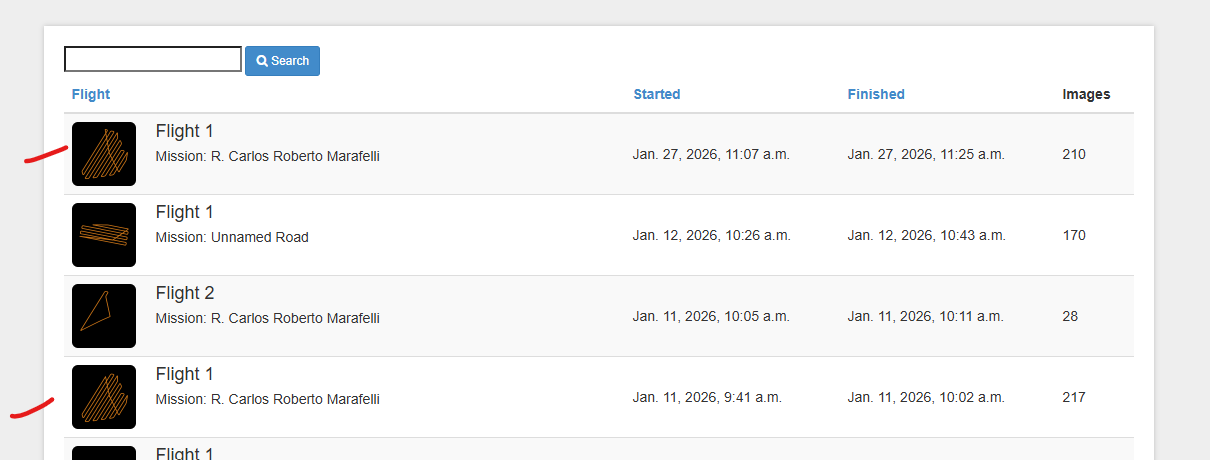
Take a look at the log files. You can compare these two flights (below), they are the same mission.
Thank you.
We will look at the log files. Can you please email us the .mme mission plan file so we can simulate it?
Ok.
Email sended.
Zane, the problem persists.
The drone behavior during the flight changed with this latest version (3.1.6b). Now the drone is fliyng normaly in a straight line taking photos at 10 m/s and stops abruply. Then he resumes and continues taking photos, but at a very slow speed. This stops occur several times. To give you an idea, the estimated flight time for the mission was 16 minutes and it took me 22 minutes to complete this mission.
This flight is just a test. I have big jobs to do where I`ll have to travel several kilometers to flight missions which will require several batteries.
But with the MPP this way it becomes unfeasible.
I would like a sicere response from you, will this problem be solved? I paid fot the annual plan and I`m unable to use it properly.
I`m sending you the last .mme files. Its from this flight below:

I`m counting on your support.
Thanks.
Maurício.
We are sorry to hear you are still having issues. There is a lot going on with this flight. First of all, you have a lot of really serious errors being thrown. They should be showing in the Aircraft Errors panel and the ! icon should be showing orange, which is not a good thing. This flight has hundreds of these errors which mean you have some control issues going on: aircraft encoder error and imu attitude limit
Also, you have a FlySafe warning occurring which should actually be keeping you from flying at all. This too is in the log:
FlySafeWarningEvent: TAKE_OFF_IN_ENHANCED_WARNING_ZONE The aircraft is in the enhanced warning zone (Airport)_ please pay attention to flight safety. zones:1
This screenshot shows how close the flight is to the flight path:
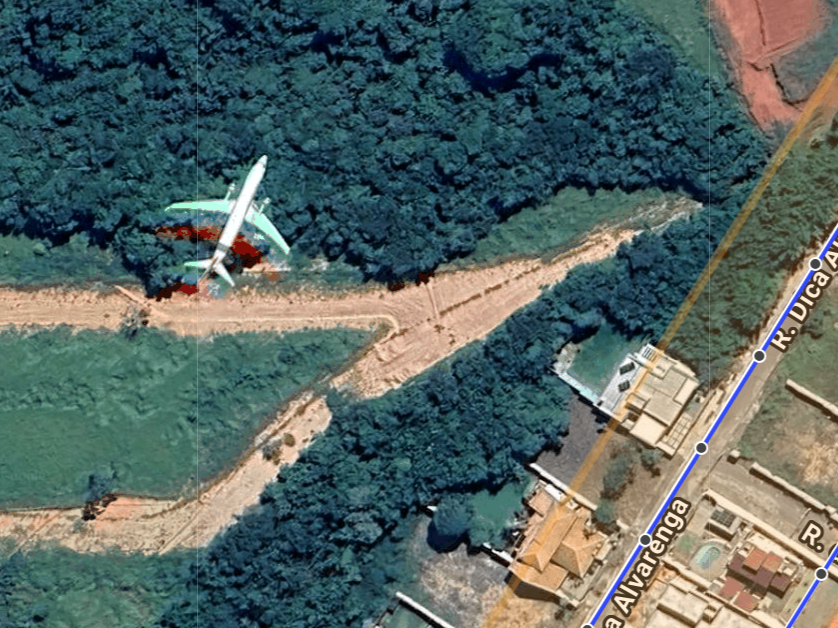
Yikes!!!
Please let us know how the app updates are working for you after the hardware issues with the aircraft are resolved and it can be tested in an uncontrolled airspace.
Zane,
I`m already calibrate IMU and COMPASS.
Tomorrow I`ll fly another mission, on another place to test.
About this plane, it is a 30.000 feet! Its a large plane en route. LOL!
There's a small airport nearby, not for this type of aircraft.
Thank you for the fast response.
Zane, the problems persists:
Air 2S stopping in a straight line to adjust speed and altitude persists.
Consequence: Low efficiency flights, more batteries/hectare.
I`m sending you (email) the last 2 log flights.
The last one, I finished the flight before the mission concluded. The mission started perfectly, Air 2S taking photos at 10 m/s, so it reduced speed abruptly and continue taking photos, but at 2 m/s. No clouds, the motion blur was good, no reason for this sudden speed reduction.
This last flight I was flying my second Air 2S (Backup), its a new drone.
I`m almost giving up MPP and switching to another Flight APP.
I count on your help.
With that extra PPK hardware on-board it is going to do all sorts of weird stuff. I am surprised it is working at all. I don't think you have mentioned this previously.
On the second link with the new Air 2S on the exact spot (line 1441) where the speed drops from 10 m/s to 1.9 m/s the log file shows this warning which was shown to you in the Aircraft Errors panel:
"FlySafeWarningEvent: TAKE_OFF_IN_ENHANCED_WARNING_ZONE The aircraft is in the enhanced warning zone (Airport)_ please pay attention to flight safety. zones:1"
Have you tried using any other Android devices? That is the common denominator here. If the processor isn't getting all the control messages out it could be falling behind and cause what you are seeing.


