Publicação

2 seguidores Seguir
0
Avatar

Version 2.8.0 New Features

Hi there,

Just updated my app to V2.8.0, the new features are looking good! But currently I cannot find any tutorials/talk-through regarding these functions. Especially the custom terrain aware, this is great help to me. Would you be able to provide some info about this or point me to the correct place for the info?

Thanks

Hins

Zhang, Hins

Comentário oficial

Avatar

We have not updated our documents on the new features yet but you need to have maps for the area you are planning on operating within on Maps Made Easy.

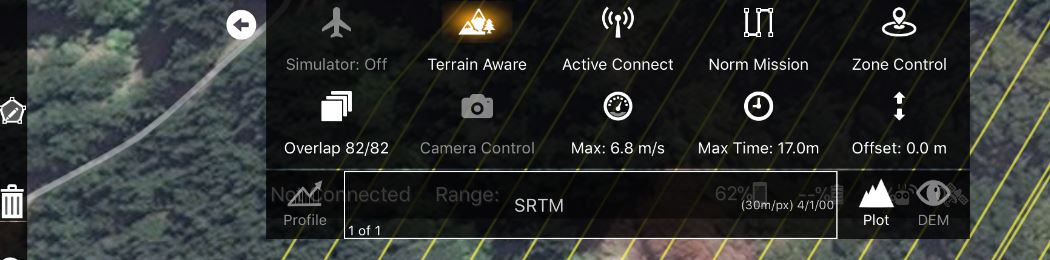
When you double tap on the map to draw your anticipated takeoff point and have a valid Maps Made Easy Access Token in the settings Map Pilot will attempt to get a list of all of the maps with centers within .5 miles. Their names will then be selectable in the list that currently only says SRTM. 

The Profile button is used to calculate a profile for the currently designed flight path. The Plot button shows/hides the plot window. The DEM button shows and hides the custom terrain view if present. 

Zane
Ações de comentário Permalink

Por favor, entrar para comentar.

8 comentários

0
Avatar

Hi Zane,

regarding the new Terrain Aware features I would like to report that I had the app crashing twice while reviewing the flight path on the plot. Something is buggy there. Ipad mini4 with iOS 10 here. The crash happened while just playing with the app not connected to the drone. Please check it.

George 0 votos
Ações de comentário Permalink
0
Avatar

George: Was this using the SRTM data or a custom Terrain Data layer?

When you say "reviewing" do you mean touching the plot panel and looking at the light blue dot's location?


Zane 0 votos
Ações de comentário Permalink
0
Avatar

I was using the default SRTM data. Yes I was touching the plot panel and looking at the blue dot's location. I will try to reproduce the crash to send more details. I think I also was trying to rotate the flight path in order to check some different combinations. It may crashed in this stage.

George 0 votos
Ações de comentário Permalink
0
Avatar

If you are rotating, the plot panel should be disappearing. 

We haven't been able to duplicate this.

Zane 0 votos
Ações de comentário Permalink
0
Avatar

Hi again, the crashing happened one more time while tapping on the terrain plot panel. However I can't reproduce the error. It seems random. One thing is for sure that is related to the terrain aware panel.

One more new GUI problem is that if the plot panel is opened and I press the Terrain Aware button on the main panel in order to turn it off the plot stays on the screen. I think that it should disappear if the user turns off the Terrain Aware button.

George 0 votos
Ações de comentário Permalink
0
Avatar

The functionality of the buttons has changed a bit with the 2.8.0 release. The Terrain Awareness button now just hides and shows the panel for its control. The Profile button triggers a plot recalculation. The Plot button toggles whether or not the plot is visible. Hiding it and showing it again does not require a recalculation as long as nothing has moved. The DEM button hides and shows the customized terrain layer.

We have not been able to reproduce your plot tapping issue but we will keep at it.

Zane 0 votos
Ações de comentário Permalink