Publicação

2 seguidores Seguir
0
Avatar

Navigating Map Pilot

I've searched and it appears my question has been asked before, but I could not find an answer.

Is it really true that to go between the Mission setup screen and the Manage Mission screen,  we need to close out the app and reopen it....Seriously ??

How about a  simple link up in the corner of all screens that goes back to the opening screen like in most other apps...please.

Dave Pitman

Comentário oficial

Avatar

No. That would be crazy. The white circular back button next to the status bar is the simple link up in the corner you seek... It allows you to go back to the main menu and either try to reconnect to your device or go to the other screens. Yes, it is small since we support devices down to the iPhone 5s. 
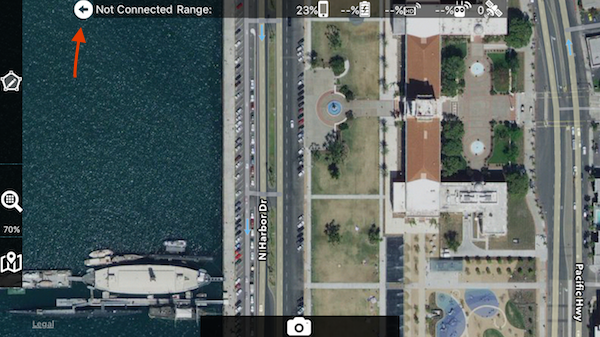
This "back button" is documented as the second item in the User Guide.

Tudor
Ações de comentário Permalink

Por favor, entrar para comentar.

2 comentários

0
Avatar

Sorry, you're correct, my fault for not finding it.  When I put on my cheaters, it was clear it was a back button.  Now if I could find the Large Icon setting to scale them to a decent size on the Air 2.

Dave Pitman 0 votos
Ações de comentário Permalink