Publicação

5 seguidores Seguir
1
Avatar

Missed Camera Trigger

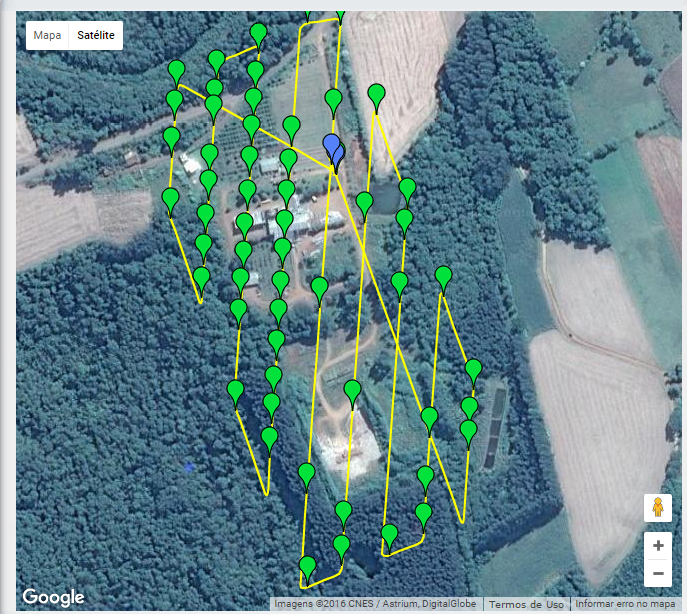
Just bought Map Pilot app, carried one small mission about 60 Acres. It has 4 Flight Lines, Triggering is not consistent(Distance varies) , I am really upset with this behavior.

I am a experienced photogrammetrist and  done several UAV precision
mapping projects with DJI S900.

Please let me know how can I fix this.

-Samir

Samir Deshpande

Comentário oficial

Avatar

What mobile device are you using? DJI added some CPU intensive logging functions that are making it so some devices are falling behind. That sounds like what you are experiencing.

Make sure you are using the highest quality SD cards available and that they aren't more than 50% full since that will affect the write speed.

Also, to minimize CPU usage, disable the Image Footprint display (green box) in the settings. It requires a lot of processing power to look up the terrain corners quickly.

Hopefully that helps. We have a new version coming out in a couple of days that has an updated version of the DJI SDK so hopefully they will have cleaned up their logging a bit.

Zane
Ações de comentário Permalink

Por favor, entrar para comentar.

7 comentários

1
Avatar

I had a similar issue 2 days ago.

Fabio Rogerio Matiuzzi 1 voto
Ações de comentário Permalink
0
Avatar

Im my case, its an IPAD A1600, with IOS 10.1.1 (14B100).

Fabio Rogerio Matiuzzi 0 votos
Ações de comentário Permalink
0
Avatar

Your iPad has an A7 processor which used to be enough to keep up with everything. We are finding that it ends up being pretty slow now with anything less than an A8.

Zane 0 votos
Ações de comentário Permalink
0
Avatar

We've updated to v2.3.0 this morning and tried to use the new "connectionless" mode using distance based triggering instead of the previous interval (or time) based triggering. Unfortunately we couldn't get the camera to trigger at all. We tried on an Inspire 1 and a Matrice M100 with both an X5 (with two different lenses) and X3 camera. Each airframe and camera is using the latest DJI firmware available. The "active connect" mode worked perfectly. 

I am a professional and experienced photogrammetrist and have a thorough understanding of your application. Is there something that I have missed?

Mattbrice 0 votos
Ações de comentário Permalink
0
Avatar

Matt: Your issue is likely different than this but may be similar to Fabio's problem.

You may have the SD card setting on a fast setting. The X5 is pretty slow to write out images so select the slowest SD card write speed in the settings menu (3 seconds). The distance based triggering is a brand new feature for DJI so we are still trying to find out the issues with it. 

Slowing down the SD write speed will slow down the aircraft a bit and give the camera more time to write out the images. 

If there problem persists, please send us a log file of the issue happening.

Zane 0 votos
Ações de comentário Permalink