
게시물

팔로워 2명 팔로우
0
Avatar

Accounting for discrepancies in number of images triggered, received etc.

I flew a mission recently with an altitude of 20m, 76x80 overlap and 0° angle. The boundary was defined by an imported KML. When I flew the mission plan, it took 3 batteries and the drone took exactly 922 images.

Post-mission, I uploaded all 922 images into MME and created a map. When the map finished processing, there were many discrepancies in the result. First, there were only 2 flights registered. For Flight 1, MME reported 460 images triggered and 421 received. For Flight 2, it was 443 images triggered and 425 received. Flight 3 is not shown at all (76 images).

I checked the filename ranges of the images carefully for each flight, as well as the timestamps corresponding to each range, and they seem correct.

Other discrepancies in the Flight Detail pages are the number of Waypoints programmed vs. visited. Does this indicate an error of some sort?

Oddly, the created Map Detail page does say 922 images were uploaded which is exactly correct.

Any ideas as to what happened? The only clues I have is that I did see a brief message on MPP show up on the iPad saying something about an issue saving an image. Yet, on the drone's SD card, all 922 images were saved and are legitimate. The other clue is that I also got an occasional poor signal warning on the last flight, as it was approx. 50m lower than the takeoff point. Does MPP need to have a continuous signal to the controller throughout the mission or does it fly & capture images autonomously?

I've attached a shot of a spreadsheet I made that shows all these discrepancies plus the timestamp ranges of each flight.

Thanks.

 
Nico Gianniotis

댓글을 남기려면 로그인하세요.

댓글 6개

0
Avatar

Sometimes more waypoints are programmed than the aircraft can visit on a single battery. The 3rd and final flight waypoints programmed and visited numbers should have matched up since the aircraft executed them all. 

The images triggered vs received is a measure of how many photo errors were received. You had a couple of random ones sprinkled throughout your flights and then had a couple places where there were large clusters of them. This means the aircraft was flying slightly faster than the camera could keep up with in writing the images to the SD card. The clusters are because the camera took a second or so to do something and couldn't record new images.

I wouldn't change anything in your settings but I would make sure you start flying with a freshly formatted SD card to keep things snappy.
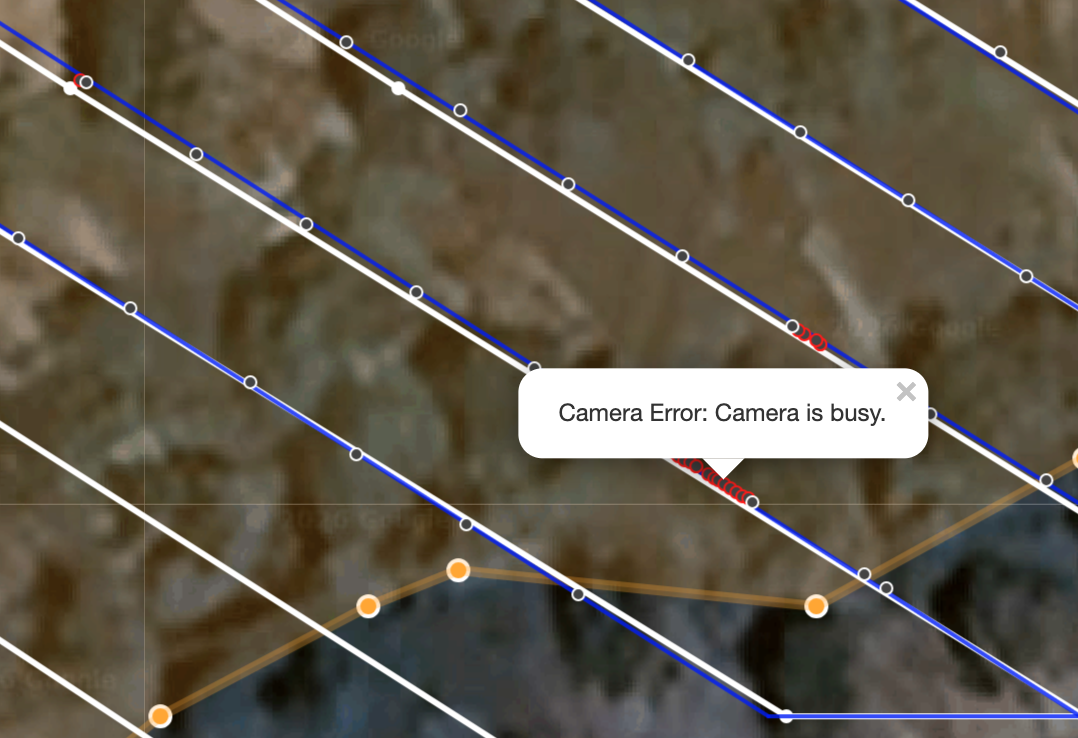
I am not seeing a really horrible signal dropouts in the flight logs. You would see red or black lines on the flight trace to designate places where dropouts occurred. 

Map Pilot Pro does want a strong connection during the whole flight though. If you can't maintain a strong connection the Connectionless setting is there to use which will handle the image triggering local to the aircraft. This fixes the issue of having to have a really strong RC connection but makes it so you have images going through the turns which introduces different issues. 
 

Zane 0 표
댓글 작업 고유 링크
0
Avatar

Zane, thanks for these great tips. I'll factor these into my next mission / map.

I will be sure to reformat the card, but would slowing down the flight speed give the drone more time to write images to the SD card? I think it's already as slow as I can make it.

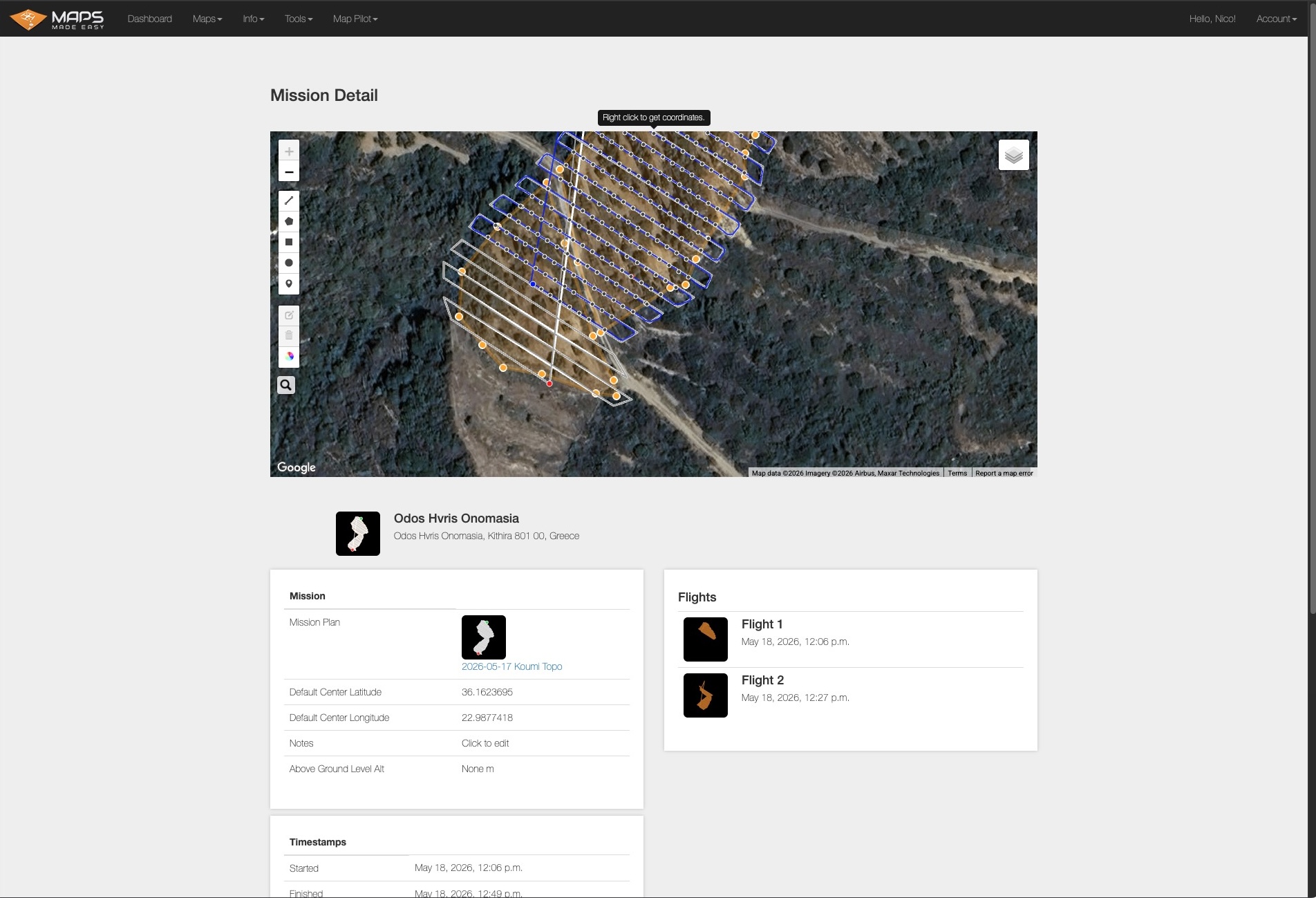
Any idea why the 3rd flight didn't show up at all in the Mission Detail page?

Nico Gianniotis 0 표
댓글 작업 고유 링크
0
Avatar

Your image spacing is all pretty good so I wouldn't change anything. You could slow the flight speed down or change the SD Card Write Speed in the settings if you want to try it but it will take longer to complete your flights. Formatting is the best bang for the buck. 

Hit the Sync button on the File Manager screen to get the 3rd log to go. 

Zane 0 표
댓글 작업 고유 링크
0
Avatar

I sync'd the mission from my iPad but Flight 3 still doesn't show up. Anything else I can try? I've attached the screenshot from the Mission Detail page. BTW, where did you look to get the Camera Error / Camera is busy info?

Nico Gianniotis 0 표
댓글 작업 고유 링크
0
Avatar

If the sync or flights occurred while you had a bad internet connection it is possible the file was marked as being uploaded but it didn't actually go. 

You can get the information on the cause of the photo error by clicking on the point. 

Zane 0 표
댓글 작업 고유 링크
0
Avatar

Thanks. I can see all the camera errors now.

A few final questions: Do you think the internal storage memory of the Mavic 2 Pro has better write performance than any external SD card? Also, I found in the MPP settings where I can set the Imaging Frame Rate to 4 secs/image. If I don't mind the extra time this will add to the mission, would this also help to reduce slow SD card writing speeds?

Also, where is the setting for Imaging Mode so I can change it from "Active Connect" to "Connectionless"? You mentioned this will have images going through the turns which introduces different issues, what are those issues?

Nico Gianniotis 0 표
댓글 작업 고유 링크