게시물

팔로워 2명 팔로우
0
Avatar

Restricting Boundary Overshoot

Hi guys,

I'm getting a bit frustrated by this now!

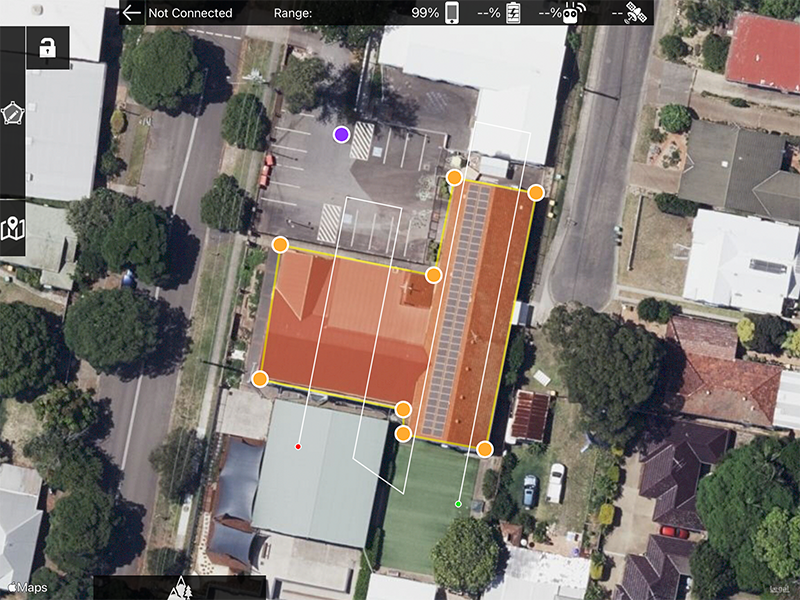
For a low level Nadir mapping flight I need to set a hard boundary. There are a lot of obstacles and trees in the area that I need to work around so the drone can't overfly the boundary line of the survey area (see image attached for example).

I saw in another post that if I turn off the "Active Connect" mode and fly connectionless then the drone will stay inside the boundary. However, whenever I click the "Active Connect" icon in the options menu it gives me a popup that says "Active Connect is required when under virtual control".

Help! I have 5 sites requiring a hard boundary tomorrow and I have no idea how I am going to achieve it at the moment...

Thanks

Mike

Mike Walters

공식 댓글

Avatar

Since your aircraft does not support waypoints it cannot execute Connectionless flight which is what gets rid of the overflight since the imaging is not controlled by speed.

With your Virtual Stick aircraft you should slow down to the minimum flight speed (2 m/s) to minimize the overflight. It shouldn't matter much anyway since it is such a small area. Then shrink your boundaries as needed to accommodate the flight path.

Limiting your flight to just the roof line is not likely going to give you very good results. 

Depending on where you are there is no reason to be confined to just the roof line. As long as you are not causing a disturbance, invading someone's privacy, or creating a safety hazard you are likely within your legal rights to fly where you need to. The air is generally recognized to the the FAA's jurisdiction. This may vary state by state though... 

Zane
댓글 작업 고유 링크

댓글을 남기려면 로그인하세요.

댓글 3개

0
Avatar

It's a shame the Air2S won't support waypoints. I suppose I will have to look at alternative mapping options as I can do it in DroneDeploy (if I pay the $4k).

These site are for a third party client so the restrictions are set in stone. Also it is in Australia so I don't think the FAA would have any jurisdiction!

The image in the last post wasn't a great example. I have a few sites tomorrow where the rooftops are surrounded completely by very tall gum trees. The dataset requires me to fly 10m above rooftop so I can't go over them.

Oh well, back to the drawing board I guess...

Mike Walters 0 표
댓글 작업 고유 링크
0
Avatar

The Air 2S will never support waypoints per DJI. We (and all other 3rd party apps) execute waypoint flight using the Virtual Stick controls to simulate real autonomous waypoint flight. 

Flying high overlap, low and slow can be problematic. You get to pick 2. The approach I described previously would work fine for your needs. Just use the slow speed and use a lot of overlap. If you run up against the minimum framing rate of the camera you could do a full grid flight or fly it multiple times with an offset. 

Zane 0 표
댓글 작업 고유 링크