Posting

2 pengikut Ikuti
0
Avatar

DJI MINI 2 - Gimbal twitches from 0-5 degree Randomly - Drone flying at intermittent speeds ranging from 0-5 MPH, then just stops, then proceeds, and stops again.

Hello,

I'm having similar issues as another DJI Mini 2 pilot from a question posted from 10 days ago. Except I have another issue that makes it impossible to gather the data that I need. 

At first it was just the gimbal twitching from nadir to about 5 degrees every 1-2 seconds. The drone still followed the uploaded automated grid pattern flight just fine, but with a twitchy gimbal. The pictures taken still seemed to work after they were processed. Mapping Date/Time: Oct 21st 2025 - 3:00pm-5:00pm PST

I checked the firmware of my drone and made sure the app was updated to the latest version.

The next day I went out to see if I'd have the same issues and something else started happening: the drone takes off normally (one day it did take off at an angle like the previous pilots issue, but it only happened once about a month ago), then it flies at intermittent speeds ranging from 0-5 MPH. Sometimes it'll get up to 10-15 MPH, but then the drone slows down to a crawl or slows to a complete stop and just sits there for a few moments only moving 0-2 MPH intermittently. Sometimes it takes a pic as this is happening and sometimes it doesn't. Plus the gimbal is still twitching up and down as this is happening. Mapping Date/Time: Oct 22st 2025 - 3:00pm-5:00pm PST

Other than that, I'm not seeing any of the other issues that the other Mini 2 pilot described. I will add that about a month ago, my drone finished a mission and came back to the home point and just sat there 200 feet in the sky. I couldn't control the drone in any way what so ever. I almost panicked, lol. To fix this I shut down the MPP app and unplugged my phone from the controller. Reconnected my phone and went into the DJI fly app and hit the land button. Then my drone finally started to descend. This issue didn't happen at all during my last two mapping flights.

I'm using a Samsung Galaxy Note 20 5g connected to my controller. This weekend I'm going to try doing another mapping job using my Google Pixel 9 Pro to see if using a different phone might solve this issue. 

I love this program due to how simple, easy, and affordable it is. But there are some bugs that need attention. 

WinslowDrone

Harap masuk untuk memberikan komentar.

2 komentar

0
Avatar

We are sorry to hear you are having issues. The gimbal twitching issue could be related to what we will talk about after this top paragraph depending on the setting. If you had it set to 0 degrees and the gimbal is not properly calibrated it will bounce like that. Check your gimbal calibration in the DJI app. This is why we have the default gimbal value set to 5 degrees in Map Pilot Pro so it has a bit of room from the stops. Or it could be related to the control issues below.

The Mini 2 is a Virtual Stick aircraft which means it is actively being controlled by Map Pilot Pro. If the signal goes away, so does the control. I see a lot of signal strength issues in your log files on the Maps Made Easy website. You can see them too in your Maps Made Easy account. The red areas show times when the signal was too low. Many of your recent flights have this issue. 
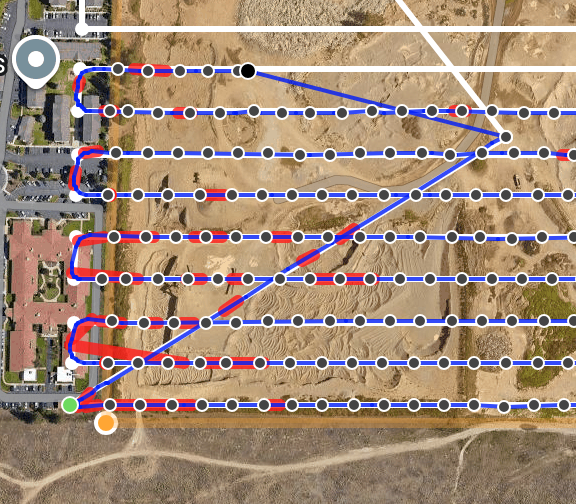
 

Things to try: 

  • Fully close other apps. It seems like Map Pilot Pro is having a hard time running well on your device. You have minimal ram available which is likely affecting operation. Closing other apps should free up RAM and CPU to ensure solid operation. 
  • Ensure your signal strength is solid by keeping the remote antenna oriented properly while having it pointed at the aircraft's location as it moves. Don't just sit it down and call it good. Actively track the aircraft. 
  • Make sure the mobile device is out of direct sunlight which can cause it to overheat quickly. This is more of a problem mid-summer but it is worth watching unless it is pretty cold outside. 
  • Once you have the flight loaded, operate in Airplane Mode to keep the phone from interfering with the aircraft signal. It isn't supposed to happen but it does. 
Zane 0 suara
Tindakan komentar Permalink
0
Avatar

3.0.13 has been released with an Advanced Setting that allows you to disable "Check Gimbal Angle" which is what is making the gimbal tick like that. Map Pilot Pro monitors the gimbals position and compares it with the currently set value and changes it if it is different from the designated setting. Give that a try and see if it is better. 

Zane 0 suara
Tindakan komentar Permalink