आधिकारिक टिप्पणी

Thanks for jumping in, Adrian. You are correct. If it is sunny outside, set the white balance to sunny in the settings menu. If it is cloudy, set it to cloudy.
टिप्पणी क्रियाएं

this is a recuring problem, it doesn't happen every time. I have 200 plus photos from the same flight, why do they have different exposures? how can I avoid this from happening. latest updates on aircraft,controller,Go App and Map pilot most current versin before flight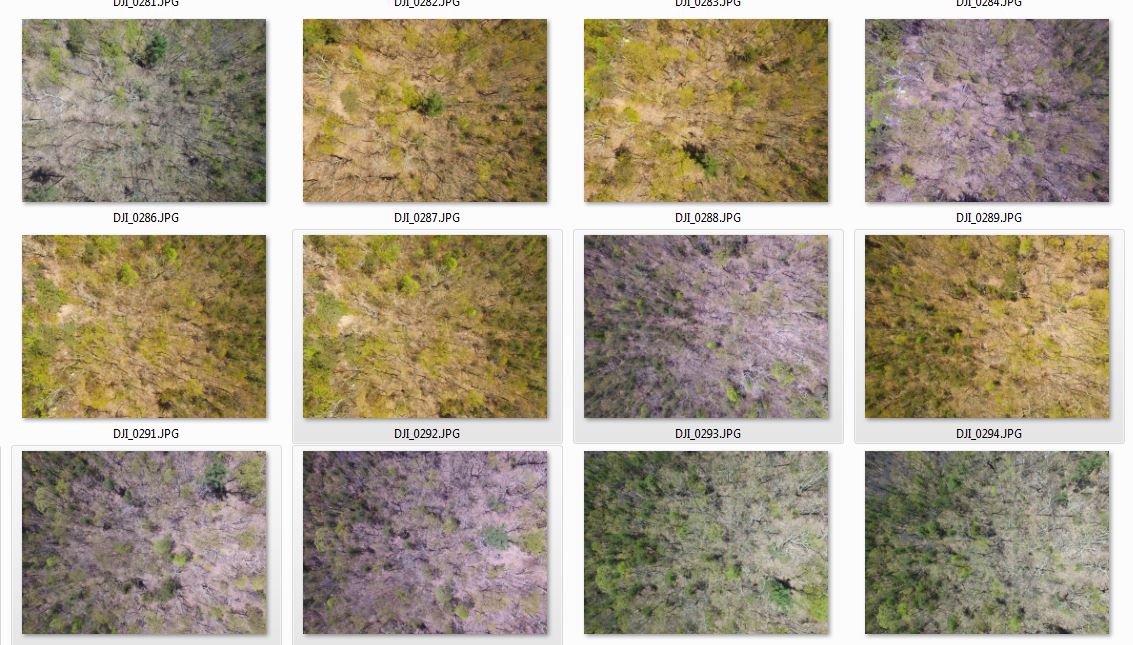
Thanks for jumping in, Adrian. You are correct. If it is sunny outside, set the white balance to sunny in the settings menu. If it is cloudy, set it to cloudy.
कृपया टिप्पणी करने के लिए साइन इन करें करें.

That's a white balance problem. You need to set it manually in the map pilot app to sunny or cloud.
Thank you, that was helpful. What I don't understand is why the Auto feature didn't work properly, when I looked in my settings, Auto was selected.
The Auto setting was working properly but what the automatic white balance is doing behind the scenes is making a judgement on the illumination level and adjusts it on the fly. White balance is adjusting for the spectral content of the incident light. Sunny conditions are redder light and cloudy conditions are bluer. The end goal is to make a white things look white but it doesn't always work out perfectly.
If you fly over a brighter area of ground it will think it is getting sunny and switch to the sunny setting. If you go over a darker spot on the ground it will switch to cloudy.
