पोस्ट

10 अनुसरणकर्ता अनुसरण करें
0
Avatar

Mavic 3 enterprise APK

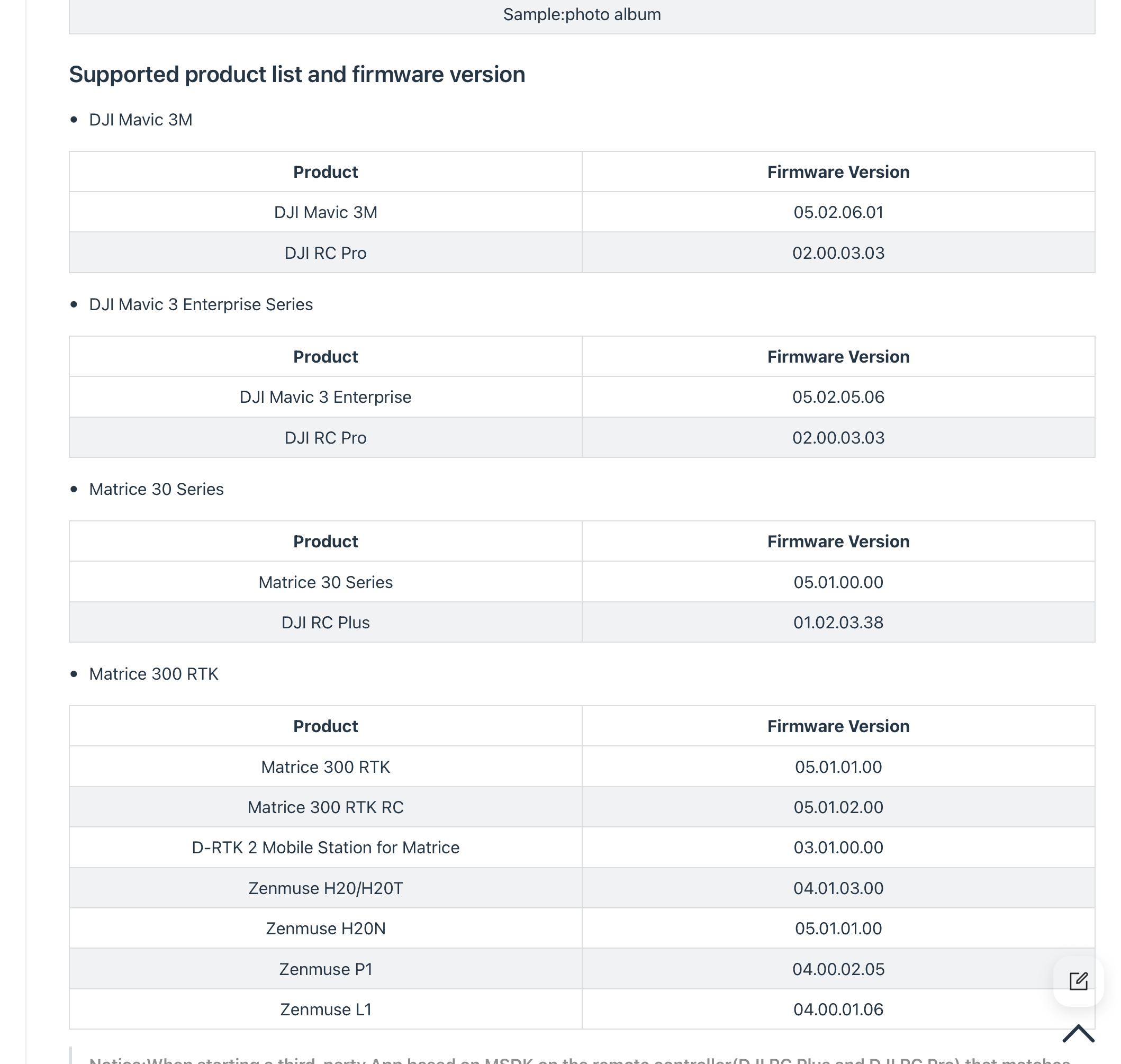
Any word on when the Mavic 3 Enterprise will be supported with the Android APK?  
I've been flying mine for a few days, but the "mapping mission" inside of DJI pilot 2 is SO clunky.  

Matthew Verley

पोस्ट टिप्पणियों के लिए उपलब्ध नहीं है.

50 टिप्पणियां

0
Avatar

That is awesome news, thanks Zane.


Are there any limitations with the new APK version for M3E?  Is Terrain Follow (using the SRTM DSM) still enabled?

Are there any issues with adding the RTK module to improve geotags?


Thanks


Peter O'Regan 0 वोट
टिप्पणी क्रियाएं Permalink
0
Avatar

Terrain Awareness is working well with SRTM and custom data sources. We are working on getting the RTK panel working. If you setup the RTK in the DJI app and run Map Pilot Pro the fix will still work and the corrected values will be in the image tags. 

Zane 0 वोट
टिप्पणी क्रियाएं Permalink
0
Avatar

Hi Zane, will the current version of the android APK work for mapping flights on the M3E thermal and multispectral drones? 

Matthew Verley 0 वोट
टिप्पणी क्रियाएं Permalink
0
Avatar

Matt: The latest release added support for the M30 drones/cameras. The M3 series is up next. 

Zane 0 वोट
टिप्पणी क्रियाएं Permalink
0
Avatar

Any idea on a rough timeline?  A few weeks?  I'm looking at ordering a M3 multispectral...just want to know if I can expect to use it for spring/summer flights.  I already have an M3E thermal; it would be nice to be able to use that one for mapping as well. Thanks for all your work on this!  The app is working nicely with the M3E.  

Matthew Verley 0 वोट
टिप्पणी क्रियाएं Permalink
0
Avatar

The normal M3 aircraft will likely be supported in the next couple of weeks. We did just get a multispectral to test with and will hopefully be adding that shortly after. I don't think we have an M3E thermal to test with yet but will keep an eye out. None of them should be too hard at this point. We will definitely have them going by spring. 

We have been having a lot of trouble getting the thermal video feed to work with DJI's new SDK but the image triggering and mission spacing are all fine. 

Zane 0 वोट
टिप्पणी क्रियाएं Permalink
0
Avatar

Actually... According to the SDK documents the M3T is not supported on the SDK. So the M3M is up next. 

Zane 0 वोट
टिप्पणी क्रियाएं Permalink
0
Avatar

Awesome progress being made Zane - thanks!  Are you able to share a rough indication of when the RTK panel integration might be ready for Beta testing?  I'm happy to help with that here in New Zealand.

Peter O'Regan 0 वोट
टिप्पणी क्रियाएं Permalink
0
Avatar

Support for the Mavic 3 Multispectral has been added in version 1.2.10. 

Zane 0 वोट
टिप्पणी क्रियाएं Permalink
0
Avatar

Peter: The RTK panel should be working on properly equipped devices. Let us know if you are not seeing it. It was added a few versions ago. 

Zane 0 वोट
टिप्पणी क्रियाएं Permalink
0
Avatar

Hi Zane.

I am preparing to fly a mission using an M3E-RTK in a remote area that has no cellular coverage at all (so no Internet). The site has very steep terrain changes, so Terrain Follow is essential.  I am hoping to execute the mission as PPK, using a couple of Propeller Aeropoints as the portable reference basestation (for logging PPK corrections).  I've installed the Map Pilot app on the M3E controller. I see the RTK screen, but am not sure how that relates to a PPK mission.  I cannot connect to a CORS station on this site.

Can I safely assume that the RTK hardware module on the drone will automatically store accurate tags on the images, using the 30+ satellites that are positioning the drone while mapping?


I contacted PropellerAero's support, and they said, for PPK processing they require the PPKRAW.bin and Timestamp.MRK files.  Does MapPilot produce these automatically as part of M3E-RTK missions - even when you are not connected to a GNSS Base station / correction service?  Thanks.

Peter O'Regan 0 वोट
टिप्पणी क्रियाएं Permalink
0
Avatar

Hi Zane

I have just been reviewing the latest version of MapPilot on the M3E controller.  It seems to work fine, however, I noticed that the SRTM terrain profile tool doesn't show an ACCEPT button any more.  There is only a REJECT button above the profile display. Also, there is no notification/ pop-up asking if Terrain Follow is desired or not.  This is a slightly different UI to the iphone version of Map Pilot, which I have used for years.  Does the lack of an Accept button mean that Terrain Following is by default automatically accepted and used in a mission on an M3E controller?  Please confirm.  Thanks

Peter O'Regan 0 वोट
टिप्पणी क्रियाएं Permalink
0
Avatar

PPK workflows are still not supported. You can use either an NTRIP server or the DJI basestation at this point. 

The Timestamp.MRK files do get created and go in the same location as the images.

For the Terrain Awareness question: the 'Accept' button only shows up with there is an aircraft connected and you are about to take off. You can minimize that window or hit 'Reject' to get the plot to go away. It sounds like you might not be connected to an aircraft when this planning is happening.


Zane 0 वोट
टिप्पणी क्रियाएं Permalink
0
Avatar

Great progress with this so far, the M3E is proving a good successor to the P4P we've been using for years.

A few small things I've noticed with this since having used it on multiple flights now:

- Terrain Awareness, with maximum waypoints in use it doesn't allow you to fly the mission after you accept the reduction in points. I've had to resort to fragmenting the flight area until I don't get the message.

- When the aircraft expends battery, it returns to home on it's own, I haven't been able to override and fly back manually like with the P4 by toggling flight modes. I can however do it during missions. Is there a feature in DJI Pilot that I need to disable?

- Minor issue with the flight lines disappearing occasionally when interacting with the screen during missions, the photo drops still show up however.

- Is there going to be the addition of a manual restart point as in with the apple app?

Kim 0 वोट
टिप्पणी क्रियाएं Permalink
0
Avatar

- Terrain Awareness, with maximum waypoints in use it doesn't allow you to fly the mission after you accept the reduction in points. I've had to resort to fragmenting the flight area until I don't get the message.

I am not sure why it wouldn't fly then but we will look at it. The new SDK supports a much higher number of waypoints and we haven't updated things to reflect that yet. We will do so in the next release. That should solve the actual problem.  

- When the aircraft expends battery, it returns to home on it's own, I haven't been able to override and fly back manually like with the P4 by toggling flight modes. I can however do it during missions. Is there a feature in DJI Pilot that I need to disable?

This might just be how the Enterprise stuff works. We always have it set to return home when the battery says it only has enough power to return to the home point. Please let us know if you figure something out. 

- Minor issue with the flight lines disappearing occasionally when interacting with the screen during missions, the photo drops still show up however.

This is a byproduct of us having to use Mapbox as a basemap library instead of Google Maps for the DJI remotes. It does some things better and some things worse. The lines are worse. We will see what we can do. Please send us screenshots of examples of it misbehaving so we have some clue as to how to reproduce it. 

- Is there going to be the addition of a manual restart point as in with the apple app?

This should be working as of the latest version (1.3.0e). 

For issue reporting about specific bugs or features please start a new thread. 

Zane 0 वोट
टिप्पणी क्रियाएं Permalink
0
Avatar

Kim:  I had the same "heart skipped a beat" moment during the first RTH when the drone ignored my mode change.  I sure hate that feeling when you don't think you have control over an expensive machine flying through the air!  

I have discovered that if you hit the pause button first, then execute a mode change (from normal to sport) you now have manual control of the drone and can fly it home.  

Matthew Verley 0 वोट
टिप्पणी क्रियाएं Permalink
0
Avatar

Thanks a lot for coming back on that Zane, hopefully the next update with the new SDK will solve the Terrain Awareness waypoint issue as we do quite a lot of steep terrain mapping. At current, when it brings up the message about reducing waypoints, once you acknowledge it, the mission uploads but you don't have the option in the top right to take off, only to upload again.

Regarding the flight lines disappearing, I'll send a screenshot next time it happens, but it's not a huge issue as it doesn't affect the flight mission. Great that the manual restart point is back too.

Thanks for that suggestion on using the pause button to break the RTH sequence Matthew, I was going to experiment with turning off the smart return to home feature in the DJI app, but that seems like a good work around. I did have a close call with that the other day, as I was helplessly watching the drone getting battered in the wind with low battery on its automated return!

Kim 0 वोट
टिप्पणी क्रियाएं Permalink
0
Avatar

Hi,

willing to buy Mavic 3E RTK and would like to know if it works in the following scenario:

Plan a mission and in the end of the mission switch to manual and take some more oblique photos of my choice. These extra photos have also rtk precision right? Also if the ntrip provider is not available can I PPK the photos?

George 0 वोट
टिप्पणी क्रियाएं Permalink
0
Avatar

From the feedback from other users it sounds like you can hit the pause button on the mission and do whatever you need to do. The additional images will have the same accuracy. 

We don't support any PPK workflows but that does not mean it is not possible. 

If you purchase your equipment from Drones Made Easy you get a year of Elite access for free. 

Zane 0 वोट
टिप्पणी क्रियाएं Permalink
0
Avatar

Starting with Android version 1.4.0 and iOS version 5.5.0, Map Pilot Pro's Terrain Awareness feature will have options for ASTER, Copernicus, SRTM and any other datasets we can add as built-in Terrain Awareness Data Sources. Copernicus is 30 meter data and is essentially global at 89 to -89 degree coverage (everything but the poles). US users now have access to 10m data from 3DEP/NED.

Having multiple independent terrain data source choice makes it so you have options if one data source has missing data in your operating location. 

We recommend using Copernicus for most work. 

You can read more about the Terrain Data Sources that are currently available here:

https://support.dronesmadeeasy.com/hc/en-us/articles/14697118095380-Built-in-Terrain-Data-Sources

Zane 0 वोट
टिप्पणी क्रियाएं Permalink