Publication

2 abonnés S’abonner
0
Avatar

Maps Made Easy Dropbox link doesn't seem to work

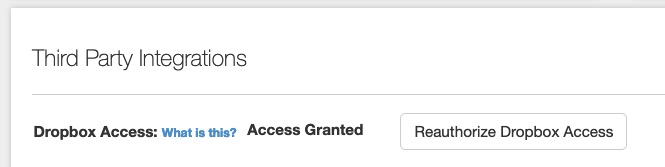
I've gone through the steps to grant MME access to my Dropbox account, and I think it worked because I saw a new folder named "MapsMadeEasy" get created in my Dropbox "Apps" folder. Also, under my profile, it says "Access Granted" for Dropbox.

However I just finished processing a new map, and I did not see any of the Advanced Output files get written to Dropbox after the map completed processing. Is there a "sync" function somewhere I need to activate to make this work?

TIA, Nico

Nico Gianniotis

Commentaire officiel

Avatar

After digging through the logs it appears that the issue is that Dropbox sync is not available when the job is submitted through the app since it uses our API. 

EDIT: We have changed it so the Dropbox sync will occur even on API submitted maps if there is a Dropbox authorization in place.

Zane
Actions pour les commentaires Permalien

Vous devez vous connecter pour laisser un commentaire.

6 commentaires

0
Avatar

There is no sync function. The files should automatically get sent when the job is processed. But I am not seeing that your account has Dropbox access associated with it which would explain why the files are not there. 

Please email us a screenshot of your Maps Made Easy Profile screen. It should say "Access Granted" for the files to be transferred automatically. 

Zane 0 votes
Actions pour les commentaires Permalien
0
Avatar

Hi Zane,

Profile screenshot attached. Cheers.

Nico Gianniotis 0 votes
Actions pour les commentaires Permalien
0
Avatar

Do you have room in your Dropbox account for huge files?

Zane 0 votes
Actions pour les commentaires Permalien
0
Avatar

My account says I'm using 1.8TB out of 3.0TB, so I assume I have enough space.

Nico Gianniotis 0 votes
Actions pour les commentaires Permalien
0
Avatar

OK, I'll take note of that next time. Thanks for looking into it.

Nico Gianniotis 0 votes
Actions pour les commentaires Permalien