Publication

2 abonnés S’abonner
0
Avatar

Range Indication not correct

Hi, how is the indication of range being calculated?

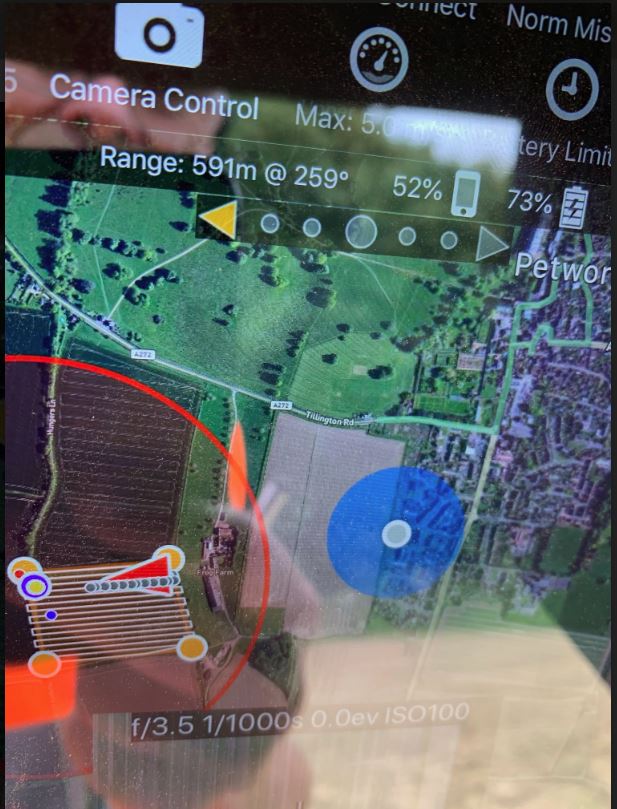
When flying with the latest version the numbers seem to be too high, eg 1000 meters came up when the drone was quite close.

I have noticed a grey dot with a circle around it and wonder if this is supposed to be my home position. The dot is actually some distance from where I am flying and on one flight was moving around?

Kim Gouldstone

Commentaire officiel

Avatar

If you are using an iOS device that does not have a GPS (wifi only models) it uses detected WiFi signals to come up with its position. This can be WAY off. In general, we recommend using airplane mode when operating offline in the field. This will make it so it uses the home point in the range calculation instead of the iOS device location. 

Zane
Actions pour les commentaires Permalien

Vous devez vous connecter pour laisser un commentaire.

3 commentaires

0
Avatar

I am standing pretty close to the drone in the flight shown in the photo with a range of 591 meters?

Kim Gouldstone 0 votes
Actions pour les commentaires Permalien