Publicación

2 seguidores Seguir
0
Avatar

Overlap help for a newbie!

Hey gang,

I've been deep down the rabbit hole of posts and instructions for sufficient overlap but just need a bit of help interpreting my overlap report.

Before we begin, I am aware I am doing this in not the greatest manner. I'm flying a DJI Mini 2 manually to generate my images, so I'm trying to learn from each flight to improve my final image, so far I haven't managed to generate a map that doesn't have something weird going on in it. 


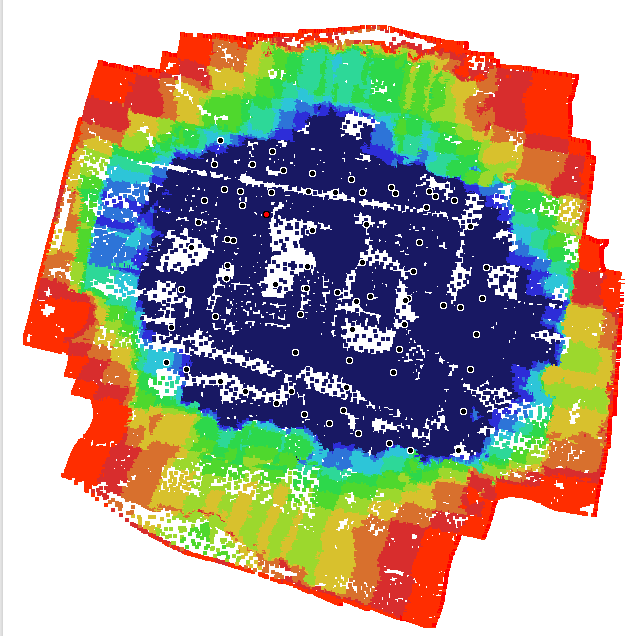
My question is this, the white sections in the central area of my overlap report, are these points where I just didn't have enough data eg enough photos taken? 


Thanks!


Edd Lane

Comentario oficial

Avatar

Your overlap report is certainly a bit hard to read. It looks like there are passes in two directions but the triggering is pretty bad. The white areas are just places that the model is flat so do worry about those (there is just no data point in the model there because there are no features). 

The dark blue is good. Everything in that area should have turned out well. 


Zane
Acciones de comentarios Permalink

Iniciar sesión para dejar un comentario.

5 comentarios

0
Avatar

Thank you.

When you say the triggering is bad do you mean the photos aren’t being taken at a uniform time apart? I’m taking the photos manually so that would explain that I guess. I flew the site again today so will see if more uniform photo taking helps.

Edd Lane 0 votos
Acciones de comentarios Permalink
0
Avatar

Not bad for manual! It is not the end of the world but uniform overlap keeps there from being too much or too little. 

Zane 0 votos
Acciones de comentarios Permalink
0
Avatar

Thank you! 

Just about to upload yesterdays shots so will see how that goes.

If DJI announce any SDK for the mini 2, or even a new one with it, will Mappilotpro add functionality for it? I'm aware they aren't the best drones for mapping purposes but the low weight class and UK regulations make them a real handy tool to have, I'm trying to do it manually as you can see but setting him loose on his own mission would be super helpful at some point. 


Thanks

Edd Lane 0 votos
Acciones de comentarios Permalink
0
Avatar

Map Pilot Pro will not likely support the Mini aircraft. There are other apps that do support it but we have chosen not to support it due to its wifi connection. 

Zane 0 votos
Acciones de comentarios Permalink