Publicación

2 seguidores Seguir
0
Avatar

Can't pick the area I want in a map

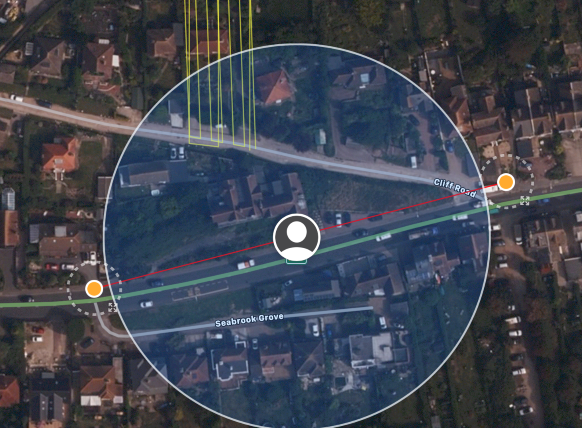
Using the latest version of the App on my ipad, I think there is a bug.

See the attached picture, To create a map, I can choose a point anywhere on the map but not within the shaded location circle area. If I tap within the circle area it just wont add a point.


Dave Strand

Comentario oficial

Avatar

We are aware of this issue. We haven't figured out how to get rid of the location marker. The blue circle should get smaller as your devices finds its GPS fix. If you are on a device that doesn't have GPS you can turn the location service off since it doesn't do much. 

You should still be able to drag into that area so just draw a marker somewhere else and drag it in. 

Hopefully we will have a fix for this issue at some point as Apple fixes things. 

Zane
Acciones de comentarios Permalink

Iniciar sesión para dejar un comentario.

3 comentarios

0
Avatar

Glad your aware of it Zane, quite right I can drag into the area. Thanks for your reply.

Dave Strand 0 votos
Acciones de comentarios Permalink
0
Avatar

Apparently the big blue circle will be fixed in 5.0.4.  

Zane 0 votos
Acciones de comentarios Permalink