Publicación

2 seguidores Seguir
0
Avatar

Mavic Pro photo regularity during the second consecutive flight

Hi Zane et al,

Lately I have been flying my DJI Mavic Pro with Map Pilot (Version 2.5.3 build 06212017) on an iPhone 6 S plus and an iPad Mini 4 both running iOS 10.3.2 and I always get the same result, the first flights is able to capture the vast majority of the pictures however in the second flight the amount of dropped pictures (unknown reason) is very significant. Please see the following screenshot 
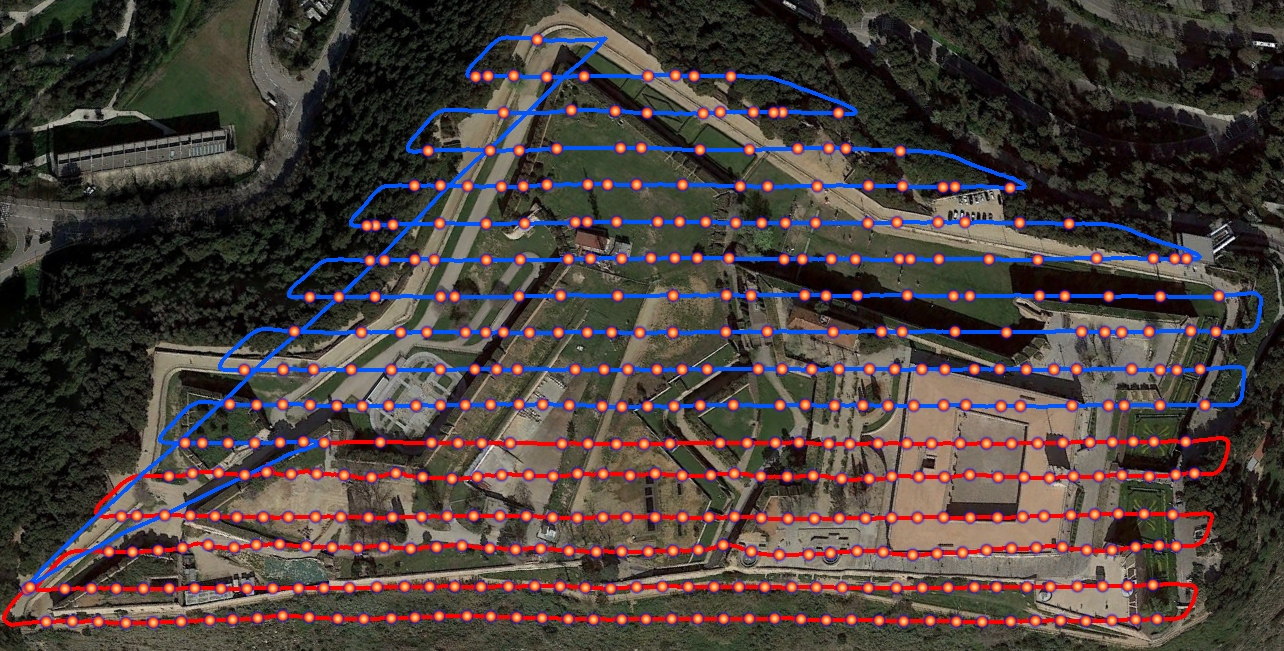
In red you can see the first flight (first battery) and in blue the second (second battery), it is obvious the large amount of gaps.

Any idea where this may be coming from, please note that this is not the only case where I have observed this same behaviour so this phenomena seems to be irrespective of the place (hence I suspect it has nothing to do with interference).

By plotting the CSV files from the two flights on can clearly see that the LatestUpdate (ms) field is far worse in the second flight although I can tell that, to the best of my knowledge, nothing changed between the two flights except the battery.
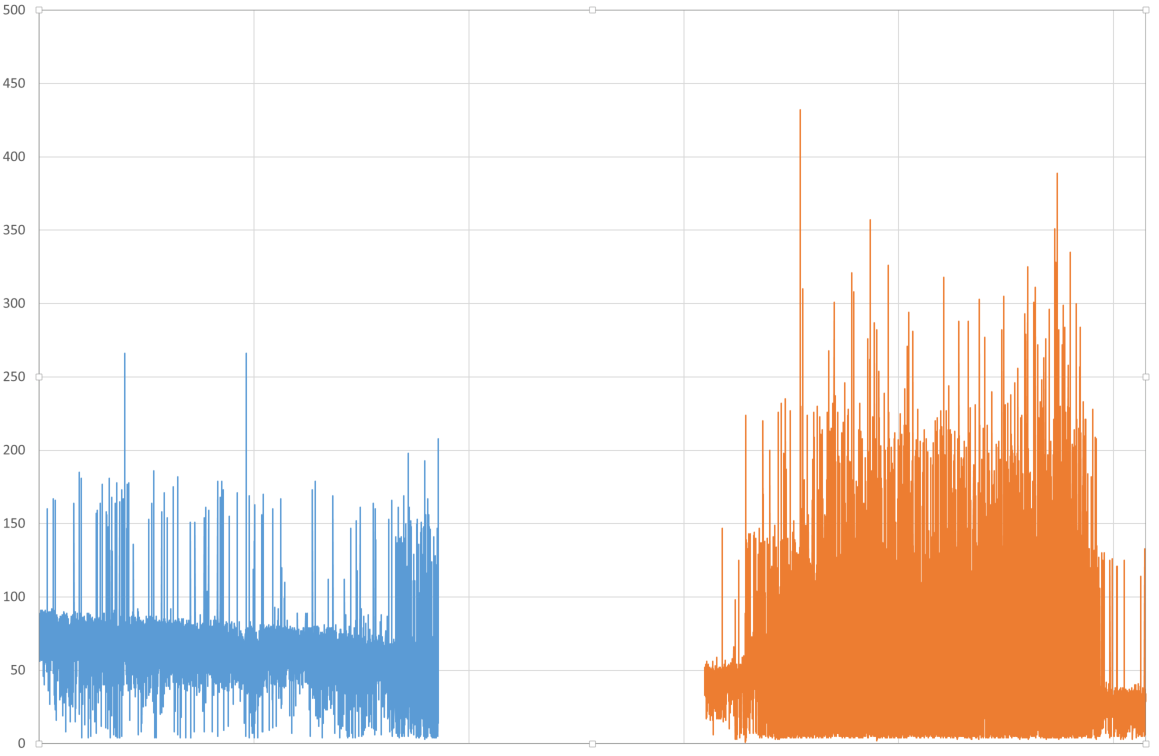
Further to my previous comment in the first CSV there are only 4 "App_Warning": "Photo Error: Error Domain=DJISDKCameraErrorDomain Code=-3002 "Camera is busy or the command is not supported in the camera's current state(code:-3002)" UserInfo={NSLocalizedDescription=Camera is busy or the command is not supported in the camera's current state(code:-3002)}" but the second CSV has 68 instances.

The MicroSD card I'm using at the Mavic is: "Micro SD SANDISK Extreme PLUS 32GB 95MB/s"

Mavic and remote controller firmware 01.03.0900

Shall I be using "Connectionless" instead of "active connect"?

Many Thanks

Isaac

Isaac H. E.

Comentario oficial

Avatar

That is certainly skipping a lot of images... Have you followed these instructions?

https://support.dronesmadeeasy.com/hc/en-us/articles/115002507683-Troubleshooting-Map-Pilot-Crashes-or-Slow-Operation

If that doesn't help you could try running things with Connectionless mode. If it doesn't work there then it may be a camera hardware issue since the issue isn't with the software triggering since it is still happening with the hardware trigger. We have seen 'slow' cameras. You could also try to use a lower SD card write speed which can be selected in the Map Pilot settings. 

You may want to benchmark your SD card too. We have seen A LOT of instances where the card does not perform as it should according to the labels. 

Zane
Acciones de comentarios Permalink

Iniciar sesión para dejar un comentario.

8 comentarios

0
Avatar

Hi Zane,

Regarding the SD card I think we will agree, taking the example I was talking about, that is very estrange to be able to capture 244 pictures in the first flight with 4 failures (2 %) before the battery change and in the second flight observe 68 failures in 220 pictures (31% failure rate), the SD card already has proven that it is able to cope with the picture data stream otherwise the first flight would have been plagued with the same issue. Further more I have seen the same behaviour with the 16Gb microSD card that came with the Mavic

What can be the cause of the radical difference between the blue part of the latency graph and the orange part?

Other than the battery there are only two variables I don't have under control, the drone temperature and the iPhone/iPad temperature... But I'm sceptical because it was a cloudy day.

In the next flight I will try Connectionless mode but if I'm not wrong this kind of negates the need of Map Pilot as there are many free apps that use the distance based camera triggering (starting by DJI Ground Station Pro)

Many thanks

Isaac

Isaac H. E. 0 votos
Acciones de comentarios Permalink
0
Avatar

When your aircraft headed home from the first flight, were the majority of the image location dots removed? 2.5.3 should remove all image location dots that are older than 30 seconds when it heads home. Failure to do this was causing some big lag issues on older devices. Please pay attention to if this was the case. 

As Map Pilot and the DJI SDK gets more and more functionality it requires a lot more processing to get the same stuff done. Older devices (A8 processors and earlier) can have a hard time keeping up which is why we have recently reoptimized things to work with legacy devices. 

Zane 0 votos
Acciones de comentarios Permalink
0
Avatar

Also, please send us any log files from affected flights so we can inspect them. 

Zane 0 votos
Acciones de comentarios Permalink
0
Avatar

Hi Zane,

Nope, the dots were not removed after the drone was sent home, during both flights I was able to see the whole shutter release map (dots).

Isaac

Isaac H. E. 0 votos
Acciones de comentarios Permalink
0
Avatar

How was your first flight ended? Battery, timeout or manual recall with RTH button? It SHOULD be clearing out the majority of the image dots which end up taking up a lot of the GPU's memory and slow things down.

Please send us your log file so we can verify a few things. 

Zane 0 votos
Acciones de comentarios Permalink
0
Avatar

Hi Zane,

Can you please provide an email or some other means of private communication, I would prefer not to post the CSVs and KMLs in the forum.

Thanks

Isaac

Isaac H. E. 0 votos
Acciones de comentarios Permalink