Post

8 followers Follow
0
Avatar

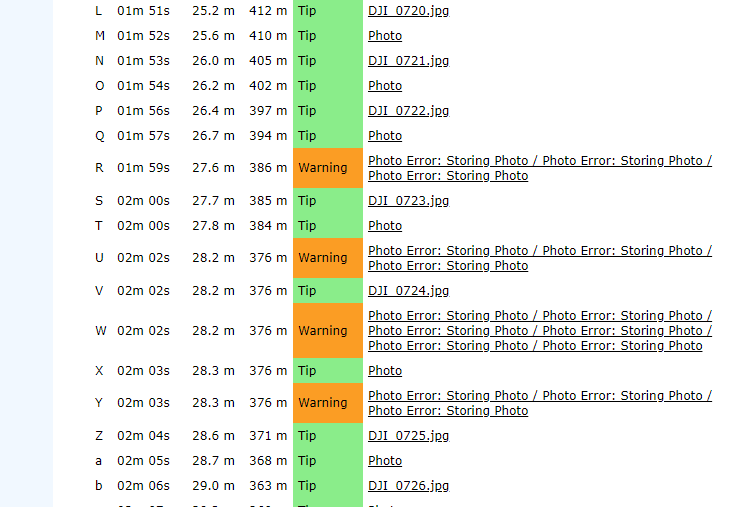
Photo Error: Storing Photo

Seem to be getting a few of these on every flight, is this normal?


Kim Gouldstone

Official comment

Avatar

These errors are caused by the SD card not being able to keep up with the imaging. This can be caused by the SD card write speed setting in Map Pilot being too fast, your SD card being full-ish, or the SD card just not being able to keep up. 

If there is one every now and then at the end of the passes it isn't an issue but large chunks of them like this are going to be a problem. Large groups of them are usually due to the SD card not being empty. You can look at the DJI Diagnostics column of the log file to see if there is any additional information. 

There are a TON of fake SD cards out there. We recommend benchmarking your cards to make sure they can handle a 10MB write every 2 seconds. 

You can see where these photo errors occur in our Flight Sync system. I can see it in your logs. 


Zane
Comment actions Permalink

Please sign in to leave a comment.

14 comments

0
Avatar

OK I have ordered some more Sandisk Extreme Pro cards from another source to try. My tests on the existing cards showed them achieving 80 MB/s serial write speed on my PC. 

These are speed class 3 cards but I have reduced the the speed class to 1 in the settings.

I am flying at 40 meters high, 80/80, so this is giving me a speed of 3.2m/s which is already quite slow.

Kim Gouldstone 0 votes
Comment actions Permalink
0
Avatar

The sad part is that even ones you order can be fake. We go through great lengths to get them straight from the manufacturer so we know they are real. 

We recommend formatting the card before every mission and testing things in the simulator first to make sure the card can keep up with your given settings. 

Zane 0 votes
Comment actions Permalink
0
Avatar

I'm late to this discussion, and just started getting this error this weekend with I2 and X5S, 12mm. The cards are the same that I've been using... Sandisk 64mb Extreme U3, V30, C10, 4K, A2... from Amazon Reputable verified Dealer. No questions it's not authentic. In addition, all Sandisk: Extreme, Extreme Plus, & Extreme Pro have the same 30 MB/s for continuous video or rapid stills. Rate. The differnt rates for single shot isn't quite so critical and a little deceiving rate for most applications.

Always format prior to a mission. Cards have been performing with no warnings for months. Temps this weekend lower in mid-20's F compared to previous sessions. I was pondering if temps were effecting the process and if needed to slow capture rate down from highest.

I used the M2P, same card... it flew the grid much slower and successful.

I was also wondering if a recent MME upgrade effected anything?
Thanks,
Doug

dougcjohn 0 votes
Comment actions Permalink
0
Avatar

Anything relating to the writing of images to the SD card is 100% internal to the camera. Map Pilot says "take a picture" and it does it as long as it isn't still writing out the last one which will return an error. This is why setting your SD Card Write Speed in the settings properly is super important.

One thing to take into account is that at this time of year there is a lot less light available so it might be taking the camera a bit more time to determine what exposure to use. Manual exposures settings will always the fastest. Auto is the slowest. 

I doubt temperature has much to do with the SD card itself but it could potentially be affecting how quickly the sensor takes the image after being triggered.

Only trust SD cards that you personally have benchmarked to meet their specs. Formatting before collecting a data set is always a good idea. 

Zane 0 votes
Comment actions Permalink
0
Avatar

I have the same problem. 

Why the Map Pilot app is taking three photos at once? 

On the photos counter, it seems like the drones should be taking three photos at once and it is not able to do that. The number of photos taken has number like this: 228, 231, 235, 238...

When I check the location of photos taken during this period, there are a bunch of photos taken unnecessary while the drone is having problems with keeping up with the higher number of photos it should take. 

It is not the problem of the card but the problem is that the Map Pilot is giving false orders (take three photos at once) to the drone. 

Any help?

Diminic Dino 0 votes
Comment actions Permalink
0
Avatar

The app will attempt to take the images until one is taken so it might be trying, trying, succeeding. Trying, trying, succeeding. This too means your card is either too slow or your setting is too fast. 


Zane 0 votes
Comment actions Permalink
0
Avatar

I'm a mac user and am wondering if reformatting using utility app to ExFAT is the correct format? There are no options for changing speed.

Claudia Strijek 0 votes
Comment actions Permalink
0
Avatar

Fat or ExFat doesn't seem to make a difference in dji drones.  Format the card in the drone using DJI Go4.

The speed settings Zane is referring to is in Map Pilot > Settings.  Try the next slower setting to see if it helps.

Dave Pitman 0 votes
Comment actions Permalink
0
Avatar

Tried loads of new cards now and benchmarked then all as being fast enough on my pc. I am just getting used to reflying missions from time to time. I suspect there is an issue with the way map pilot is communicating with the camera when an image is slightly delayed, which is overwhelming it. If it keeps firing take photo requests then the camera will just stall. I have seen the error reported yet still have photos 1 second apart?

Kim Gouldstone 0 votes
Comment actions Permalink
0
Avatar

We recommend doing the formatting on the drone and doing the benchmarking on the camera you intend on using. It doesn't matter if your computer or the packaging says the card is fast. Some cards work with some devices better than others. If using the DJI Go app intervalometer doesn't work with a card it isn't going to work in Map Pilot.


Zane 0 votes
Comment actions Permalink
0
Avatar

If the problem is in the cards, shouldn't the problem persist? Should we get errors constantly?

I had situations with Photo error only on one battery (mission consisted of 5 battery changes) and not with the whole set of photos from that battery but only on one passage. When the drone reached the end of the line, it turned 180 degrees for the next passage and from that point on the problem disappeared...


Thanks

Diminic Dino 0 votes
Comment actions Permalink
0
Avatar

If it is only occurring while going in one direction it could be that the aircraft has a tail wind in one direction and the ground speed of the aircraft is now faster than what is programmed. Tail winds can cause the aircraft to fly 1-2 m/s faster and a head wind can cause it to fly 1-2 m/s slower. This difference is enough to cause imaging issues. This is why we always recommend flying perpendicular to the wind or flying during calm periods when possible. 

Zane 0 votes
Comment actions Permalink
0
Avatar

The erratic photo with extra shots, had something similar... not consistent with every shot but quite often... dup or triples, and a few skiped between these multi-shot sections. I had a fast card: Sandisk 64mb Extreme U3, V30, C10, 4K, A2 and was within the range of the faster card setting within the photo taking option. As a test, selected a slower setting, which in turn slowed the mission speed and it appears to have corrected.

My conclusion was if the write speed - the whole process between image capture and writing to card was too fast, it caused problems. It may not be the card, it may be circuitry, temp, humidity, etc. If it's on auto focus an windy day, is lens hunting a few nano-seconds too long. 

The M2P was flying the same mission a lot slower... so I slowed the I2 down, reduced the speed of the card write option and formatted in the DJIGO App.  The I2 still went faster than the M2P, but a lot slower than the program would permit. 

Note on Mac OSx and formatting DJI SD Cards. I've experienced some real odd behaviors at times when I've formatted on Mac OSx. Not sure if the Mac's hidden files cause issues or if the format isn't as expected. Using the Go4App avoids those issues. 


dougcjohn 0 votes
Comment actions Permalink