Post

2 followers Follow
0
Avatar

Phnatom 4 RTK

Hi,

I use Phantom 4 RTK multispectral. Within DJI GS app there is an option to connect to a network of reference stations so all corrections are sent directly to the app. This is very useful cause I don't need a ground station and all images are in the correct position. The problem with DJI GS is that it does not support the terrain profile what Map Pilot does. Is there a way to have RTK network connection within Map Pilot Pro?

best regards

Michal

Michał Brr

Official comment

Avatar

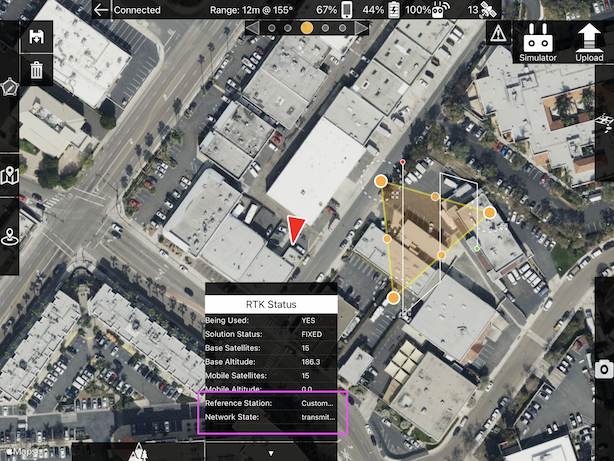
It is possible to connect to an NTRIP network in Map Pilot Pro if that is what you are talking about. It is handled in the RTK panel that shows up when you connect to the proper hardware.

Zane
Comment actions Permalink

Please sign in to leave a comment.

6 comments

0
Avatar

Yes. This is exactly what I meant. Is there any manual on how the RTK panel in Map Pilot works?

Michał Brr 0 votes
Comment actions Permalink
0
Avatar

It shows all the same telemetry that the DJI app shows and has a spot for you to enter your NTRIP address. We will look at making a document for it but it is pretty self explanatory if you are familiar with the DJI settings. 

Zane 0 votes
Comment actions Permalink
0
Avatar

I simply wanted to know where it is located in Map Pilot Pro. I cannot find it in the settings or main menu. There is no need to explain details. 

Michał Brr 0 votes
Comment actions Permalink
0
Avatar

The panel pops up at the bottom when the proper hardware is detected. 

Zane 0 votes
Comment actions Permalink