

It is really important to follow the Data Collection guidelines in order to get repeatable results. If you don't follow them you can have a map work out one time and not the next.
From the Data Collection guidelines:
- Never Fly Backwards or Sideways - Collect all of your data while traveling forward. Most aerial cameras have rolling shutters and mixing forward and backward flight ruins the chances of the job turning out well.
- Collect Images at a Consistent Speed - Images for a set should all be collected while traveling as close to the same speed as possible. With a rolling shutter, images taken at differing speeds will have different geometries and harm the accuracy of the final product.
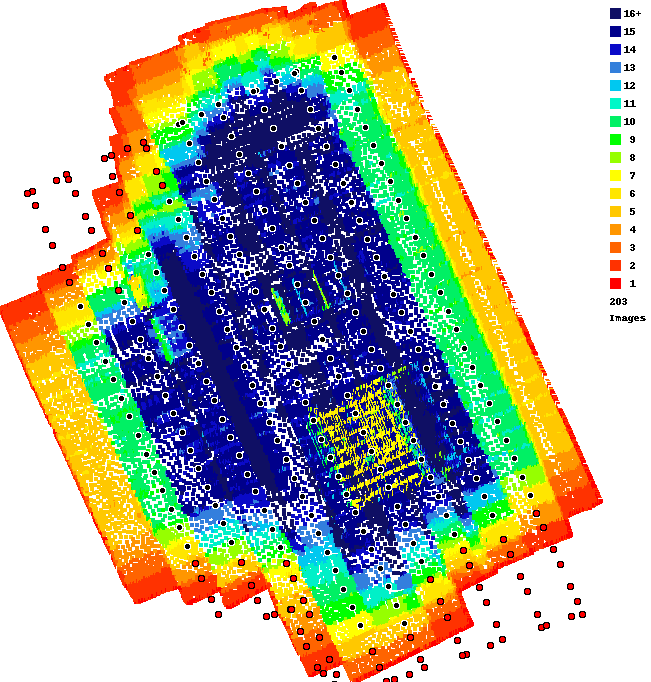
The overlap here is not great. The edges will always have slightly less overlap. We always recommend using at least 80% overlap for anything that matters. Doing this will give better overlap along the edges and provide the system with at least 25 looks at everything.
Your Overlap Report shows that images were taken in the corners WHILE turning. This is not going to help anything.
The good news is you might be able to save this dataset by selecting your images in the uploader and then clicking on all of the images in the end passes. Then remove them from the upload file list. This will leave you with just the pass data which should give better results.
We HIGHLY recommend using Map Pilot Pro to keep these issues from happening.
The end areas that look a little weird were filled in with the Flat Map Failover which uses the image pointing information instead of matching features. For timber and more featureless areas it works out well but in the case it obviously isn't ideal.


