Post

2 followers Follow
0
Avatar

Believe my recent issues are related to iPad - drone halts in the air randomly

I recently posted several issues I was having on a bad day flying a mission. After yesterday's attempts I am narrowing the issue down the iPad App / iPad / iOS version - something to do with the device running MPP not the drone (P4A).

Yesterday after another failed attempt at the mission with the drone ascending to altitude only a few seconds on its way to the start point the drone stopped and that was it, it just hovered. I had to land it. After landing i swapped devices to my Andorid phone and to my suprise, the mission flew successfully. Twice in the same day in fact. 

I have been flying this mission for 4 weekends now. 
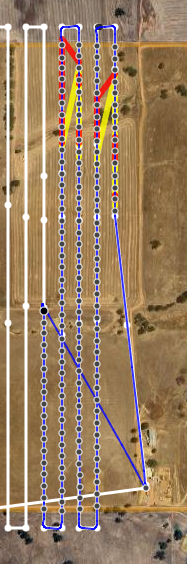
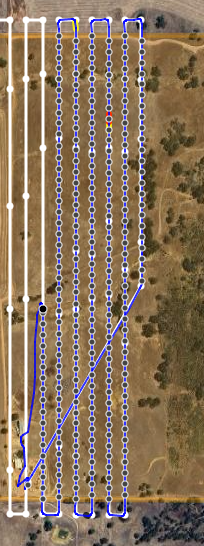
June 9th - Flight 3 - Drone halts in air mid mission.

June 25th - Flight 2 & Flight 3 - Drone halts in air mid mission.

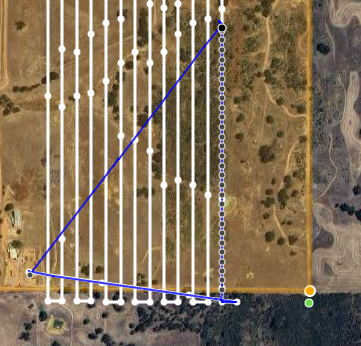
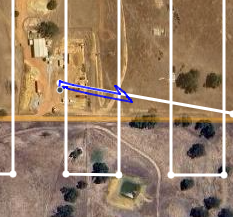
July 1st - Flight 1 - Drone halts flying to start point (Possiby strong gale reason but should it stop?)

July 8th - Flight 2 - Drone halts in air mid mission.

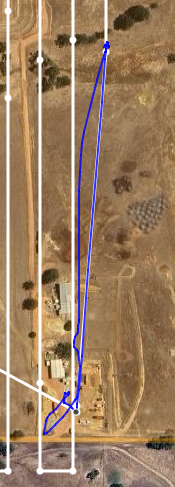
July 8th - Flight 3 - Drone halts flying to abandonment point.

July 8th - Flight 4 - Drone halts flying to abandonment point.

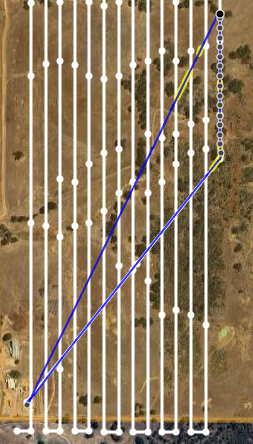
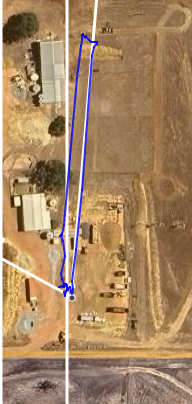
July 9th - Flight 1 - Drone halts flying to start point

At this point, i swapped devices from iPad mini to my andorid phone. I was able to fly the 3 battery mission with no issues twice in one day. 

The iPad flight logs plagued with these errors every time i fly with it;
dji_check_fc_takeoff_failed_unknown_error
dji_check_fc_gps_reason

My Andorid phone only reported these 2 errors the whole 3 batteries mission which I flew twice in one day. It was windy.
aircraft is tilted - please keep the aircraft stationery and level before flight
strong wind. fly with caution.
 
And most importantly the drone did not randomly stop mid-flight which completely ruins the mission. 
Why am I having so many problems with the iPad? I have already removed and re-installed the application. 


Glenn Stampalia

Official comment

Avatar

Those all like like a few different reasons. Some of it is just RC connection which could be caused by not pointing the remote at the aircraft to maintain the connection. If the connection isn't strong all sorts of stuff is going to go wrong. 

You had a LOT of aircraft errors being thrown. Most of the are hardware errors about the GPS, which is bad, and would explain the flight dropping out. If the GPS signal goes away it will kick itself out of the automated waypoint flight mode. 

There were also a bunch of warnings about high winds and stuff like that which will also kick you out of the automated flight. 

Please familiarize yourself with using the Aircraft Errors panel. 

https://support.dronesmadeeasy.com/hc/en-us/articles/360060753611-Aircraft-Errors


To find the specific causes of any issues you can always inspect your CSV log files by looking at the 'DJI Diagnostic' column and the 'App Warning' column of the log file. You can get the CSV files from the File Manager in the Map Pilot Pro app or download them from Maps Made Easy once they are synced. 

Zane
Comment actions Permalink

Please sign in to leave a comment.

5 comments

0
Avatar

The RC connection was optimal and the controller always pointed at the drone.
The idea behind posting this is I had completely different results between iOS and Android.
Everytime I flew the mission with iOS received those gps errors. Flying the same mission with android, not a single GPS error, just a high wind warning which was expected as it was windy..

Glenn Stampalia 0 votes
Comment actions Permalink
0
Avatar

There are differences between how errors are reported in the iOS and Android SDKs. The raw errors get written to the CSV files if you want to take a look at then. These errors will also show in the Aircraft Errors panel. 

The RC signal plots show that there was a very limited signal strength. Please read your manual to make sure you have the antenna oriented properly to maximize the signal. The signal strength indicator will help you track the motion of the aircraft. Make sure the view of the aircraft is unobstructed. 


Zane 0 votes
Comment actions Permalink
0
Avatar

I can only see 2 examples above where RC signal "May" have contributed. The rest of the flights had fine RC signal, yet still the drone stopped mid mission. 

Even if the iOS and Android SDK's report errors differently the messages are completely different. Android logs mention nothing to do with GPS. yet the iOS logs are flooded with them ...... 
Unless iOS = dji_check_fc_gps_reason and Android = aircraft is tilted - please keep the aircraft stationery and level before flight ....

could not find any information on that though. 

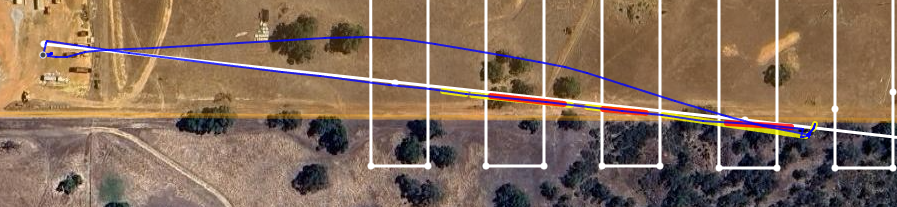
Checked the logs. At the abandonment point the RC signal was 100%. However had a dji_check_fc_compass_abnormal_reason which may be the reason ? ..... 

As a side note found this when looking up the error - is there any reason the iOS app does not parse the user friendly strings for these errors?
https://github.com/dji-sdk/OnboardSDK-Ping-iOSApp/blob/master/DJISDK.framework/DJISDKResources.bundle/en.lproj/Localizable.strings

It appears the android app does parse the user friendly strings. 

Glenn Stampalia 0 votes
Comment actions Permalink
0
Avatar

We can't go through all of your flights and try to match them to the images. Please provide the links if you want us to look at each individual flight. Having it in separate threads would help with managing the conversation for each one. 

The contents of the 'DJI Diagnostic' column come directly from the DJI SDK. We don't touch it. Every entry just gets packed into the current log file entry. Compass and GPS issues are the most common cause for the automated flight mode to be exited. This is something that is handed by the aircraft and is not commanded by Map Pilot Pro.  

The strings are pretty easy to understand as compared to their 'translations' and we try to keep things the same for iOS and Android.  

Zane 0 votes
Comment actions Permalink