
Offizieller Kommentar

Sorry for the issues. We are glad to hear of your prior success.
If you did not have enough points to process the images then it will not let you past that step in the workflow. At the time of upload it tells you how many 12 megapixel images you have enough points for. Maybe it is time for us to change that to 20 MP images since that is what most people are using now...
This is where it says how many images you have enough points for: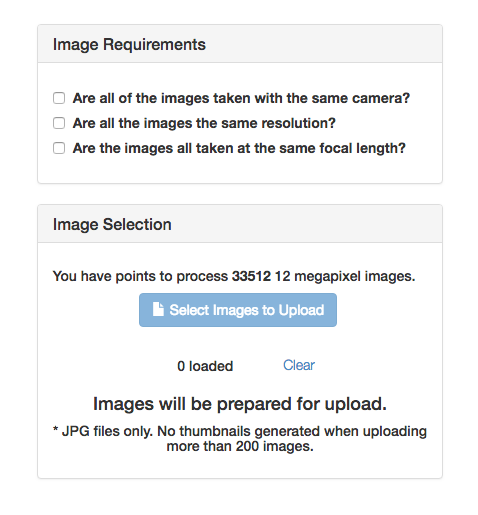
This is a screenshot of the window where the point total is calculated:
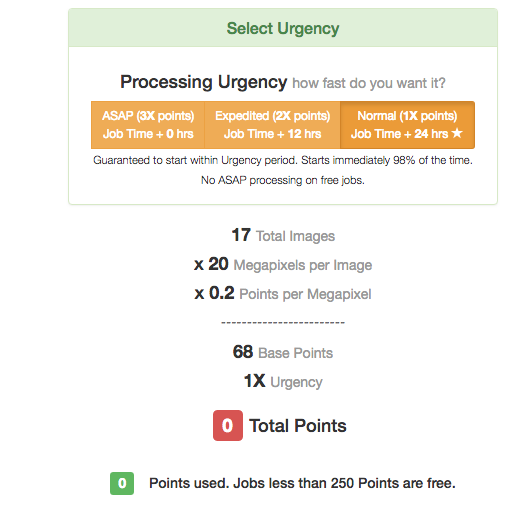 The formula is Number of Images times the megapixels in each image divided by 5.
For your example it would be 513 x 20 / 5 = 2052
Your previous total was 889 so more points were needed.
When you are uploading, whether you have over 200 images or not, you get a block with the image file names and a progress bar. It should be very evident that progress is being made. If it is not, it is safe to cancel out and start over. No points are charged until all images have been uploaded.
If you are trying to process more than 200 images you need to reselect all the images a second time as the warning says. This will be fixed in the future and we will no longer be showing the thumbnails at all.


