Post

4 Follower Folgen
0
Avatar

M3E - RC Pro - Map Pilot

Hi Zane,

I just got a M3E.  I've installed MPP and it is up and running.

I did a quick test flight with both Pilot 2 and MPP using the same settings as much as possible. 

With MPP, I tried tapping on the camera view to focus when the craft had reached mission height, as is my habit. But, rather than pull focus, as it does with other craft, the camera view simply closes.  I could not find the combination to make it go to full screen in order to try that way.  Is this possible?

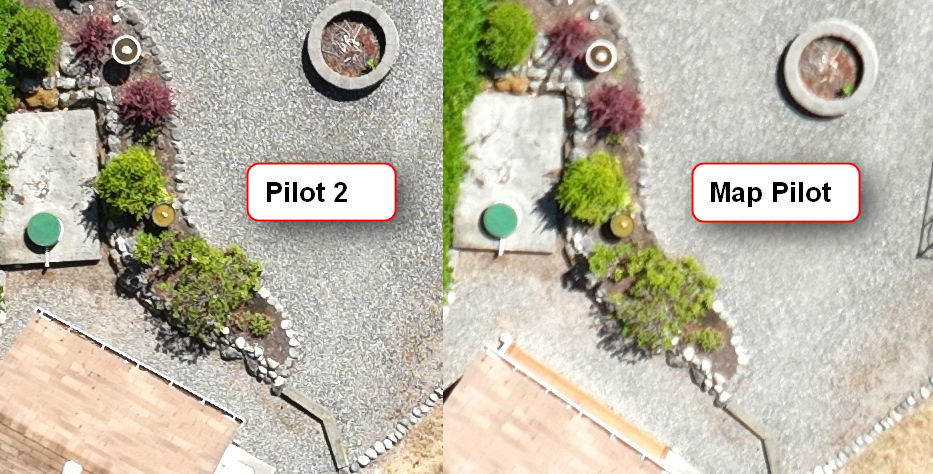
Comparing the images for both flights, the images from MMP are out of focus.  I know it's not blur because I have anti blur set to 1X GSD and the craft was indeed flying slower than it did using P2.  So, I need to get to the bottom of this somehow.  Looking for some guidance.

Thank you!

Dave Pitman

Bitte melden Sie sich an, um einen Kommentar zu hinterlassen.

18 Kommentare

0
Avatar

Is this happening all the time or just this once? It could be that the spot the autofocus was pulled wasn't contrasty enough and it just provided a bad solution. It is really important that it isn't moving at all when the autofocus is pulled because that messes up the successive contrast calculation. Try to pay to attention to that if you can. 

It won't do the focus pull when you tap unless the Aircraft is dead stopped. That might be the issue too. 

Otherwise, sync the mission to your MME account so we can take a look at what is happening when. 

Zane 0 Stimmen
Aktionen für Kommentare Permalink
0
Avatar

From the Camera and Gimbal controls article:

https://support.dronesmadeeasy.com/hc/en-us/articles/4401958968468-Camera-and-Gimbal-Controls

  1. Auto Focus - At the top of the climb to the flight height an autofocus solution is pulled after the aircraft settles using the standard on-camera DJI autofocus using the center of the camera preview area. This process is done for every flight. This is the default setting. If there is motion occurring in the area the autofocus solution is pulled from it can cause out of focus images. If you are ever questioning your focal quality you can stop the flight and double tap on a contrasty spot in the camera preview screen to force the auto focus to pull another solution. 
Zane 0 Stimmen
Aktionen für Kommentare Permalink
0
Avatar

This was the first test.  I will try again and if I still have issues, I'll sync the flight log.

With the RC Pro, is there any way to make the camera view full screen?  'Cus, when I tap on the camera view thumbnail in the right corner, it just closes to the right. I'm not sure how the app would distinguish between me wanting to focus rather than closing the thumbnail.

Thanks!

Dave Pitman 0 Stimmen
Aktionen für Kommentare Permalink
0
Avatar

We did not have that feature in the Android version yet. It is in the iOS version only at this point. We will work to get it into Android in one of them extra leases.

Zane 0 Stimmen
Aktionen für Kommentare Permalink
0
Avatar

I installed 161e to check out the focus gesture and ran into a new issue.  The RTK dialog does not initially show.  I can get it to show by opening Pilot 2 and checking the RTK status and go back to Map Pilot and the dialog is now there.  But the camera dialog disappears.

Didn't get to test camera focus.

Steps:

  1. Open Pilot 2 and set up RTK
  2. Close Pilot 2
  3. Open Map Pilot and select mission.
  4. M3E recognized, but no RTK dialog.
  5. Open Pilot 2 and view RTK dialog.
  6. Open Map Pilot and RTK dialog is now there, but camera dialog is gone.
Dave Pitman 0 Stimmen
Aktionen für Kommentare Permalink
0
Avatar

The RTK stuff might have gotten overlooked here. We are working in that area right now and will try to fix this in the next release if we can reproduce it. 

Tudor 0 Stimmen
Aktionen für Kommentare Permalink
0
Avatar

Just ran a small mission, and still no camera view was available, although the outline of the dialog was visible, weird. (see screenshot).

Only one image was captured for the mission, and it was at ground level. Looking at the image exif, it says Float (RTKFLAG - 34 ) even though it said FIXED in the app during the mission.

So, a few things going on here. Unless it's just me.


Dave Pitman 0 Stimmen
Aktionen für Kommentare Permalink
0
Avatar
  1. What is your AC firmware?
  2. What is your Remote firmware?
  3. When you say "still no camera view was available", have you ever been able to get a camera feed in map pilot pro 1.6.1?
  4. The RTK panel not appearing consistently is a bug and will be fixed in the next release here very shortly. However, are you leaving DJI Pilot 2 on in the background (to overcome this currently deployed bug, per your previous comment)?
  5. The images not being taken during surveying is an issue and will be looked at. 
  6. The RTK solution mismatch between Map Pilot and Exif Data is concerning. What type of RTK are you using (mobile station or NTRIP)?
  7. What RTK solution in the exif data do you expect to see?, so that I can try and recreate it.
Kevin 0 Stimmen
Aktionen für Kommentare Permalink
0
Avatar

1. Aircraft Firmware: v07.01.10.03

2. Remote Controller Firmware: v02.01.00.03

3. No.  I got a camera view in 1.5.5e

4. No.  I have to go back and open Pilot 2 and then come back to Map Pilot and it usually is then showing.  Note, I also have the setting selected for Map Pilot to be able to close any other apps.

6. I use NTRIP. 

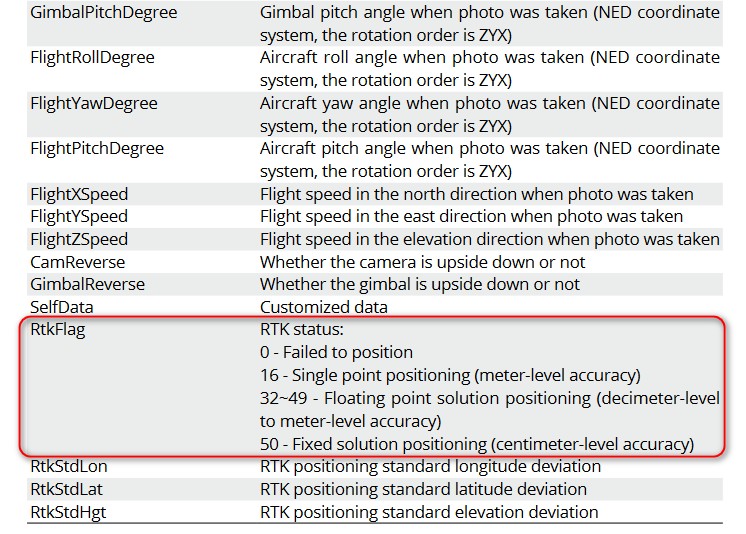
7. The user manual (about page 87)  lists the exif parameters and the optional values.  If the image was captured with RTK precision, the exif parameter "RTKFlag" will have a value of "50".   I did a Pilot 2 mission (the same mission plan) just prior to using Map Pilot, and the image's exif from that mission report a value of "50".  


Dave Pitman 0 Stimmen
Aktionen für Kommentare Permalink
0
Avatar

On #3 I recall that while sitting on the ground, the camera view was working.  I think it is when I opened Pilot 2 in order to get the RTK dialog to show up that when I went back to Map Pilot, the camera view was the empty frame.  Maybe this distinction is helpful.


Dave Pitman 0 Stimmen
Aktionen für Kommentare Permalink
0
Avatar

Can you please confirm that the video feed works in Map Pilot Pro 1.6.1e with DJI Pilot 2 closed out of the multi tasking background.

Kevin 0 Stimmen
Aktionen für Kommentare Permalink
0
Avatar

Dave: Where did you get that table that explained the RTK stuff? We would like to be able to direct people there in the future.

Tudor 0 Stimmen
Aktionen für Kommentare Permalink
0
Avatar

Using 162e, everything looked good except that the mission would not start.  Uploaded fine, would not take off and subsequently, the Take Off icon went gray.  The props never spun up.  

The camera view went full screen for the first time, and I was able to pull focus!  I fumbled a bit to get out of full screen because the arrow was not that noticeable to me on the controller.  After I noticed it, it was no problem.

Dave Pitman 0 Stimmen
Aktionen für Kommentare Permalink
0
Avatar

Thanks for the screen recording. Here is what I would recommend:

  1. Are the props able to be started in DJI Pilot 2 prior to exiting and entering Map Pilot Po? (DJI Pilot says everything is "normal" in the camera view, so I'm assuming you are not in any Fly Zones)
  2. In Map Pilot Pro, in the RTK Panel, notice the "Network State" is "Disabled". I would recommend "Starting" NTRIP by entering the custom network settings (via the "custom network settings >" button) and hitting "Start". This will start NTRIP within Map Pilot Pro.
  3. In your specific case (I mimicked your set up as closely as possible, albeit with my own custom network, and couldn't get a motor stall on take off), I would power cycle and try again.
  4. Finally, I would power cycle, disable RTK within DJI Pilot 2 ("RTK Positioning" toggle), and fly a non-RTK mission to establish that 1.6.2e works with our mavic 3 and takes survey images. And then work RTK back into the equation.
Kevin 0 Stimmen
Aktionen für Kommentare Permalink
0
Avatar

Kevin,

After setting up the NTRIP credentials in Map Pilot, everything progressed mostly smoothly.

I ran the mission and all went well.  I was able to pause, focus and resume.  All images were recorded, and they all show as having a FIX solution.  I ran the mission a second time, and the second time, things went the same except that, after the first image, the RTK status dropped to Single as per the image exif.  I did not have the RTK dialog open during the flight.  I checked it before hand and then closed it and started the mission. For this type of work, there needs to be an instant message if FIX status is lost.

Also of note, the images were still not recorded as in focus as the earlier test using Pilot 2 taking off from the same spot.  So, I will play with that a little more to see if I can resolve it or not.

Thanks for the attention to this!

I would also note that there seems to be a bug in the latest DJI firmware where if you pause the mission with the RC pause button, there is no way to resume.  The mission must be ended and started again.  I tried the RC Pause button with Map Pilot on one of the missions and had the same problem.  Using the software pause button in the app worked as expected.

Dave Pitman 0 Stimmen
Aktionen für Kommentare Permalink