Bài đăng

2 người theo dõi Theo dõi
0
Avatar

Images not being stitched even with large overlap

I'm new to Maps made easy, I've had one successful attempt and two poor attempts. I'm capturing the images with DJI GS that overlap by 70% in both directions so I cant see why I'm having huge gaps in the result? Has anyone had any similar experiences and what was the answer?

Malcolm Hitch

Vui lòng đăng nhập để lại bình luận.

5 bình luận

0
Avatar

As noted in the Data Collection guidelines that are agreed to at the time of upload, we generally recommend using at least 75% overlap to get good results. 

The gaps you are seeing are either related to the terrain you are mapping being higher than the takeoff point at which the overlap pattern was likely generated for or you could have your camera parameters in there wrong or something. Check your focal length setting.

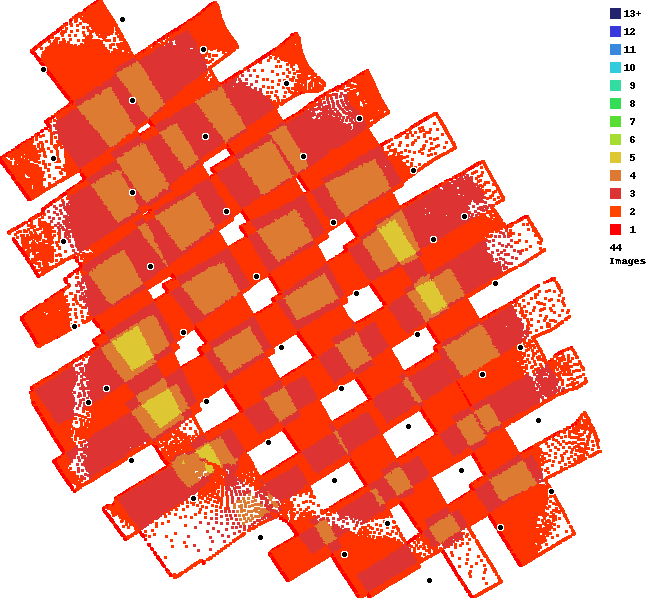
The bottom line is that your overlap isn't nearly enough. It looks like 40-ish%. 
 

Zane 0 bình chọn
Thao tác bình luận Đường dẫn cố định
0
Avatar

Thanks for the reply. I think that the problem lies with DJI GS Pro, if I select the X3 camera it wants to take about 90 pics of my test field whereas if I select the X5 camera which has a narrower field of view, it only wants to take 45 pics which is clearly wrong! I'm going to try Dronedeploy and Pix4D again although I've had issues in the past with both of these platforms. I can't use the Maps Made Easy app as it crashes everytime I input the X5 camera into the settings!!

Malcolm Hitch 0 bình chọn
Thao tác bình luận Đường dẫn cố định
0
Avatar

When you say it crashes every time you put in the X5 settings what do you mean? In the Settings panel on or in the Options Menu to set the mode of the camera? Some more detail would be great so we can try to fix it. 

What version is this on? 

Does it happen with a fresh installation?

Zane 0 bình chọn
Thao tác bình luận Đường dẫn cố định
0
Avatar

It crashes from the start up dashboard having selected 'Settings' and then selected my camera? I have reinstalled the app twice now and this still happens. I would like to see the lite version work first before upgrading to a paid version.

As a matter of interest it only crashes on selecting the following cameras, X5, X5S and X7, all the other cameras take me onto the next step. I hope this helps.

I have retried Dronedeploy which was unsuccessful and Pix4D which was half successful. With the latter the focusing of the camera is unreliable, crisp one run and then slightly off the next run!

Malcolm Hitch 0 bình chọn
Thao tác bình luận Đường dẫn cố định
0
Avatar

This is a pretty basic thing that we are unable to reproduce on multiple devices on the 4 most recent versions of the app. 

What version is this on? 

Zane 0 bình chọn
Thao tác bình luận Đường dẫn cố định