Publicação

3 seguidores Seguir
0
Avatar

Converting RAW Images to JPG and JPEG - images rejected by MME..

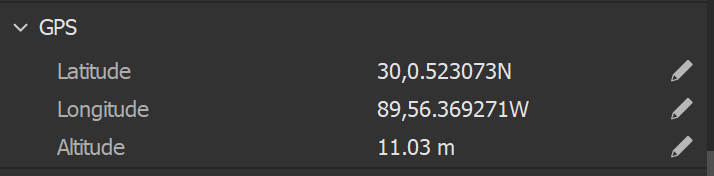
Flew a short stretch of road by hand using RAW images. **I was not connected to the internet.** I converted the image to JPEG using PhotoShop Image Processor - all on the SD card from the A/C. I DID NOT color-correct the image in any way or sharpened them – just a straight file-type conversion. I also converted to JPG - no help. The Geo References are still there in the new JPEG files (see image), but I continued to get the message below.

EXIF Tag Integrity Error

It appears that this image has been edited using image editing software that is known to overwrite the tags that were initially populated by the camera.

Please use images directly as they come from the SD card, without modification.

Any ideas to get MME to accept these images? Should I downsize them? Thanks in advance.

Old Scout

iniciar sessão para comentar.

4 comentários

0
Avatar

The size is not the issue. RAW images are not accepted by Maps Made Easy for processing. JPG only. 

Those coordinates need to be in decimal degrees. I am not sure what that format is. 

It is possible to use Photoshop to convert the images but it is notorious for mangling the tags. Email us one of the images so we can take a look at what you have so far. 

Zane 0 votos
Ações de comentário Permalink
0
Avatar

Hi, I have a similar situation. I shot a mission with MPP using my default camera settings, which saved the images as DJI raw files.

I understand that MME doesn't process raw files natively, so after I got them off the SD card, I converted them to JPG using DXO PL, which has an excellent DJI raw decoder. Now when I try and use these jpgs to create a map using DJI Workflow, I'm seeing the message "Compatible DJI Camera Data Only. This workflow is designed for relatively new DJI camera collected data only. Please choose a test file that was collected using a DJI camera."

I've dumped out all the EXIF tags from the original DNG and the converted JPG with exiftool and it seems all the important DJI tags are preset in the JPG, so not sure why MME isn't happy. Any further attempts to splice in original tags results in a new error: "Tags have been modified. This image's tags have been modified. Please use the original images directly off the SD card.".

Happy to attach exiftool dumps of the original DNG and converted JPG files for analysis, if anyone wants. The JPG does not look mangled in any way... Cheers!

Nico Gianniotis 0 votos
Ações de comentário Permalink
0
Avatar

Thanks Zane, I will try out  that site.

As a software engineer myself (and keen photographer) I am very experienced with exiftool. I wrote a spreadsheet that compares the differences between a native DJI DNG raw file, a native DJI JPG file, and a DNG file converted into JPG by DxO PL.

I've put a link to it on my Dropbox if anyone cares to look at it.

I found a few differences of course between all these files, but nothing which obviously stands out as the reason that MME rejects the converted JPG file... I did see in some files some embedded binary data, which suggests DJI have put something proprietary in there. If MME is looking for that, then converted files will definitely not have that included.

Of course, the easy solution is on my next mission to shoot JPG :-)

I will try that herokuapp.com site next...

Link to my exif tags analysis spreadsheet:https://www.dropbox.com/s/htlv6pw9ltblfho/pivot%20analysis.xlsx?dl=0 

https://www.dropbox.com/s/htlv6pw9ltblfho/pivot%20analysis.xlsx?dl=0

Nico Gianniotis 0 votos
Ações de comentário Permalink