Posting

2 pengikut Ikuti
0
Avatar

Linear flight not taking pictures on outside edges

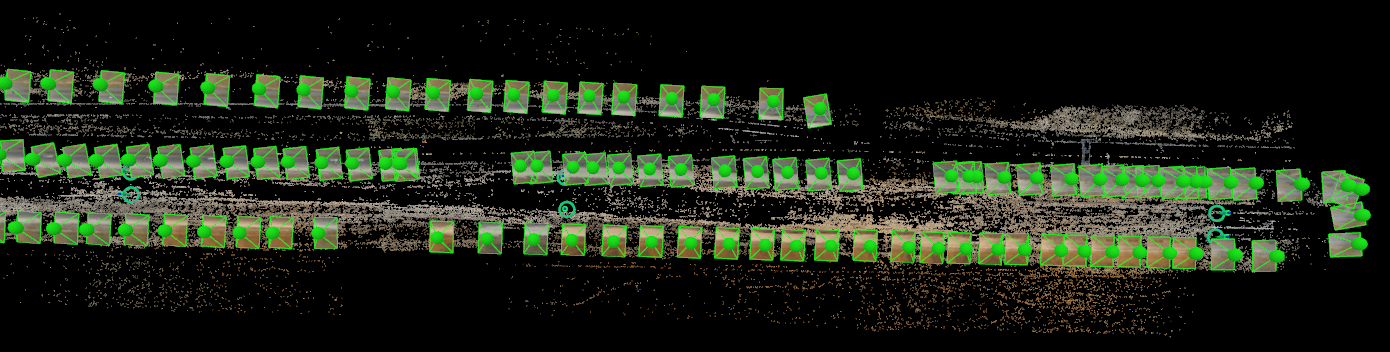
I was trying to linear flights yesterday. It was not taking picture on the outside two edges of a 3 line flight. I could do them manually though? It also started to say exiting programmed mode or something of the nature and the drone would eventually start going its on direction? 

Erik

Komentar resmi

Avatar

What do you mean by "do them manually"?

If it says "exiting programmed flight mode" that means you either hit the PSA/PAF switch out of the programmed flight mode or a hardware issue may have kicked the aircraft out of the programmed flight. If this happens images will not be taken.

When the programmed flight mode is exited the aircraft goes into ATTI mode and will drift with the wind until the pilot takes it over manually. 

Zane
Tindakan komentar Permalink

Harap masuk untuk memberikan komentar.

6 komentar

0
Avatar

What do you mean by "do them manually"? Default button on the controller to take pictures in in DJI App. On the single flight back it would do a bunch in a row, then skip as well. See attached.

If it says "exiting programmed flight mode" that means you either hit the PSA/PAF switch out of the programmed flight mode or a hardware issue may have kicked the aircraft out of the programmed flight. If this happens images will not be taken. 

When the programmed flight mode is exited the aircraft goes into ATTI mode and will drift with the wind until the pilot takes it over manually. 

It must be a hardware issue. I never pushed the button out of "F" mode. It did it right after I pushed start mission.


Erik 0 suara
Tindakan komentar Permalink
0
Avatar

That is something I have never heard of doing... The DJI Go app should be fully closed during any Map Pilot operation. Pushing the "take a picture" button is fine but it will cause too many images to be taken which is most likely what is happening with the starting and stopping that you are seeing. 

If the starting and stopping is happening without your intervention it is likely caused by your SD card either not being empty, being too slow, or your SD card write speed setting being too fast in the Map Pilot settings. Basically, the triggering is outpacing the camera's ability to write the files to the disk. 

Zane 0 suara
Tindakan komentar Permalink
0
Avatar

Linear flight is all done in connectionless mode so if you have things set too fast and the camera can't keep up this is what would happen.

You can try slowing the aircraft down, erasing your SD card fully or using a slower SD write setting in the Settings.

Zane 0 suara
Tindakan komentar Permalink
0
Avatar

That may be why it wasn't taking pictures on it. I clicked off of connectionless mode. I will test it out when I get back to work on Friday.

Erik 0 suara
Tindakan komentar Permalink
0
Avatar

You shouldn't be able to turn connectionless off... We will look into that.


Zane 0 suara
Tindakan komentar Permalink