Posting

2 pengikut Ikuti
0
Avatar

2 flights - repeated pics

I flew my first mission today and it repeated some of the pics after a battery swap. Any reason for this since it extended the overall mission time?

Danny Garcia

Harap masuk untuk memberikan komentar.

9 komentar

0
Avatar

That is a bit odd. It looks like an extra waypoint got inserted out there... There are some sync issues going on there. Were you manually triggering images when it took off or while it was on the ground?

The first flight looks fine. The second one had an extra waypoint which is not something that is supposed to happen. 

Was this a saved mission or freshly designed one?

Zane 0 suara
Tindakan komentar Permalink
0
Avatar

Also, did you mean to be using Terrain Awareness? Was there anything weird with that?


Zane 0 suara
Tindakan komentar Permalink
0
Avatar

To answer the questions...

I created the mission, downloaded, then launched it when I was there. 

I did not take any photos on the ground myself. I noticed there were three from my launch point - each flight there were three "ground" photos to be clear.

I was not aware what terrain awareness was - thought I did not use it.

Danny Garcia 0 suara
Tindakan komentar Permalink
0
Avatar

When you say you created the mission and downloaded it what do you mean? Did you create the mission at a different location? Did you save it and recall it? When you say you downloaded it do you mean you uploaded the mission to the aircraft? 

It definitely looks like a lot of images were taken at the takeoff location. Usually there is only 1 per takeoff and it looks like you had two or three. 

The mission did not fly with Terrain Awareness (account for changes in ground elevation) but the log file says it did so we are trying to figure out what went on here. 

If you uploaded the mission to the aircraft and them moved it that might be the source of the issue. 

Zane 0 suara
Tindakan komentar Permalink
0
Avatar

When you say you created the mission and downloaded it what do you mean? Did you create the mission at a different location? Did you save it and recall it? When you say you downloaded it do you mean you uploaded the mission to the aircraft? 

New to this so maybe my terms are off a bit. I created the mission when I was somewhere else. I did it on my phone and saved it. When I got to the take off point, I recalled it and uploaded it to the drone.

It definitely looks like a lot of images were taken at the takeoff location. Usually there is only 1 per takeoff and it looks like you had two or three. 

There were three, two look the same, the third a little different, but still at the take off point.

The mission did not fly with Terrain Awareness (account for changes in ground elevation) but the log file says it did so we are trying to figure out what went on here. 

OK, thanks. I didn't think I turned it on.

If you uploaded the mission to the aircraft and them moved it that might be the source of the issue. 

Before taking off, I did do one thing - I updated where I actually was rather than where I had guessed I was going to be. 

As a side note, the flat map didn't look great, so I uploaded all the files again to try the DJI workflow and see what comes of this. 

Danny Garcia 0 suara
Tindakan komentar Permalink
0
Avatar

Sorry for the runaround. We are just trying to figure out what happened here since something weird did happen. 

When you say you saved it and recalled it do you mean you did a layout and closed the app and reopened it or did you hit the Save button and load it from the Mission Plans screen?

The Flat Map system is for doing specific things that don't work for the normal photogrammetry processing. They also make it so you can get a result with as little as 10% overlap. For your first map you want to start with 80% overlap and use the normal processing. It looks like your next attempt worked out. 

Zane 0 suara
Tindakan komentar Permalink
0
Avatar

Sorry for the runaround. We are just trying to figure out what happened here since something weird did happen. 

No worries at all! I would rather give as much info as I can to help you figure this one out.

When you say you saved it and recalled it do you mean you did a layout and closed the app and reopened it or did you hit the Save button and load it from the Mission Plans screen?

If I remember correctly, I placed the approximate take off point, then drew the polygon, then saved it. I drove to the location and once there, I don't remember if I pulled it back up from mission plans or if it was still on the screen. I do remember having to adjust the take off point to where I was actually at before starting the mission. Hope this helps.

The Flat Map system is for doing specific things that don't work for the normal photogrammetry processing. They also make it so you can get a result with as little as 10% overlap. For your first map you want to start with 80% overlap and use the normal processing. It looks like your next attempt worked out. 

I did not change the overlap, so the 80% is there. I did not have time to sit and learn the system, just listened to a few YouTube videos and did what I could once I was on the way there. And, yes, the next attempt worked out fine! On my first upload of images, I did not upload ALL the files, I got rid of the "duplicate" ones that were taken on both flights. 

A couple of other observations:

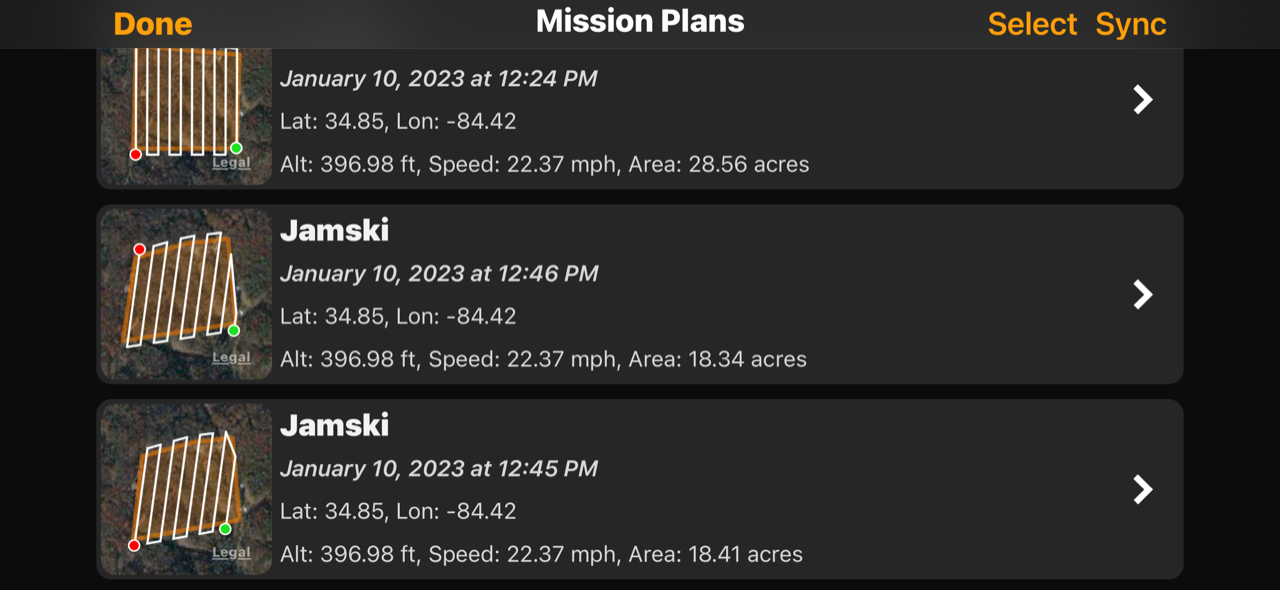
When I look at the Map Detail screen linked on the most recent map, it says this was 49.02 acres. However, when I look at the mission plans (3 of them all named the same, sorry), the acreage is much different. What is the correct number? I am including a screen capture of the phone showing the acreage here.

My settings have the Air 2S as the drone model, yet if we look at the Mission Plans they either say Mavic Pro or unknown.

Last observation - I set this to capture RAW, but noticed it captured both RAW and JPG files. I am glad it did since you guys apparently don't support RAW. Do you have something on the roadmap to support RAW?

Thanks!

Danny Garcia 0 suara
Tindakan komentar Permalink
0
Avatar

The acreage shown in Map Pilot Pro is for the survey area polygon. The acreage shown in Maps Made Easy is the area of the map that is created. It will usually be a bit larger since it includes area that is slightly outside the survey area polygon. 

The missions plans in your screenshot don't all look to be identical so they will have different areas. 

This is problematic: "My settings have the Air 2S as the drone model, yet if we look at the Mission Plans they either say Mavic Pro or unknown." Were you connected to the aircraft when you did the layout? Can you please email your saved missions to mapping@dronesmadeeasy.com? Just swipe left on the item in the Mission Plans screen and hit share. 

Map Pilot Pro allows you to collect RAW images but Maps Made Easy does not accept them. Maps Made Easy will never support RAW image processing. The tradeoff involved in flying slow enough to get them and the bandwidth involved just isn't worth the the minimum increase in quality.

Zane 0 suara
Tindakan komentar Permalink
0
Avatar

The acreage shown in Map Pilot Pro is for the survey area polygon. The acreage shown in Maps Made Easy is the area of the map that is created. It will usually be a bit larger since it includes area that is slightly outside the survey area polygon. 

Understood.

The missions plans in your screenshot don't all look to be identical so they will have different areas. 

Yes, I am aware of that, but was mostly concerned over the larger number difference.

This is problematic: "My settings have the Air 2S as the drone model, yet if we look at the Mission Plans they either say Mavic Pro or unknown." Were you connected to the aircraft when you did the layout? Can you please email your saved missions to mapping@dronesmadeeasy.com? Just swipe left on the item in the Mission Plans screen and hit share. 

Done. One of them may have come from a gmail - sorry.

Map Pilot Pro allows you to collect RAW images but Maps Made Easy does not accept them. Maps Made Easy will never support RAW image processing. The tradeoff involved in flying slow enough to get them and the bandwidth involved just isn't worth the the minimum increase in quality.

Fair enough.

Danny Garcia 0 suara
Tindakan komentar Permalink