पोस्ट

3 अनुसरणकर्ता अनुसरण करें
0
Avatar

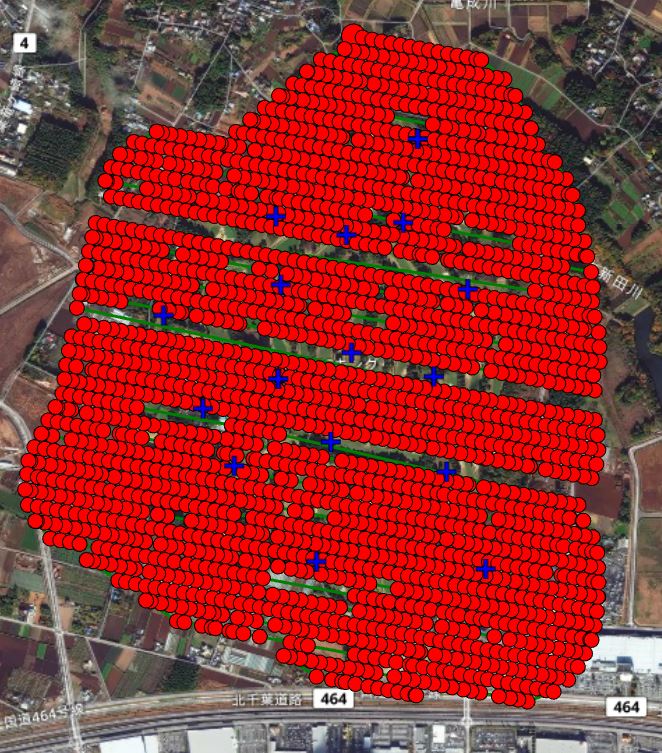
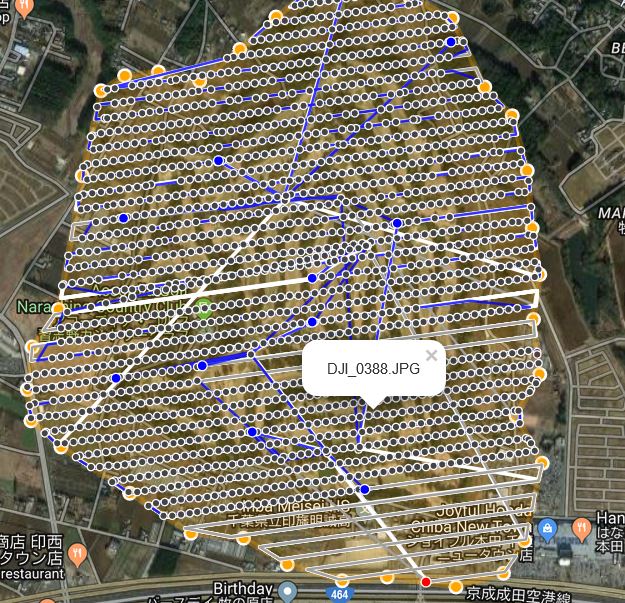
Multiple Missing Lines of images in 90 line mission

Hi, I Recently spent 3hrs mapping with no chance to verify data in the field. When verified, multiple "lines" of flight paths were either "JUMPED" and therefore complete lines missed, or..... Others flown but missed taking anything from 1-20 images in a row. I use a San disck U3 XZC1 V30micro SD Card

https://www.amazon.com/SanDisk-Extreme-microSDXC-Adapter-SDSQXNE-064G-GN6MA/dp/B013CP5IWO/ref=sr_1_3?keywords=sandisk+u3+v30+xc1+64gb&qid=1568430467&s=gateway&sr=8-3

Needless to say i had to refly the entire mission (an alternative to fly missing individual lines/sections of lines was tedious and in different conditions) but in the end used another flight app to guarantee capture.

Is there any reason for this? I prefer to use Map Pilot but have no way of doing so if I can't do the job. I have the paid business version. Please help!!!

P.S. Can I up my ISO settings (say up to 200 max, and fixed on that) to get better speed during a mission whilst not losing TOO MUCH image quality with a Phantom 4 Advanced?? Many missions seem to fly at 3-5mts/sec. on a 240 Hectare property this is impossible to get done. Thanks

Graeme

आधिकारिक टिप्पणी

Avatar

We can't see the flight in our Flight Sync system so we can only guess that you are likely having signal integrity issues. You can upload your log files to AirData to see if there were signal strength issues. 

If you are mapping in a location that is large or might present connectivity issues we recommend using Connectionless mode to allow the triggering to be handled by the aircraft and not the mobile device. 

A link to a card you bought on Amazon means nothing these days. We get counterfeit cards from there all the time from customers that got "Amazoned" (receiving counterfeit stuff that looks legit).

You can manually adjust ISO in manual mode or make bump adjustments to it using the right click wheel. 

For more detailed help in the future make sure you are logged in to Maps Made Easy with Map Pilot and have Flight Sync turned on so we can provide more detailed information. 
Zane
टिप्पणी क्रियाएं Permalink

कृपया टिप्पणी करने के लिए साइन इन करें करें.

6 टिप्पणियां

0
Avatar

Thanks for your reply and sorry for the delay replying.

I have checked Flight Logs (10) and all have been synced on the day, and are viewable on your platform on my Laptop when logged in. Can you access them? Can you analyse them? I'm not 100% sure how to verify radio signal strength or anything else to work out the issues I experienced. I am 99% sure I flew in Connectionless Mode, but may be wrong.

As I prefer your mission planner, and wish to use it (but can't if it misses images) any help to allow me the previous success i have had would be appreciate. BTW, is it true I can "UP" the ISO manually with my Controllers RIGHT Wheel to say 200 ISO, to help maximise my flight speed/shutter speed, whilst maintaining good clarity (Low Noise) in imagery? Is so, this is a great feature I wish i knew about before. It would really help.

Telemetry (Flight Sync) seems to be off in all, despite being ON, on app!!? How do I resolve?

Flight 5 was definitely in Connectionless Mode but missed multiple lines of imagery. Can you narrow it down, as to why?

P.S. Is there any COMPLETE feature video (Long I know) of Map Pilot available anywhere. Worth making if not, I would suggest.

Graeme 0 वोट
टिप्पणी क्रियाएं Permalink
0
Avatar

The only reason it would be missing images in Connectionless mode is if your SD card is not able to be written to as quickly as the "SD Write Speed" setting dictates. 

When the app is in Connectionless mode it may not get all of the image dots since those are reported over the RC link that may be bad. The images SHOULD be being taken properly as long as the camera is functioning properly with the SD card. This is only able to be determined when you start processing and check the tag data. You may need to do some more testing to make sure that your SD card is able to keep up with a given flight speed and overlap setting. 

Zane 0 वोट
टिप्पणी क्रियाएं Permalink
0
Avatar

Thanks Zane. It's a bit of a mystery. The same SD Card was used the following day with another Mission app. All flight specs (altitude, overlap, direction) were the same and the Drone flew faster. On that mission, no images were missed (incomplete flight lines when battery was low and RTH resulted, were reflown from the start with the new battery!!) I'm sure you know which app that was!!P4D wouldn't load (too large), and GSPro had failed the day before that (missed images too). I was happy to have double ups rather than large missing segments, even if extra batteries were burned. MapPilot is fantastic; I have had wonderful experiences in the past. But with a lost day, this tainted my experience and trust. I wish I knew the anser to avoid issues in future. BTW, can the right wheel on the controller be used to manually UP the ISO (100-200 for example) to allow flight control software to realise the drone can fly faster? I read this somewhere from a colleague of yours. If so, the loss of clarity but increased speed would be a wonderful trade off. Respect if this is built in to the app; a massive time saver potentially. (P.S. I would not fly with ISO higher than 200 but it could definitely help in dark conditions with virtually no loss in quality of image for mapping at least)

Graeme 0 वोट
टिप्पणी क्रियाएं Permalink
0
Avatar

The right click wheel can be used to change the ISO values but you have to make the adjustment before the aircraft heads from the point above the takeoff location to the green dot on the flight plan since this is the area that is used to measure the available light. Or you could turn off that setting to allow it to fly full speed but they you are likely going to get smeared images. 

If the images are not getting written to the SD card and the triggering is happening at the aircraft (connectionless mode) then the issue is between the camera and the SD card. Everyone swears up and down that their cards are good based on what is printed on it but I will tell you that we see fake cards ALL THE TIME that do not live up to the specs printed on them. We recommend benchmarking your SD cards to make sure they can take an 8 MB image ever 2 seconds. Then there are issues of compatibility with the DJI cameras... You can test this by opening DJI Go and seeing how many images you can get it to take in a minute. If the number is 30, you are good for an image every 2 seconds. But if that number is only 20 you need to turn the SD card write speed down to an image every 3 seconds. 

Zane 0 वोट
टिप्पणी क्रियाएं Permalink
0
Avatar

I also had problems with missing images with P4 Advanced.

Tried to troubleshoot with different SD Cards and even try to use slow speed 3s/image but no luck. Random missing photos every time but only with Conectionless mode. In active mode there is no problem at all.

My only request is to give us the option to fly linear missions in active mode. Please..!

George 0 वोट
टिप्पणी क्रियाएं Permalink