Publication

2 abonnés S’abonner
0
Avatar

Incomplete mission

Yesterday I flew the Air2S on a mission.  Before I take the drone to a property I always check for DJI firmware and app updates.

The DJI app always comes on first when I start up the drone and controller.  I check the height which is usually set around 385 feet.  When in the Map Pilot Pro app I usually get the following questions before I can begin.

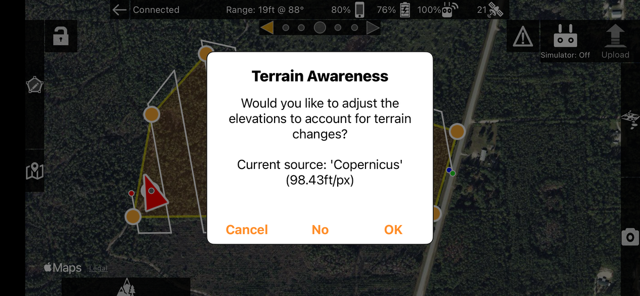
1) "Terrain Awareness:  Would you like to adjust the elevations to account for terrain changes?"  I usually select No since in Florida there's very little change in elevation!

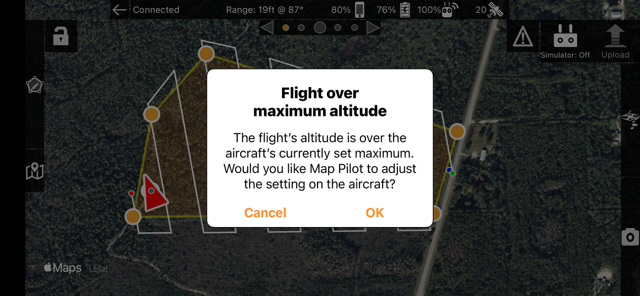
2)  "Flight over maximum altitude:  The flight's altitude is over the aircraft's currently set maximum.   Would you like Map Pilot to adjust the setting on the aircraft?"

  I have previously checked the max height in the DJI app to make sure I'm not over 400'.  If I select "No", the app won't allow me to proceed.  If I choose OK, then if I go back to the DJI app and I see that the height is no longer 385' but 410'.  Not sure why this is happening.

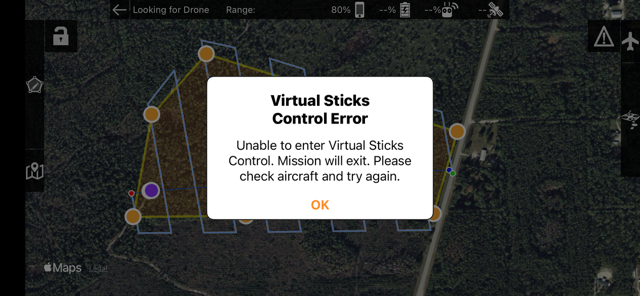
3)  This is a new error, not sure why this is happening:  "Virtual Sticks Control Error - Unable to enter Virtual Sticks Control.  Mission will exit. Please check aircraft and try again."

After I answered the questions and was able to get the mission to proceed, the drone flew to the starting point and just sat there.  I had to hit the RTH button and bring it back.  I shut everything down and started over.  Same thing, the drone flew to the starting point and would not begin the mission.  I brought it back again and shut everything down.

When starting up again I got a "Remote ID Error".  Not sure why this happens, I understand this is probably a DJI problem.

The last time I did get the drone to begin at the starting point which was good.

How can I eliminate the errors in order to have a positive mission?  If there is some information that I need to follow please send to me.  Or if you are aware of similar problems that others have had and I could piggyback off of solutions would be great.

FYI.   I have flown this drone for 3 years of more and have never had a crash.  I just recently sent the drone to Drone Nerds for a diagnosis and they told me it flies correctly and there aren't any issues. 


John Halvorsen

Vous devez vous connecter pour laisser un commentaire.

1 commentaire

0
Avatar

The "Flight over maximum altitude one" means that you are trying to plan a flight that is higher than the limits set on the aircraft. If you hit the OK button even once it may have moved the max height value. That is something that gets stored on the aircraft and can be set or viewed by any app accessing the aircraft. 

Do you have an RTH offset value set in the Settings? That could have something to do with it too. Of if you have even done the terrain awareness once for that spot or in simulation. 

The Virtual Stick controls error is showing while it says it is "Looking for Drone" which means it is disconnected. 

The Remote ID error means you are not logged into the DJI app properly. You will need to open the DJI app and make sure it is logged in there to have the proper remote ID authorization. 

I would start smaller and lower just to start eliminating issues. I don't think they are all related here. 

Sometimes it gets into a weird loop with the DJI app and Map Pilot Pro and full power cycle will help clear it out. This process can help: https://support.dronesmadeeasy.com/hc/en-us/articles/40622925490708-Reconnection-after-Battery-Change

Zane 0 votes
Actions pour les commentaires Permalien