Publicación

2 seguidores Seguir
0
Avatar

Processing issue in crop fields

Have had a few processing problems - 3 bad fields, 6 good so far.  Flying a P3 Pro with Map Pilot at 60% overlap.  The corn field is flat within a couple of feet of elevation and no trees around.  I wondered if there was an upload problem, so I tried submitting again with roughly the same results.  Previous 5 maps have processed as expected and I've been pleased with the results, but need to figure out what is causing this.

Problem maps:

https://www.mapsmadeeasy.com/maps/public/8ffbaaf95f544789b60cfc0b86e7ec17/

https://www.mapsmadeeasy.com/maps/public/c3be44480da944b5abec106d86acecd2/

Good map flown minutes before:

https://www.mapsmadeeasy.com/maps/public/3b74404f5ba44edba1fb918b4189ad27/


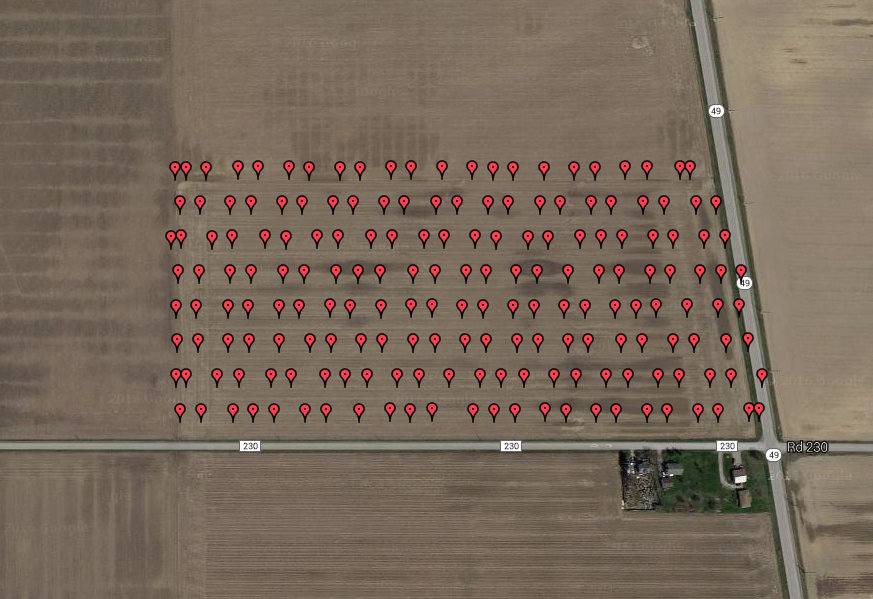
GPS coordinates of pictures of problem field:

Additional problem map:

https://www.mapsmadeeasy.com/maps/detail/546a500208a64a2aac0554409e742924/


Hand3809

Comentario oficial

Avatar

Sorry to hear you aren't happy with the results. 60% is not really enough overlap to guarantee that anything will turn out well. Think of 60% as the bare minimum. Crops are actually a pretty hard thing for our system to render because of the repeating patterns associated with it. For our Agronaut NDVI system we use 80% overlap to make sure that the data will be usable. There isn't much that worse for mapping than not taking enough data and realizing that you have to back to the site.

You want to see at least a little bit of blue between the passes in the overlap report.

It also looks like there might have been a few oblique images thrown in there which is never a good idea.

Try bumping the overlap up over 70% and it will probably work out. It will definitely work out at 80%.

Tudor
Acciones de comentarios Permalink

Iniciar sesión para dejar un comentario.

1 comentario