Post

2 followers Follow
0
Avatar

Several interface items

I've been using, I guess your Drones Made Easy Pro for DJI system for a bit on my iPhone, and wonder if there are fixes for the following:  

1) When I accidentally touch the remote and it cancels the mission, there is no way to tell it to start again.  The "continue" button does nothing.  Can this be addressed?

2) I enjoy how your system can manage for blur.  However, when it lowers the speed it also keeps the speed low for the periods when the drone transits to / from home during battery changes.  Can the transit speed be unchanged?

3) I use several apps.  The RTH and Maximum Height Limits seem to be changed a lot between applications.  Can these values be set explicitly in your app to maintain control?

4) Can you provide a single reference resource for ALL settings found in the app?  Many options in 'settings' are not covered anyplace I can find, and there are too many places to reference items from the various prior applications.

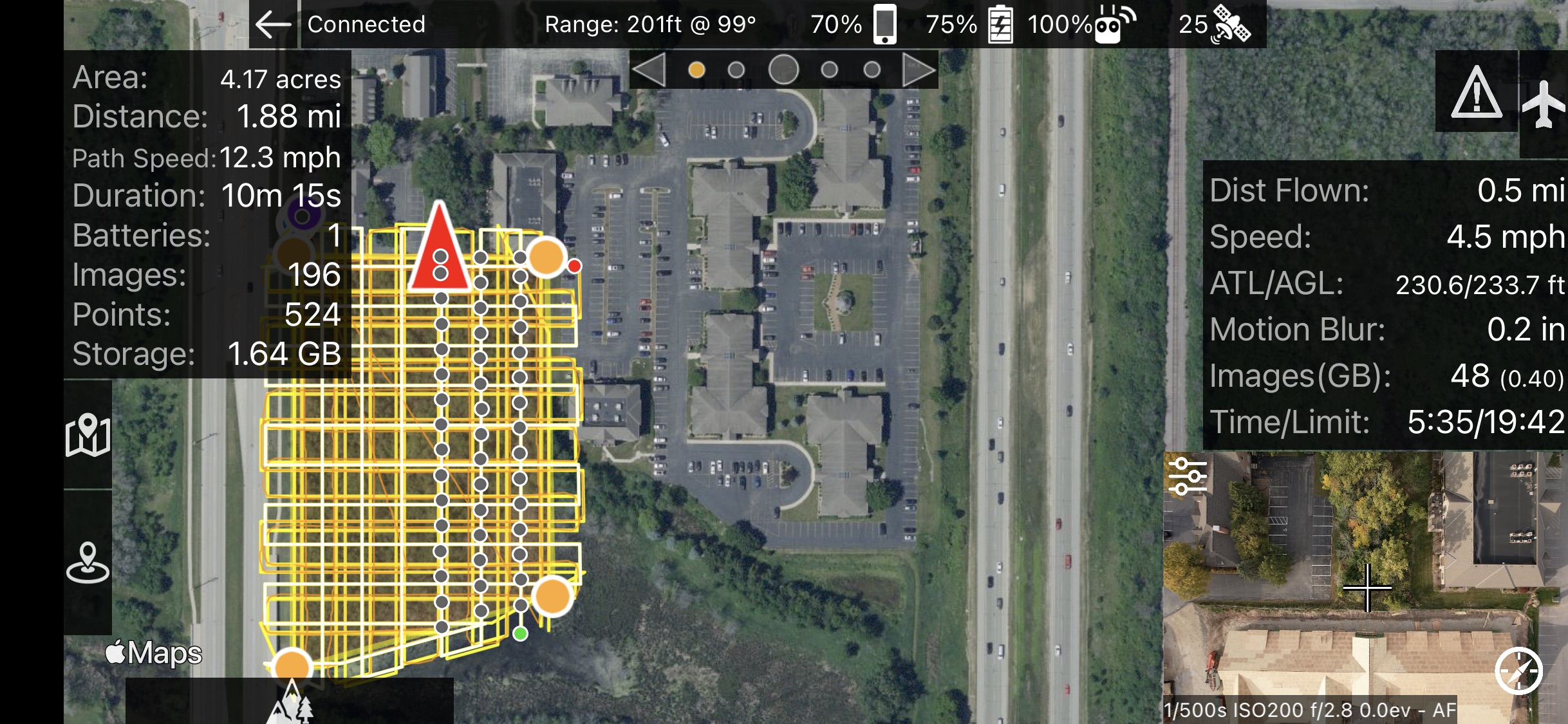
5) The past missions remain inside the app and make the interface difficult to read.  Can unused missions be removed?  See here:

Overall, I love how it all just works!  

-Mike

Mike Bahr

Official comment

Avatar

1. This is how Virtual Stick controls work. Once the flight mode is exited it is unable to restarted. Continue should work if you hit 'Stop' first but any stick input will exit the flight mode as informed in the popup before taking off. 

2. It SHOULD be speeding up for the approach and return legs despite being adjusted for light conditions. We will look at that. 

3. Map Pilot Pro sets these values as needed for flight that is executed in Map Pilot Pro. For normal non-Terrain Aware flight the RTH Offset in the settings is used. It defaults to 10 meters higher than the programmed flight. Map Pilot Pro does not touch the max height limit. 

4. Yeah, these are all over the place but have been left there for SEO reasons. Generally searching for any setting's name will surface discussion about it. 

5. You can turn that off by disabling "Show Nearby Mission Plans" in the User Interface section of the settings.

Zane
Comment actions Permalink

Please sign in to leave a comment.

1 comment