Post

2 followers Follow
0
Avatar

Public link has wrong logo and too big - how to remove it

All my public maps have this big logo on it -example

https://www.mapsmadeeasy.com/maps/public/00a3bf09fdaf4cdbbe481d10cda4b1a7/

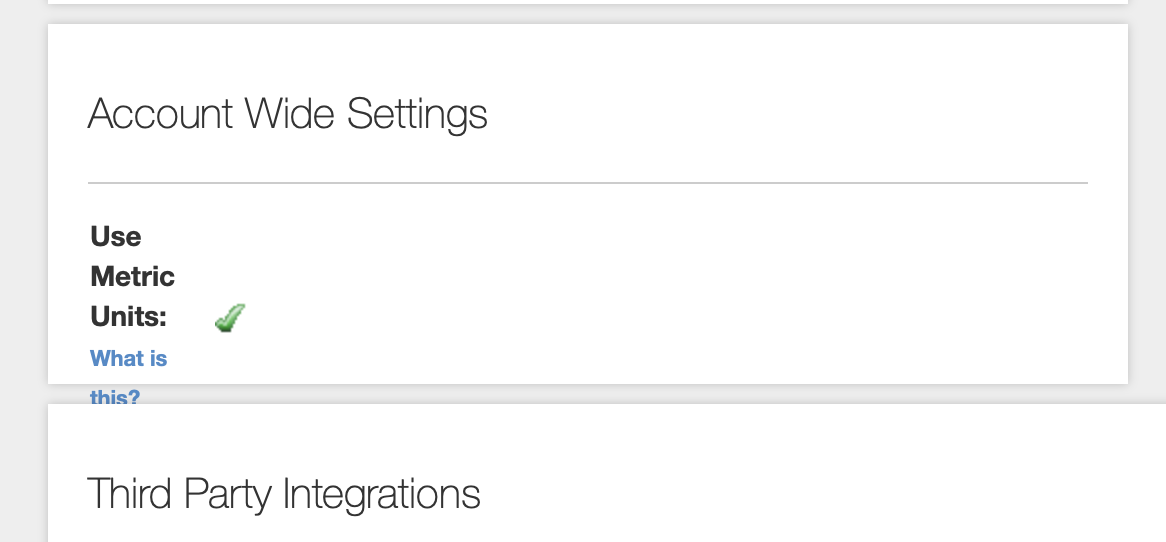
On my profile I do not see the option to update logo, just the metric question. How can I resolve this please?

Shirley

Official comment

Avatar

I believe you emailed about this previously. You may not have gotten our response.

Here is our response from before:

What browser is this? It is in the Account Wide Settings section under the one for Metric Units but it appears to be cut off. Try a different browser if you can. Or resize the window. 

You need to adjust the size on your hosting. It will shown at its native resolution. 

Here is your link: https://images.squarespace-cdn.com/content/58b6cec9f5e231aeca97726d/1582763743038-NCPWB419L8LDUR8ISKA4/H%26M_logo_web_small.png?format=1500w&content-type=image%2Fpng

If you change the value from 1500w to 150w or 100w in the URL it will look fine.


Zane
Comment actions Permalink

Please sign in to leave a comment.

8 comments

0
Avatar

Hi Zane

Thank you, I couldn't find my original post. I am on Safari but it also appears to be the same on Chrome on another computer. 

I am not sure how to actually change the size or are you saying to update the public Url manually?

Shirley 0 votes
Comment actions Permalink
0
Avatar

Yes that's a better size but how can I update my public map so that it resizes correctly or removes the logo completely? I am embarrassed to send to client like this and they are waiting.... might have to send as is if I cannot remove it

Shirley 0 votes
Comment actions Permalink
0
Avatar

I see what is going on now. The sizing is getting cut off because your URL is so long. We have fixed that issue but we will manually adjust it for you now so you can get back to work. 

Zane 0 votes
Comment actions Permalink
0
Avatar

That is great thank you, I noticed it was updated and have sent to the client now.

Also our logo has changed, so I will need to be able to update it at some point. When and how can I do this please?

Shirley 0 votes
Comment actions Permalink
0
Avatar

The issue with it cutting off has been addressed so you should be able to service it yourself now. 

Zane 0 votes
Comment actions Permalink
0
Avatar

Thank you! Yes I can see the option now under my profile settings. Will look at updating it myself now. Much appreciated for your quick and much needed help.

Shirley 0 votes
Comment actions Permalink