Post

2 followers Follow
0
Avatar

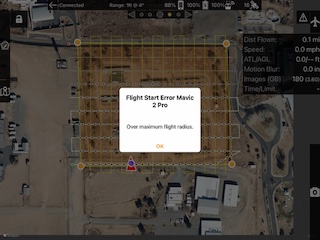
Flight start error

Hi, 

Lately, when I've been flying a job that needs 2 batteries, between flights I'm getting an error message telling me that I am 'over the maximum flight radius'. To get the drone to complete the job I have to shut everything down and restart. Then it operates normally. 

I saw that there was another post about flight start error that related to airspace. I am operating on the edge of airspace with LAANC authorization. Don't know if that might have something to do with it. 

Scott Ernst

Please sign in to leave a comment.

2 comments

0
Avatar

This is a message that comes from the aircraft. It seems to occur if you try to start the second flight too quickly and parts of the firmware think the aircraft is somewhere else. Usually just waiting a bit will allow it to proceed.  

It seems like you were able to continue based on your flight logs. What exactly did you shut down to get it to proceed? The aircraft/remote? Or the app? 

Zane 0 votes
Comment actions Permalink
0
Avatar

The answer to the 30m limit and the flight radius error is to make sure you are recently logged into your DJI account. It may help to log out and then log back in. Then do this:

  1. Go into DJI Fly
  2. Attempt to start up the motors manually
  3. Sign in, accept, agree, consent to any NFZ warnings
  4. Attempt the start up the motors manually (“manually” = sticks down and in)
  5. If successful, close the DJI Fly and go back into MPP without turning drone/rc off
  6. Attempt to start up the motors in MPP manually. 
  7. If successful, stop the motors manually and use Map Pilot Pro. 
  8. If not successful, go back into the DJI app and make sure all applicable zones are unlocked.
Zane 0 votes
Comment actions Permalink