Post

3 followers Follow
0
Avatar

Restore function not working

Hello
I purchased the linear mission option and now its saying i need to purchase it again.
I have the receipt from Apple proving that i have purchased it using the same Apple ID/email.

When i click on the restore button it just takes me to the App store purchase page saying it wants to charge me $30.99

What do i do to prove i have purchased the in app purchase and get my features back.

Regards

Peter Caldwell

Official comment

Avatar

Sometimes the In App Purchase feature restoration is a bit flakey... It is OK to purchase the feature again since your Apple account cannot be charged twice for any of our features. If that doesn't work you can try deleting the app and reinstalling it before repurchasing the feature. We have heard that works sometimes.

Zane
Comment actions Permalink

Please sign in to leave a comment.

5 comments

0
Avatar

Same issue here. I've tried both ways, and none is working. I've bought the extended overlap, and I can't use it. Very annoying!

Elemer Szalma 0 votes
Comment actions Permalink
0
Avatar

We are aware of the issue and are trying to fix it. It appears that some accounts have duplicates of the features in them which makes it crash. There should not be duplicates in there since it is not a consumable feature. 

Our of curiosity, what are you using the extended overlap for?

Zane 0 votes
Comment actions Permalink
0
Avatar

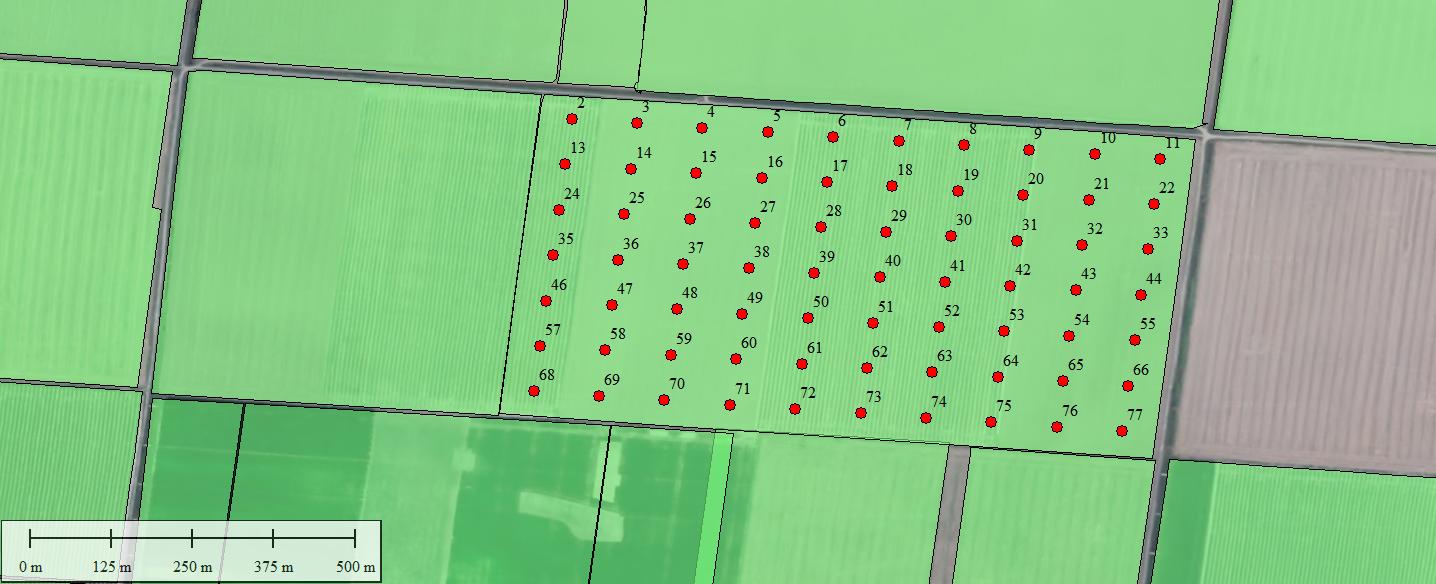
I would like to make a flight plan, which takes pictures only at the specified points (loaded from a kml file containing points previously made by ArcMap) I want the drone to take only one picture at the center of every half hectar piece of the field. (U can see the plan on the picture attached) I want the drone to fly on a 10 m altitude, with a 90 degree gimbal (I have a Mavic 2 pro) and stop at every point for one second, and take a picture. Between the points it can travel with it's maximum speed.

Summary I want to make a sample picture at every point seen on the attached map. (One picture every half hectar). I don't want to make an orthomosaic from the pictures, this is why I don't need overlap for pictures. Can U pls offer me a solution, how to make the kml file work as a flight plan (I've used wgs84, geographic), or how to make a .csv file and load it in the app.

Elemer Szalma 0 votes
Comment actions Permalink
0
Avatar

That is not what the extended overlap feature is designed for. We do not offer anything that allows imaging at specific locations.

Zane 0 votes
Comment actions Permalink