
Offizieller Kommentar

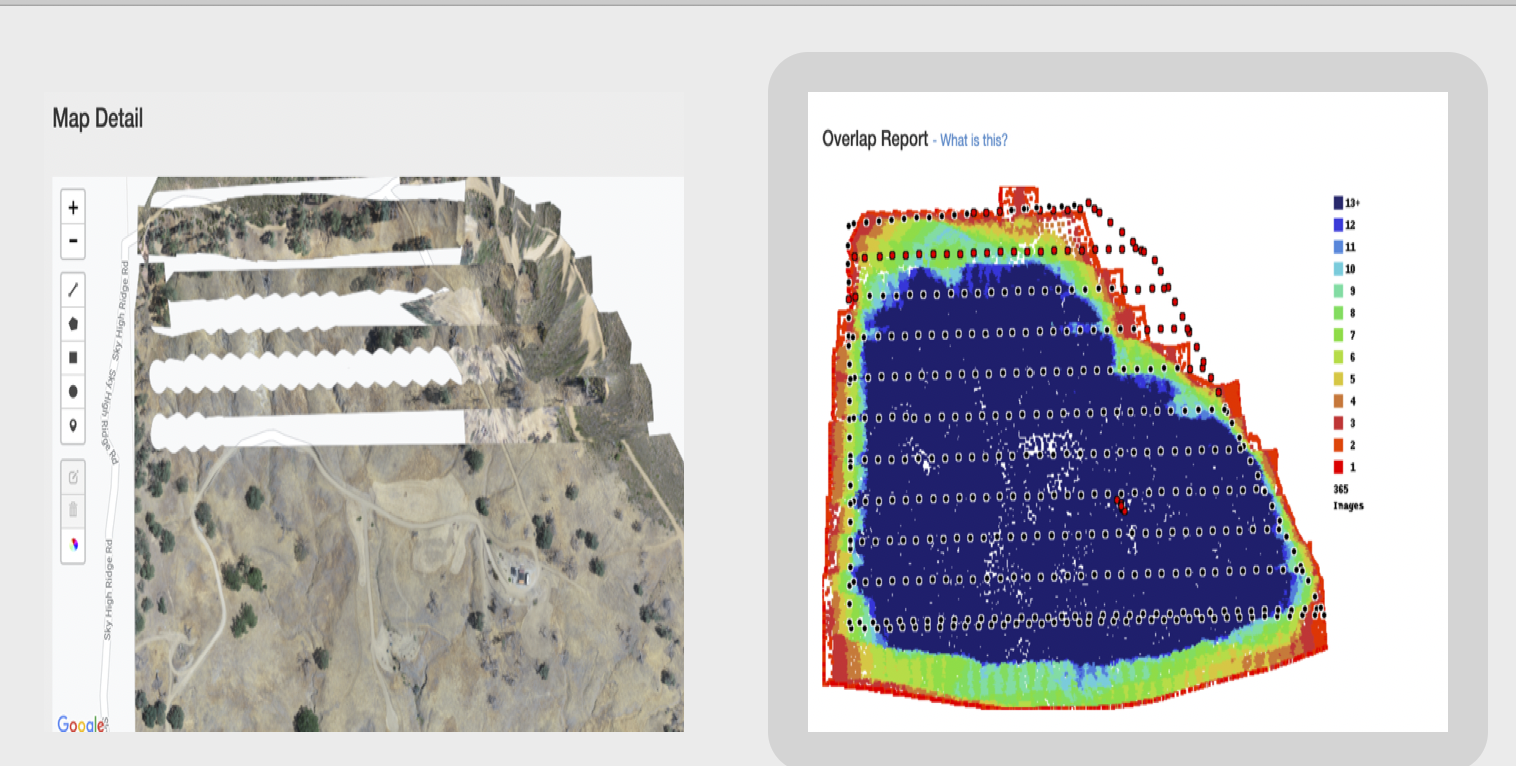
There are a few different issues going on here. First of all, the dataset is actually only using 65-70% overlap. The gaps are due to the trimming that occurs to clean up the edges but since the images aren't close enough to each other these gaps showed up in the trimming process. Your overlap looks artificially high because of all of the oblique images that were included.
The other big issue is the "victory lap" that was taken around the perimeter. Those images are primarily taken while the aircraft is moving backwards and sideways, both of which are warned against in the data Data Collection guidelines that are agreed to at the time of upload. It is better to just collect the data using the recommended amount of overlap and skip the extra data collection activities.
Another thing to keep an eye on is the sun hotspot in your images. It didn't appear to affect it too much here but the sunspot was present at the edges of your images. If you had mapped an hour or so later it might have been worse.
Usually we would just tell you to reprocess the data without that victory lap and things usually turn out fine but since your overlap was marginal to begin with might not work out.
Since you already started the data a second time we changed the setting to not include the Auto Trim setting. The trimming will not occur on the next processing of the data so the gaps won't show up.
