Post

2 Follower Folgen
0
Avatar

Create orthophoto without distorted man made objects.

Over the last several months I have experimented with MME using photos taken with Map Pilot (Phantom 3 Advanced and Phantom 4).

I am not particularly interested in creating 3D models but rather want to make straightforward orthophotos using MME to perform both the stitching of the images and also to perform georectification.

When the survey area contains made made objects (sheds, conveyors, machinery etc) the results have been very disappointing compared with those achieved with either Microsoft ICE or Photoshop.

These other two do have one very significant benefit over MME in that both are able to analyse (very successfully) the frames of an appropriately recorded movie to generate a composite stitch.

But they both have one fatal flaw. Neither program georectifies.

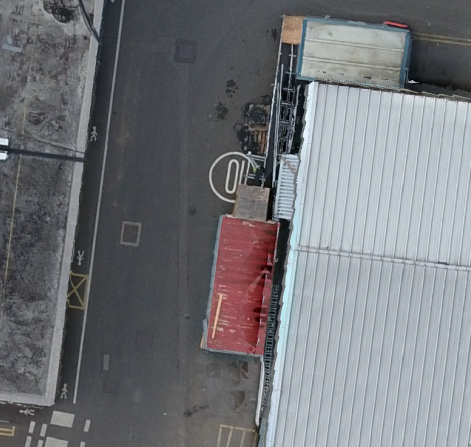
The image below shows a comparison between MME on the left and Microsoft ICE on the right. The difference is obvious. The various items in the MME image (roof, piping, gantries etc are completely distorted whereas in the ICE image they are undistorted.

I have tried flying at different heights but always get the same distorted results with MME whenever the image contains man made objects.

I have also tried the stitch only option in MME but even with that the objects in the image are completely distorted.

Any suggestions as to how to resolve this problem with MME would be appreciated).


Ian Grierson

Bitte melden Sie sich an, um einen Kommentar zu hinterlassen.

4 Kommentare

0
Avatar

There is a reason why Photoshop and ICE don't offer georeferenced outputs: it is really hard (nearly impossible) to reconcile to cumulative error introduced into the stitch job without taking 3D effects into account.

At this point you can either get georeferenced 3D reconstruction based stitching, which will almost always exhibit the artifacts you are pointing out, or a simple 2D feature matching based stitching that is not georeferenced. I am not aware of anything that does a hybrid.

The issue is perspective and parallax. Yes, in your picture on the right, the image looks great, but what if it had been taken at a more oblique angle? Then it would look all wonky and not match up well with the next image over.

Video pulls are too compressed and low res to be used reliably in 3D reconstruction based techniques. Yes, 4K video has the resolution but if you grab a frame and compare it to a still it ends up being equivalent only after reducing the resolution down by a factor of 16 or so.

Jay 0 Stimmen
Aktionen für Kommentare Permalink
0
Avatar

Thanks for the prompt response. I would make the following comments.

1. Perspective and parallax - certainly an issue especially on sloping terrain but when you consider the normal overlap provided by Map Pilot, an intelligent stitch can accommodate this in most cases. Certainly ICE has very few problems in this regard even though it is designed to create landscapes from images shot from a single point rather than a stitch of multiple overlapping images taken at various locations on a flight path.

2. Cumulative errors - this is a problem with both ICE and Photoshop especially in sloping terrain. If you stitch several photos with the drone running along the strike of the terrain you end up with a banana shape rather than a rectangle. This can be resolved, albeit with significant effort, by distorting each image into a rhombus rather than a rectangle before stitching.

3. Video frames - I have to disagree with you on this one. I have created a stitch using the 4K resolution on a movie shot using a Phantom 4 and compared it to a stitch created using individual 12mp images generated by Map Pilot and the results are comparable. The stitch from the individual images has the edge but there is nothing much in it.

4. Stitching and georeferencing - this is not particularly difficult when the software has access to the location of each image (and preferably elevation and direction). Because of the severe artefacts created by MME in areas of man made structures, I have approached this by first creating a stitch wth ICE and then making use of QGIS to georegister against a satellite image or aerial photograph. In my area of interest, the most recent satellite imagery is several years old and most of the structures don't exist. Therefore georectification requires making use of natural features. This has its own problems in that new, roads, dumps etc hide the older features.

What I have done is to first georeference the MME image and then use it as the base for further missions with stitching performed by ICE.
Unfortunately this is still a time consuming experience requiring the entry of 15 to 20 GCPs to give a good result.

5. 2D orthophoto vs 3D model - I had hoped the Stitched Imagery option in MME would provide a less spatially distorted stitch than ICE as it has access to ground coordinates for each photo. This would then make a later georeference more straightforward (requiring only a few points and an affine or polynomial transformation). Unfortunately this option produces similarly distorted objects produced by the Georeferece w/Camera GPS option. (see distorted building from your own sample image).

Please accept these as constructive comments rather than criticisms of MME. I think your service is an excellent one but I find it frustrating that it is not possible to create a clean 2D orthophoto using it.

Since my original post I have reviewed several MME stitches of the same mine area flown at different altitudes and different survey orientations. Some have less artefacts than others.

Do you have any suggestions as to what mission options would produce the best results from MME?

Ian Grierson 0 Stimmen
Aktionen für Kommentare Permalink
0
Avatar

Here is the crop from your Stitched Imagery sample that I forgot to attach to my previous post.

Ian Grierson 0 Stimmen
Aktionen für Kommentare Permalink
0
Avatar

The "Stitch Only" workflow is still doing the same process but without any GPS information so the results are not georeferenced.

If the accuracy of vertical features is key for your applications we would highly recommend using lots of overlap (>80%) and maybe including some slightly off nadir images to help resolve the vertical surfaces.

Below is a nice example of what is possible at 85% overlap with the P4:

The ridges in that wall are actually there and the fine features don't look like junk.

Jay 0 Stimmen
Aktionen für Kommentare Permalink