

We are sorry to hear you are having issues. The gimbal twitching issue could be related to what we will talk about after this top paragraph depending on the setting. If you had it set to 0 degrees and the gimbal is not properly calibrated it will bounce like that. Check your gimbal calibration in the DJI app. This is why we have the default gimbal value set to 5 degrees in Map Pilot Pro so it has a bit of room from the stops. Or it could be related to the control issues below.
The Mini 2 is a Virtual Stick aircraft which means it is actively being controlled by Map Pilot Pro. If the signal goes away, so does the control. I see a lot of signal strength issues in your log files on the Maps Made Easy website. You can see them too in your Maps Made Easy account. The red areas show times when the signal was too low. Many of your recent flights have this issue.
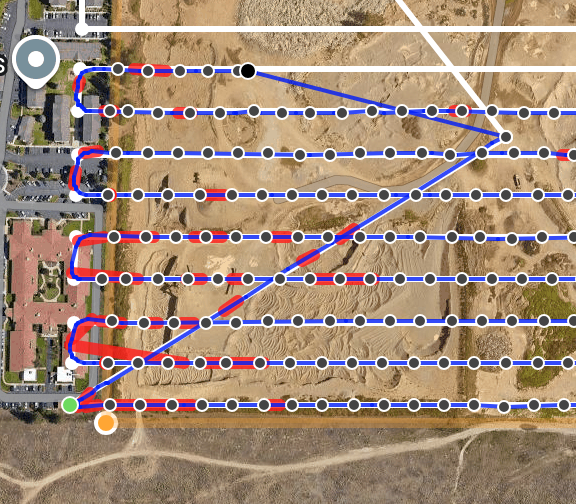
Things to try:
- Fully close other apps. It seems like Map Pilot Pro is having a hard time running well on your device. You have minimal ram available which is likely affecting operation. Closing other apps should free up RAM and CPU to ensure solid operation.
- Ensure your signal strength is solid by keeping the remote antenna oriented properly while having it pointed at the aircraft's location as it moves. Don't just sit it down and call it good. Actively track the aircraft.
- Make sure the mobile device is out of direct sunlight which can cause it to overheat quickly. This is more of a problem mid-summer but it is worth watching unless it is pretty cold outside.
- Once you have the flight loaded, operate in Airplane Mode to keep the phone from interfering with the aircraft signal. It isn't supposed to happen but it does.


