منشور

‏5 متابعين اتباع
0
Avatar

Custom Terrain Update?

Again, I love the app and the concept of using custom terrain. However, I have a ton of my own terrain data that I would like to use (We're a mine with elevation changes of >500'). I've seen it hinted that this feature is in the works and was hoping for an update on this.

This would be extremely valuable (~$100 in app purchase?)! Nobody else out there is offering something like this on iOS that I know of.

Alex

الرجاء تسجيل الدخول لترك تعليق.

44 تعليقات

0
Avatar

Michael: That DEM is 16046912869.0 acres... 

The amount we charge for processing the data is for the total number of acres in the rectangular DEM file. Corner to corner height times corner to corner width.

Your sample file was successfully read by the new system but is way too big to process. 

You need to look at Step 3 in the data preparation article. You need to be cropping the DEM and not just masking out other data. 

Zane 0 أصوات
إجراءات التعليق ارتباط ثابت
0
Avatar

Hi Zane, 

I'm sorry I guess I don't understand what steps you're doing on your end with my data.  The .tif  I sent is only a 130 acre updated site survey.  Are you saying that this terrain data needs to be stitched into a USGS DEM and then cropped down to a smaller square of that overall data set?  Then I would send a link of that to you guys?  

I can do this, but the steps you sent are not really clear for my particular case.  As I stated earlier I'm trying to use updated survey data for my Site, so just downloading free USGS DEM data may not be adequate for a dynamic construction earthwork site. 


Is there a way to discuss this over the phone? (858.716.2937)

Thanks


Michael Carlson 0 أصوات
إجراءات التعليق ارتباط ثابت
0
Avatar

Sorry about that. That file is 1700m * 1141m which equals 479.3 acres. 

Step 3 can be done on any valid data source. It is just the step of reducing the size of the covered area of the file. 

All support for Map Pilot and Maps Made Easy is done via email and this forum. 

Zane 0 أصوات
إجراءات التعليق ارتباط ثابت
0
Avatar

No problem man...So you imported my .tiff into a USGS DEM tile and that tile is 1700m * 1141m which equals 479.3 acres?  Can you pleae confirm if my data supersedes the USGS DEM within the 130 acre footprint?  

If so, from what I'm gathering, I just have to merge my terrain data set into a USGS DEM that I download via a GIS platform and then crop it down to a smaller square correct?  Then I would send a link of that to you guys?

Thanks. 

Michael Carlson 0 أصوات
إجراءات التعليق ارتباط ثابت
0
Avatar

Zane,

I need your help because the instructions you provide in the https://support.dronesmadeeasy.com/hc/en-us/articles/360021867012-Arbitrary-DEM-Preparation-for-use-as-a-Custom-Terrain-Source does not fit in my case.

I have my own elevation grid (i don't need to download anything from https://viewer.nationalmap.gov/basic/ because i am not in US) and I don't understand how to make it available in Map Pilot. I have enough points in order to buy the hosting of the DTM so please explain to me how to do it.

For example I need to host this file

https://www.dropbox.com/s/9kee6bx3t5x101a/PALAIOKASTRO.tif?dl=1

How do I proceed?

George 0 أصوات
إجراءات التعليق ارتباط ثابت
0
Avatar

Hey George,

It looks to me like you have already done most of what you need to do. I think if you start at step 6 (Assuming you already have >~180 MME points). Just put your dropbox url in place of the "https://s3-us-west-1.amazonaws.com/YOUR_BUCKET/westside.tif" section of the code. Then follow the rest of the directions. I hope this helps, I really would like to see this feature take off.


Alex

Alex 0 أصوات
إجراءات التعليق ارتباط ثابت
0
Avatar

It doesn't really matter where the data comes from. That article is meant to show how you can use publicly available data to get high resolution and more up to date terrain data into Map Pilot. 

If you have your own data: great! You will still likely need to prepare it a bit so you aren't paying for more acreage than you need. 

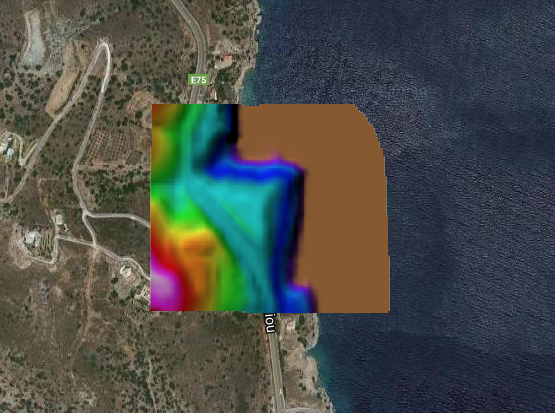
George: Your link is fine but the file is super small, like 100 x 100 pixels.


If you want to add terrain data to your account before it is available in Map Pilot you can email us with the link to your data and your MME Access Password (the same you put in the Map Pilot settings to do Terrain Awareness). We can add the data for you or you can use the following Terminal command:

curl -H "Authorization: Token YOUR_MME_ACCESS_PASSWORD" -H 'Content-Type: application/json' -X POST -d '{"url": "LINK_TO_YOUR_DATA"}' https://www.mapsmadeeasy.com/api/v1.1/new_dem/

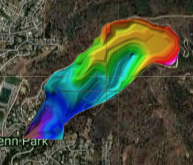
Michael: Here is a screenshot of what yours looks like

Zane 0 أصوات
إجراءات التعليق ارتباط ثابت
0
Avatar

Thanks Zane...the screenshot helps and your article is helpful. 

It looks like my terrain data came in correct.  So the overall size of the screen capture itself is the 479 DEM acreage I would pay for correct? 

Or are you saying if you create a square around the extents of my data, that shape = 479ac? 

I ask because if it is the latter, that is fine because the Site is so irregular and I will pay.  If it is the former (size of your screen shot), then I understand that I need to download the DEM, merge my data into it, and then trim it down.


Michael Carlson 0 أصوات
إجراءات التعليق ارتباط ثابت
1
Avatar

The size of your DEM rectangle was 497 acres. This is measured from corner to corner. The area you care about may be smaller but we have to process the whole thing so you don't get any bonus points for having a bunch of nodata or transparent values in there. Since your entire flight has to be within the covered area it makes more sense to have it all there to provide you with more options for takeoff locations. 

That screen capture was just zoomed out a bunch so you could see where it was. 

3 points per acre. 


Zane 1 صوت
إجراءات التعليق ارتباط ثابت
0
Avatar

OK great thanks Zane!  This makes sense and I agree with you on the size as I have it currently.  I will buy points tomorrow and will send a formal email with the .tiff link and my MME Access Password to request a custom terrain upload.  Thanks again.   

Michael Carlson 0 أصوات
إجراءات التعليق ارتباط ثابت
0
Avatar

Thanks Alex and Zane,
I am not familiar with Terminal commands (do they work under windows pc?) so I suppose i must take the email route.
However I have a suggestion for the procedure as follows
1. The user creates his own DTM converted in WGS84
2. The user uploads the tif or img file to his mapsmadeeasy.com account via the Maps->New menu
3. The system generates a preview of the dtm over google maps (like the picture you posted) in order to check if everything is ok.
4. If the user agrees with the result, pays for the map and the dtm becomes available in his Map Pilot app.
What do you think?

P.S. The DTM I sent you is indeed very small (about 50 Acres if I am correct) but that is the area I want to cover. It is a 4m/pixel DTM based on a 10x10m elevation Grid available in my country.

George 0 أصوات
إجراءات التعليق ارتباط ثابت
0
Avatar

George: The DEM link submission will be in a future version of Map Pilot since it is for Custom Terrain generation. Us hosting the DEM doesn't have much use for MME users. 

We are making the assumption that anyone using this feature is a "power user" and being that they can source appropriate terrain data we assume that they can also follow directions and understand the coverage rates. 

For the system to generate the preview it might as well just process the whole thing if it is OK. We will not be providing a preview and accept step. We don't see this feature being used widely and we have added it as a "nice to have" feature and don't want to clutter up Maps Made Easy with stuff we are pretty sure only a few people are ever going to use. If it starts getting used more widely we may add more official MME support.  

Zane 0 أصوات
إجراءات التعليق ارتباط ثابت
0
Avatar

Hi Zane,  

I bought MME points and sent an email with the link below asking for upload assistance. 

Please note, I downloaded an NED dataset in ESRI ArcGIS and clipped it down to an approximately 425 acre square shape.  Then I merged my updated Site-specific survey topo data into that using Civil 3D to output the geotiff. 

https://www.dropbox.com/s/ey62k8y3lmnn8u8/Savage%20Cyn%20Hybrid%20Terrain%20%28NED%2BSRVY%29_NAD83%20CA%20SPC-ZONE%20V_meters.tif

Michael Carlson 0 أصوات
إجراءات التعليق ارتباط ثابت